URL Blacklist: What It Means Exactly (and How to Fix!)
In today’s guide, I am going to show you everything you need to know about website URL blacklist including what URL:blacklist is, Google URL blocklist, Avast url:blacklist meaning, how to check if a URL is blacklisted, why a website might be land in the blocklist, URL blacklist virus, the effects and how to fix the issue.
Sounds like what you are looking for?

Then, let’s get started right away!
Feel free to use the table of content below to jump to any section you are interested in.
First, What is a URL Blacklist?
A URL blacklist contains a list of websites that are deemed insecure/unsafe for browsing by search engines (Google, Bing, Duckduckgo e.t.c), antivirus softwares (Avast), or browsers (Chrome, Fireforex e.t.c) because of one of more suspicious activities that are detected on the website.
Let’s take Google as a search engine for example.
Google takes online security very seriously and wants to protect its users.
In fact, Google will go to extreme measures of actually removing a website from its index if such website is found to go against its quality guidelines.
In other cases, Google may keep the website indexed while warning users of the possible danger ahead when they try to visit such website in the search engine or on the browser.
You may see such warning on Google search engine result page that looks like this:

This site may be hacked Google warning on Google SERP
Or if they website has been blacklist by Google Chrome browser, you can see errors like:
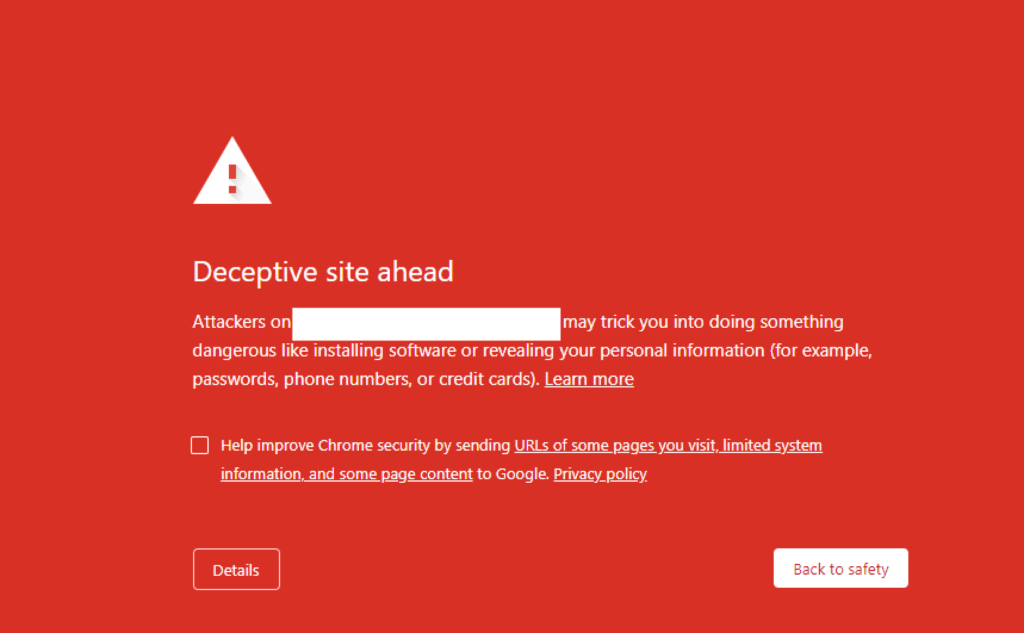
Every day, we discover thousands of new unsafe sites, many of which are legitimate websites that have been compromised – Google
The warnings that may be presented to users vary depending on exactly what kind of suspicious activity is detected on such website. Some of the warning messages include:
- Deceptive site ahead
- The site ahead contains malware
- The site ahead contains harmful programs
- This page is trying to load scripts from unauthenticated sources
NOTE: Google started making efforts since May 2018 to replace the term “Blacklist” and “Whitelist” with “Blocklist” and “Allowlist” respectively in Chrome, in a bid to be racially neutral. It all makes sense especially since Google is publicly in support of the Black lives matter movement.
Now, if you are wondering, “How does Google detect these suspicious websites?“
Well, to a large extent, Google actually uses automatic algorithms when their bots crawl websites to detect and compile these potentially dangerous websites.
This bots can detect suspicious codes, scripts, plugins or virus on a website that can make a URL land in the blocklist.
User feedback is another way by which Google detect such websites.
Another example is what you see on Avast antivirus software (if you use it), you get a message that shows “Infected with URL: Blacklist” or “URL:Blacklist”
If you think it is a mistake and want to remove Avast URL:Blacklist notification when you visit a website, jump here.
Is URL Blacklist bad?
For the website owner, YES.
If your website is blacklisted, there are so many negative effects it will have on your website such as:
- Drop in Click-thorough-rate (CTR) of a website
- Drop in Google SERP ranking (which means decrease in visibility and traffic of a website) or total removal of website from Google index and that of other search engines
- Can affect monetisation e.g Google ads getting suspended
However, for a user, it’s not necessarily bad.
As a user, you can add a website to your router network blacklist to prevent access to such URL. You can easily use this a parental control technique, or block unwanted ads on your devices if you know the URLs that they ads load from.
Why a Website Might Land in the Blacklist?
There are several reasons why a website URL might get blacklisted.
Some of these include:
Website that contains virus (URL blacklist virus)
A website can land in Google URL blocklist in Chrome or other browsers if it contains the URL blacklist virus.
The URL blacklist virus can find its way into a website through various means. It can either be intentionally added by the webmaster or unintentionally (for example, when a webmaster uses nulled or pirated themes/plugins/libraries on is website which unknowing to him contains the URL blacklist virus, which could have been added by the theme developer for the purpose of attacking webmasters that use them or by another attacker who then shares it freely to webmasters that need them as the “nulled” version).
This is why you should stay clear of free themes that are not available on the official WordPress themes directory, or nulled version of premium themes. The same applies to plugins.
Pages that contains malware or promote an unwanted software
According to Google:
A malware is any software or mobile application specifically designed to harm a computer, a mobile device, the software it’s running, or its users.
Unwanted software is an executable file or mobile application that engages in behavior that is deceptive, unexpected, or that negatively affects the user’s browsing or computing experience.
Examples include software that switches your homepage or other browser settings to ones you don’t want, or apps that leak private and personal information without proper disclosure.
You can read more on malware and unwanted software here on Google Search documentation.
Websites that practice social engineering techniques
Social engineering is content that tricks visitors into doing something dangerous, such as revealing confidential information or downloading software.
A typical example of social engineering is phishing.
Phishing is a type of social engineering where an attacker sends a fraudulent (e.g. spoofed, fake or otherwise deceptive) message designed to trick a human victim into revealing sensitive information to the attacker – Wikipedia
This often involves the use of scripts that scrap user’s information illegitimately.
For example, an attacker can design a page that looks similar to a social media login page, redirect users to such page and when users try to “login” into their social media account, their login details get sent to the attacker who then uses the details to login to their social media account, likely changing their password in order to get certain benefit(s).
- Hacked website
In a lot of cases, the webmaster is not the one who engages in any of the practices listed above.
A hacker can gain access to a website, and do one or more of the above for his/her own benefit.
How to Check if a Website is Blacklisted
The next question is, “How do I check if a website is blacklisted?”
Well, that’s easy.
- Head over to Google’s safe Browsing site status checking tool by clicking here.

- Enter your website URL in the box and click on the search icon, or click on “Enter” on your keyboard
- The result will be displayed to you
If there are no suspicious activities detected on the website or traces of URL blacklist virus, you will see a result like the one below:
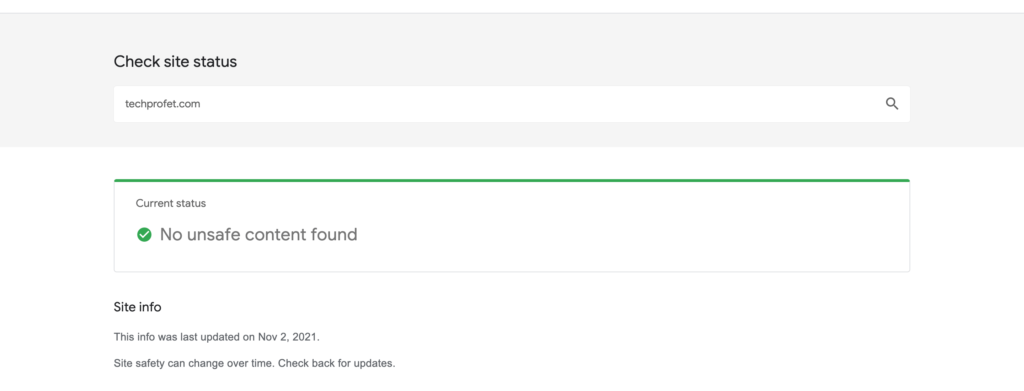
Otherwise, you will get a result showing what the issue is with such website.
Now, let’s say your URL is blacklisted on Google for whatever reason (hacked, contains the URL blacklist virus or malware, contains unsafe content, engage in social engineering), the $365,000 question is, “How do I fix my blacklisted URL?”
Now, that is the technical part.
I will assume that in this case, you weren’t responsible (at least not intentionally) for the blacklisting, otherwise you wouldn’t be looking for a solution here.
How to Fix Your Blacklisted URL
Like I have explained earlier, there are a number of reasons why you can end up in the URL blacklist. So, depending on that reason, here are the things you should do.
1. Find the source of the problem
The first thing you want to do is to scan your website.
NOTE: It is recommended that you backup your website before you do this.
You can do this by scan your whole website (including database and files on the server) for potentially dangerous virus, malware and other threats.
Then, if found, remove the malware/virus while making sure you do not break your website.
In other to do this, you can scan using Jetpack, Malcare, WordFence e.t.c
You can also scan it via your cPanel or contact your hosting provider for help in finding the source of the problem (if your hosting provider offers such service).
This resource by Google will help you if your website was hacked.
2. Remove plugins/themes from untrusted source (if any)
If you have any theme/plugin on your website that is not from the official WordPress directory (free ones) or from the official website of the themes develop (for premium ones), then remove them on your website.
3. Report incorrect warning
In a case you got a warning on your Google search console and you are absolutely sure that no such thing is on your website (e.g. you get a warning for phishing page, you can report for incorrect phishing warning by here)

4. Submit for Review
If you successfully found and removed the source of the warning, the next thing is to notify Google that you have removed the suspicious page(s), virus, script, malware or content from your website.
Once Google confirms that the issue is no longer found on your website, your URL will be removed from the blacklist.
- To do this, go to the “Security issues” tab on your Google search console.
- Select “I have fixed these issues”
- Click on “Request a review”
How to Protect your Website from the URL Blacklist
- Use trusted secure hosting providers
- Switch to HTTPS
- Implement Cloudflare (I personally use Cloudflare for so many things on this blog. You can use it to speed up your blog, get Firewall feature for protection, get free SSL certificate and many more)
- Avoid using nulled plugins/themes
- Use strong passwords, limit login attempts and hide your login page from the generic wp-websiteurl/login.php if you are using WordPress CMS
- Scan your website regularly
How to Remove Avast URL:Blacklist
If Avast URL Blacklist keeps popping up, what does it mean and what can you do?
If a URL has been infected with url:blacklist virus, then you will probably get a “url:blacklist” on Avast antivirus software.
If you are getting such notification, but you still want to visit the website anyway, then follow the procedures below to successfully remove the website from Avast URL:blacklist.
- Open the Avast antivirus software and click on Menu
- Click on the Settings tab, then click on Exceptions
- Under this, click on ADD EXCEPTION
- Enter the URL you wish to remove from the Avast URL:blacklist and save it.
You will be able to visit the URL without seeing the avast URL:blacklist notification.
Now, I hope I have been able to answer your question(s) on URL blacklist and Avast URL blacklist. If you have any more question, feel free to use the comment section below.
Don’t forget to drop a comment if you found it helpful. Also, share the content with others by using the share buttons below.
URL Blacklist’ Virus: ‘What it is and How to Fix it?

We try to find everything off the internet. From the best online multiplayer games to nearby massage parlors, from DIY videos to smartphones. The internet will help you find anything and everything. We get the answers to everything we are looking for through search engines.
Search Engines like Google, Bing, Yahoo, etc. provide results for your searches in the form of website links (generally speaking). You can take the help of these websites to get the perfect answer to your query. But sometimes you may have seen that you were stopped from accessing a website by the search engine. The statement presented by the engine generally reads that the website is blacklisted.
Getting blacklisted is like the worst nightmare for the creators of the website. If you also want to know what is blacklisting and how to fix URL blacklist Virus. Then the later sections of this write-up will address everything related to the topic. If you ever faced or heard of URL:blacklist, then this article is the best solution to all your queries.
What is URL:Blacklist or URL Blacklisting?
As it must be very clear from the name, URL:blacklist or blacklisting is an approach opted by the search engine to block any website. If any website contains any harmful or malicious content. Then the search engine, sooner or later, blocks or blacklists such websites. Once blacklisted, the user will be warned by the search engine to close the tab or switch to some other website and not to proceed further.
This will motivate the visitor of the website to do the same for protection against various threats.
Why Does a Search Engine Blacklist any Website?
There is more than just one reason behind the blacklisting of any website. Generally, the reason is that the website contains some kind of malware. Other instances include the threat of:
- Trojan horses schemes or programs
- Server vulnerabilities
- Unsafe plugins
- Unsafe download links
These are the general reasons, not all, behind the blacklisting of any website by the search engine. Now you must be wondering what is URL blacklist virus, let’s have a look at that too.
What is URL Blacklist Virus?
URL blacklist virus nothing but the website clocked by the search engine. When the search engine or any antivirus program blocks the website on your device, it categorizes the website as a URL blacklist virus. As stated earlier, the search engine or your antivirus may blacklist the website due to any suspicious activity.
Nothing is worse for the developers of the website than to see a red message stating that the website is infected with URL:blacklist. If you are also one such creator then let us tell you something, this is extremely harmful to your website and may lead to losses. You will lose the traffic to your website and the repercussions maybe even worse if not addressed quickly.
What is the Process to Know about URL Blacklisting?
If you want to know whether a website is blacklisted by the search engine or not, then you can take the help of the Safe Browsing site status from Google. You can check the authenticity of the website by running the Google Safe Browsing site status and inserting the website URL there.
This platform of Google works to find all the malicious websites or infected with URL blacklist on the internet and block them if necessary. This portal alone checks over 10 million websites daily.
How to Fix URL Blacklist Virus?
If any search engine or antivirus program blacklisted your website. Then here we will explain how to fix URL blacklist Virus. The process to do that is threefold and very easy to deploy. All you need to do is follow this trail of steps:
- Check the Website for Malware
The first thing you should do to fix infected with URL:blacklist on your website is checking the whole website for malicious files. There are some third-party websites on the intern that can help you do that very easily. Once you do this, then you can ascertain the source of blocking. After doing this, move on to the next method.
- Remove the malware from the Website
As of now, you know the culprit behind the blacklisting. To know how to fix URL blacklist Virus, you need to clean the website. You use the same third-party apps or websites as you did in the previous steps to remove the malware.
- Upload the Website
Now that there is no kind of malware or virus on the website, you can upload it. The users visiting the website will not see the URL:blacklist message from now on.
What Should I Do to Protect My PC Against URL Blacklist Virus?
As you know that the website may contain malicious content too. Most of the time, the search engine you are using will let you know if some website or URL contains malware and prevent you from accessing the website. But there are a lot of different websites on the internet. The search engine may even fail at times to depict and block such websites.
What would you do in such a condition?
If you like to surf the internet, then to protect yourself from such threats, we recommend that you use a trusted antivirus program or anti-malware tool for ease. Such tools will not only block all the harmful websites but will also protect you from malware and other virus attacks.
Additionally, even if you visit a harmful website somehow and download a malicious file from the same. The antivirus or total security tool will show you the malware on such a file and delete the same before you access it.
So this is everything you need to know about what is and how to get rid of URL blacklist Virus. We hope that this article will help you find everything you need to protect yourself from such websites and your websites from such blacklisting.
URL:Blacklist — что это за вирус?
 В данной заметке речь пойдет об URL:Blacklist — такой термин вы можете увидеть в уведомлении антивируса. Постараемся выяснить что это. напишу все простыми словами.
URL:Blacklist — что это такое?
Функция антивируса, содержащая список опасных сайтов, доступ к которым будет ограничен в соответствии с настройками безопасности.
Все опасные сайты или вирусные заносятся в список URL:Blacklist, так называемый черный список. Может существовать вообще одна база, которую используют популярные антивирусы и другие системы защиты (например блокировщики рекламы, функция Protect в Яндекс Браузере).
Пример использования списка можно увидеть в антивирусе Avast:
 Сайт блокирован, так как он находится в черном списке.
Второй пример — антивирус ESET тоже может иметь базу опасных адресов:

URL — что это такое?
URL расшифровывается как Uniform Resource Locator и это значит просто адрес сайта или его страницы. URL всегда отображается в браузере, вверху в текстовом поле. Например поисковая система Гугл имеет адрес https://google.com, а Яндекс — https://yandex.ru, это и есть URL.
Например вас могут спросить — предоставьте URL опасного сайта. Это означат что просят сообщить адрес сайта. Поэтому соответственно понять URL:Blacklist легко — черный список URL, то есть опасных адресов, имеется ввиду не только сайт, но и адреса страниц.
Как вручную проверить URL?
Существуют специальные ресурсы для проверки сайта на опасность, вот некоторые из них:
- https://www.virustotal.com/gui/home/upload
- http://antivirus-alarm.ru/proverka/?url
- http://zulu.zscaler.com/
- http://sitecheck.sucuri.net/
- http://urlvoid.com/
Вы можете проверить сайт на этих сервисах, если никакой опасности нет — тогда его можно занести в список исключения антивируса. Хотя просто так туда сайты не попадают, то есть если попал, то часто есть веские причины.
What is URL Blacklist Virus and How to Fix It?

Quite true isn’t it? A website is more like a digital portfolio, the face of a business that represents you, your organization, products and services, and everything else on the most gigantic virtual setup i.e the Internet. If your URL is blacklisted by any of the search engines say Google, Bing, Norton Safe Web, or any other portal, believe us it’s not good news for your website’s online presence.
While browsing the web, aren’t there are a few times when you try to access a certain website but its contents are unable to load and you see a warning message instead? Well, yes, it’s quite common.

Image source: Kinsta
Ever heard of the URL Blacklist virus? If your device is installed with antivirus software, then as a security measure it will prohibit you from opening suspicious links on your device.
Let’s learn all about the URL blacklist virus, the URL blacklisting process, how to fix it, and everything else that you should know.
What is URL Blacklisting?
Whether we want to search for a nearby restaurant serving our favorite cuisine or book tickets for your next vacay, Google is the first place where you head-on, right? Search engines embody an entire world within themselves and allow you to explore anything, get answers to almost anything within a fraction of seconds.

Image source: Sectigo
As a security mechanism, most search engines including Google, blacklist certain URLs and websites which are potentially harmful or the ones that contain malware content. URL blacklisting is a process where search engines remove a specific URL from their respective index offering users a secure browsing experience. The moment you try to access any blacklisted URL or website, you’ll be warned right away and the website’s contents won’t load on the screen. Well, not just search engines, in fact, a lot of popular antivirus software also blocks suspicious webpages to protect your digital privacy.
In a nutshell, you can think of URL blacklisting as a process where a search engine or antivirus program merely rejects a website to protect your device from being infected.
Why do Websites Get Blacklisted
There are a variety of reasons why a certain website or URL might get blacklisted from a search engine’s index. Here are a few to name some:
- Includes malicious content.
- Phishing Schemes.
- Trojan Horses.
- Includes suspicious download links.
- Unsafe plugins or libraries.
- Vulnerabilities in the server.
What is a URL Blacklist Virus?
Search engines and antivirus security tools maintain a list of blacklisted URLs that are not secure for your device, or the ones that contain malware potentially. So, if a website is tagged as “Blacklisted” due to any suspicious or malicious behavior, users will be forbidden to access that page’s content.
If your website’s URL is blacklisted, it can prove out to be extremely devastating for your business’s online reputation. All the organic traffic that is generated via the search engine can degrade immensely and users will instantly jump to a different website as soon the warning alert hits the screen.
How to check if a URL is Blacklisted?
One of the most authentic ways to know whether a certain URL is blacklisted is not by using Google’s Safe Browsing tool.

Open this link on any web browser, copy and paste your website’s URL in the textbox. Hit Enter.
Google’s Safe Browsing is an online tool that checks millions of websites in a day, blacklists suspicious content, and removes it from the search engine index. You simply need to enter a website’s URL and then within a few seconds, you can view the exact status of the website from Google’s end.
How do I remove the URL virus blacklist?
Here are a few steps that you need to follow for dealing with the URL blacklist virus and make your webpage up and running again on the Internet.
1. Scan for Virus or Malware
The first step is to check your entire website for a virus, malware, trojans, or any other malicious threats. You can get this job done by using any third-party cleaning tool like Malcare, SiteLock, WordFence, etc.
2. Clean the Website

In our recommendation, we would suggest you download Malcare as it offers reliable website protection. Malcare features an advanced deep scanning technology that scans your entire website for virus or malware traces and removes it. After installing a website cleaning tool plugin, clean the entire website if any virus or malware was found.
3. Submit the URL for Review
After you’ve successfully scanned your entire website and made sure that there were no instances of virus or malware found, the next step is to submit your URL for review. You can put in a request to the authorities, get a review so that your website can be whitelisted again.
Is URL blacklist bad?

Image source: Kinsta
Yes, a URL blacklist virus can turn out bad, especially for businesses. It degrades the online presence of your webpage and can cut down the traffic percentage, thereby affecting the sales and revenue of your business. There’s a bare minimum possibility that a user will visit a blacklisted URL anytime soon once they have witnessed suspicious signs or alerts.
How do I Remove Avast blacklisted URL?

If your device is installed with Avast Antivirus software and if it’s blocking you from accessing a certain website, here’s what you can try to bypass the restrictions. Head on to the Settings> Website Module and enter the website URL in the “Exceptions” list.
Download Systweak Antivirus for Windows
Systweak Antivirus is one of the best security tools for your Windows device as it offers real-time protection against viruses, malware, trojans, spyware, ransomware attacks, and any other malicious threats that may potentially expose your digital data. This comprehensive antivirus package acts as a guard between your device and threats.
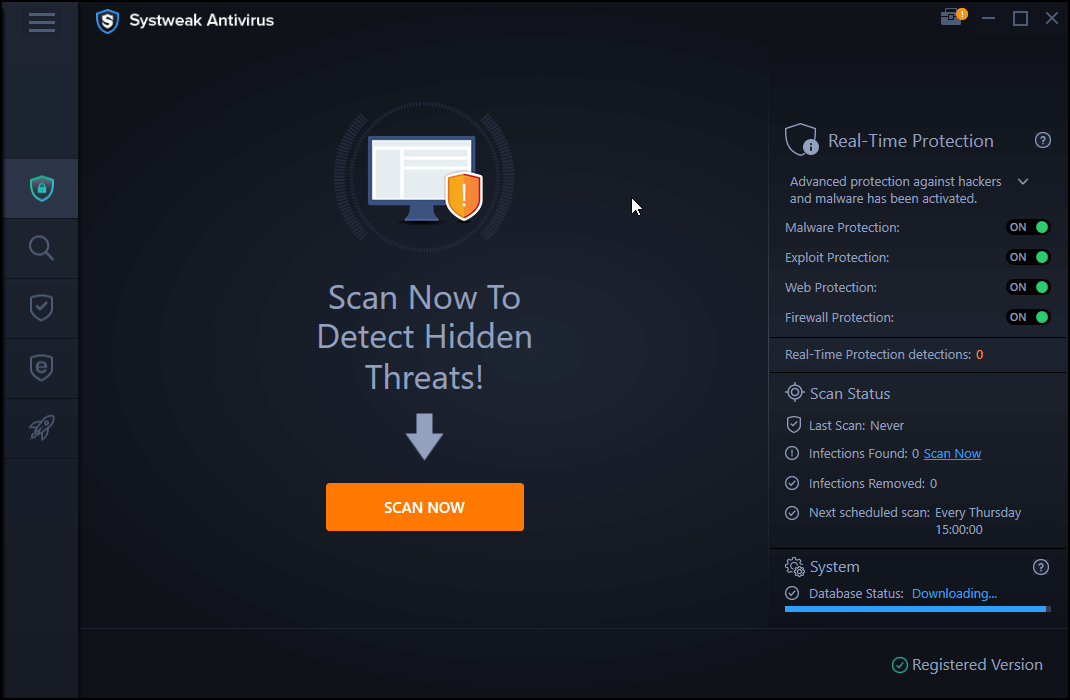
It offers you three different types of scanning types: Quick Scan, Deep Scan, and Custom scan. Systweak Antivirus not just safeguards your device but also boosts your device’s speed and performance by getting rid of unwanted/malicious startup programs.
So, fellas, that was all on what is a URL blacklist virus, how can you remove a blacklisted URL, and everything else on the subject. For any other queries or assistance, drop your thoughts in the below-mentioned comments space.
People Who Read This Post Also Like
Best Ways To Fix “Chrome Not Asking to Save Passwords”
7 Best VPNs to Watch BBC iPlayer in Abroad 2023
How To Fix The Event Viewer Not Working In Windows 11?
Leave a Reply Cancel reply
Recent Posts
Best Ways To Fix “Chrome Not Asking to Save Passwords”
How To Stop Chrome From Redirecting To Bing In 2023?
Fake App on a Mission to Steal Personal WhatsApp and App Data – Stay Safe
Comparison: Systweak PDF Editor vs. Foxit PDF Editor
7 Best Malwarebytes Alternatives to Try in 2023
Subscribe & be the first to know!
Signup for your newsletter and never miss out on any tech update.
All product names, trademarks and registered trademarks are property of their respective owners. All company, product and service names used in this website are for identification purposes only. Use of these names, trademarks and brands does not imply endorsement. WeTheGeek does not imply any relationship with any of the companies, products and service names in any form.
WeTheGeek is an independent website and has not been authorized, sponsored, or otherwise approved by Apple Inc.
WeTheGeek is not affiliated with Microsoft Corporation, nor claim any such implied or direct affiliation.
Disclaimer Last updated: January 01,2023 The information contained on wethegeek.com website (the “Service”) is for general information purposes only. Wethegeek.com assumes no responsibility for errors or omissions in the contents on the Service. In no event shall wethegeek.com be liable for any special, direct, indirect, consequential, or incidental damages or any damages whatsoever, whether in an action of contract, negligence or other tort, arising out of or in connection with the use of the Service or the contents of the Service. Wethegeek.com reserves the right to make additions, deletions, or modification to the contents on the Service at any time without prior notice. Wethegeek.com does not warrant that the website is free of viruses or other harmful components.External links disclaimer Wethegeek.com website may contain links to external websites that are not provided or maintained by or may not be in any way affiliated with wethegeek.com. Please note that the wethegeek.com does not guarantee the accuracy, relevance, timeliness, or completeness of any information on these external websites.
Please note that wethegeek.com may receive commissions when you click our links and make purchases. However, this does not impact our reviews and comparisons. We try our best to keep things fair, objective and balanced, in order to help you make the best choice for you.
Copyright © Wethegeek.com , 2023 All rights reserved.
 Subscribe Now & Never Miss The Latest Tech Updates!
Enter your e-mail address and click the Subscribe button to receive great content and coupon codes for amazing discounts.