Comparing OpenGL and Vulkan with Dynamic Cubemaps
In this project, as a team of two people, we decided to reimplement the dynamic cubemap application using Vulkan. The previous implementation was using OpenGL. In this text, we are (1) reimplementing the dynamic cubemap application, then (2) comparing between the two implementations, in terms of metrics such as FPS.
What is OpenGL?
OpenGL is a cross-platform rendering API (started development in 1991, released in 1992) for vector graphics, maintained by Khronos Group. Being cross-platform makes it advantageous over its alternatives such as D3D (Direct3D) which was designed by Microsoft specifically for Windows. It’s an older API.
What is Vulkan?
Vulkan is also a cross-platform rendering API for vector graphics, maintained by Khronos Group. OpenGL’s performance and efficiency was rivaling API’s such as Microsoft’s D3D 11. With the arrival of D3D 12, and Apple’s Metal APIs, the demands of graphics industry exceeded what OpenGL had to offer. Therefore, Vulkan was announced in 2015 and released in 2018, being a low-head API stepping into the competition. OpenGL uses a single state-machine, which means that every host instruction is sequential, making it less feasible to run on multiple threads. However, Vulkan uses objects instead, allowing for multi-thread support. It also has multi-GPU support. OpenGL also it as long as both devices are the same model (SLI for NVIDIA and Crossfire for AMD). Vulkan allows for devices with different models. Being cross-platform also makes it advantageous over its alternatives such as D3D and Metal.
Preliminary
Environment Mapping
Environment mapping is a type of texture mapping that incorporates sampling a texel from an external texture and approximating it on an object surface. The object may have reflective or refractive properties depending on the image texture. There are a variety ways of doing this, such as sphere mapping and cube mapping. We will use the cube mapping.
Cube mapping
Cube mapping is a type of environment mapping that uses essentially a cube of 6 planes (called a cube map), each having a texture. A normalized direction vector is calculated from the origin of a cube object and the with the aid of this vector, the properties of the fragment intersecting the vector is sampled from the image texture. A picture illustrating this concept is below
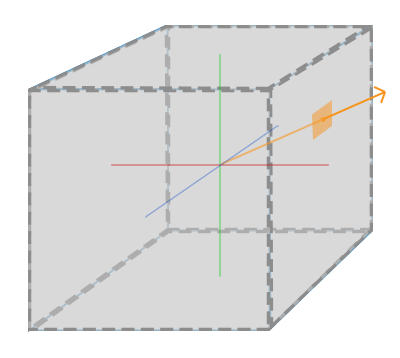
Cube maps has basically two types. When textures are provided from an image texture, it is called static cube mapping. However, static cube maps are not much useful in real-time applications. The other type is called dynamic cubemaps, which is used to render a scene into the sides of a cube. It can be used to create reflections as we will implement in this project.
Contents of the Project
In this project we will create a fixed skybox object with static cubemaps and create a mirror object which uses a dynamic cubemap to reflect the scene. In the scene there will be one floating object with different polygon counts to compare the results between Vulkan and OpenGL. To debug the scenes, user can fly around the scene using the keyboard and mouse.
Explanation of the Shaders
Vertex shader for skybox is below.
We feed the coordinates of the vertices as aPos variable. We don’t need a model matrix since we will not do additional transformations to the skybox such as rotation, scaling and translation. In order that the rendered scene in the viewport changes as the user inputs, we need view and projection matrices.
In the previous implementation, the line gl_Position = pos.xyww; was gl_Position = pos and we were rendering the skybox object first. The scene objects were written on the skybox. This was working however was inefficient, due to the fact that we were rendering every fragment of the skybox. When user was moving in the scene, there could be cases where a scene object was (almost) completely blocking the skybox. For such cases, we render the skybox last. In order to compensate for this we made both the z and w components the same. Because we are using the perspective projection, we have a perspective divide, making both z and w components 1. Because z is the largest value, which is 1, no matter when the skybox was rendered, it would (almost) always fail the depth test. To remove almost we change the depth test so that the depth value with less than or equal to the current depth value passes. After the skybox, we may revert back to the default which was to pass the depth values less than the current.
Fragment shader for skybox is below.
Notice that the texture coordinates are 3D coordinates as we are using a cube map (Notice the variable with samplerCube field). Further note that the they are the interpolated from the coordinates fed by the vertex shader. We are simply sampling the fragment color, similar to any texture.
Note that both vertex and fragment shaders of the mirror are used for scene objects. Vertex shader for the mirror is below.
Because we are using this shader on scene objects, we may use the model matrix this time. We are given positions, colors, normals and texture coordinates in aPos, aColor, aNormal and aTexCoord . Whenever user moves, we need to update the viewport. We set gl_Position accordingly. However, position and normals need to be updated differently, because normals’ w component is 0, not 1.
Fragment shader for the mirror is below.
We are computing the eye (I) and direction (R) vectors. We are similarly sampling with the direction vector. Notice the similarity to the skybox’s fragment shader. The difference is that we may also use this shader with dynamic cube maps.
OpenGL Implementation
First we need to create a framebuffer, they are usefull for rendering off-screen just like in our case. Then, we set our camera’s position into the objects position whose surface is reflective. After that it is simple, we render 6 times with 90 degrees viewing angle in each direction for our cube’s faces and move these into our cubemap texture. While doing this we need to make sure that our reflective object is not in the scene to get the result without the inside of our object.
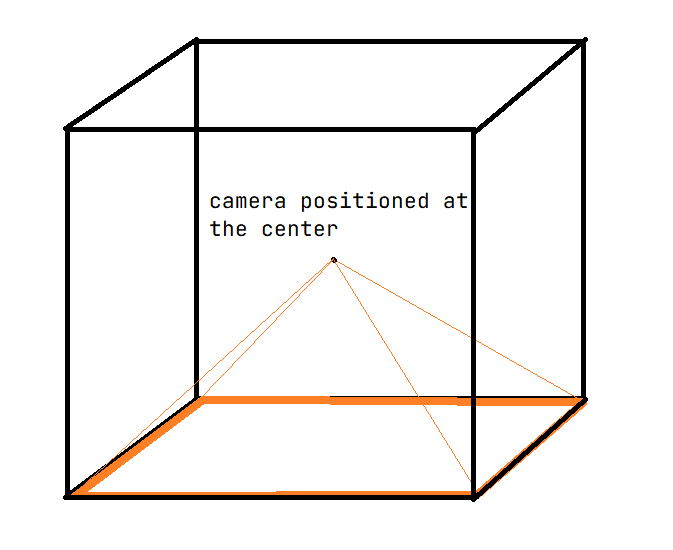
All there is left to do is sampling from the cubemap texture in our fragment shader of our object with a function called “reflect” which calculates the reflection of the direction between our camera and our point with a given surface normal.
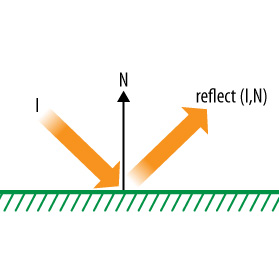
Creating these framebuffers and rendering them into a texture is a breeze. The reason behind that is in OpenGL most of the things are set to default if you don’t change them. This helps to creating basic applications like this in a faster way.
Vulkan Implementation
In the core of the things, we did the same in the Vulkan. We created a framebuffer, we set it to offscreen, we created a cubemap texture to copy the offscreen renders. Also, the shaders are same as the OpenGL. We write the shaders in GLSL and compiled them into SPIR-V.
However, in each step the lines of codes are multiplied against the OpenGL. For example, to render different objects with two different shaders, we need to create two different Graphics Pipeline objects in which we specify all of the steps of a graphics pipeline like viewport, culling, shader steps, shader layout informations, the vertex buffer informations, rasterizer information, multisampling information, stencil informations, color formations. After specifying these things, we collect them and create the pipeline for each object with different shaders.
After feeding all the information Vulkan needs, one difference is the drawing commands into the GPU. In Vulkan there is a concept called Command Buffers which you can prerecord your GPU calls and after that you will never be overheaded with the draw commands. However, while creating our code while rendering into the dynamic cubemap, we need to change the view matrix in the shaders. We couldn’t write the code for prerecording these commands, and in the end in each frame we rerecorded these commands then submit them into our GPU.
And while writing these codes, there is a need to create a validation layer in Vulkan to debug the program. In default most of the Vulkan commands will take structures as parameters and it doesn’t check the inside of these structs. This will cause problems like if you send a wrong command, the program will most likely crash. To prevent this while debugging we activated these validation layers to check these parameters and some other stuff and throw us the error codes that we need to solve.
Other than the sheer amount of information we need to pass into Vulkan, we couldn’t make the code into a clean structure. The reason behind this is while writing the code we didn’t know what we need in the end. This forced our code into being a big complicated pile. We think that our code is far from optimized.
Your browser does not support the video tag.
Here is the end result of the dynamic cubemap application in Vulkan.
Comparison and Benchmarking
In this section we compared these programs with respect to the performace.
Metrics Used
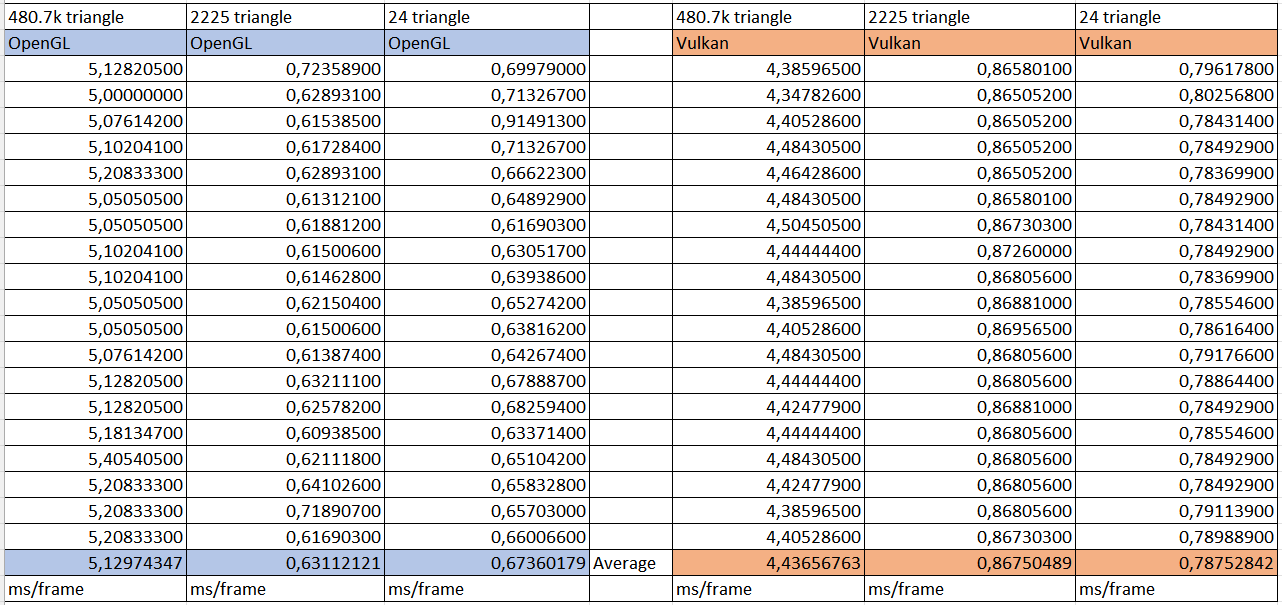
We compared the average frame time in ms in order to see the performance of the programs. We didn’t use the FPS because we thought that using the frame creation time is a more intuitive metric. The lower times will be better with respect to the performance because it creates the frames faster.
We found three models with different triangle counts, a cube with 24 triangles, a teapot with 2.3k triangles, and a hover with 480k triangles.
Results
Cube Model
Here is the videos of the two programs with cube model (24 Triangles).
Your browser does not support the video tag.
Above is the Vulkan Implementation.
Your browser does not support the video tag.
Above is the OpenGL Implementation.
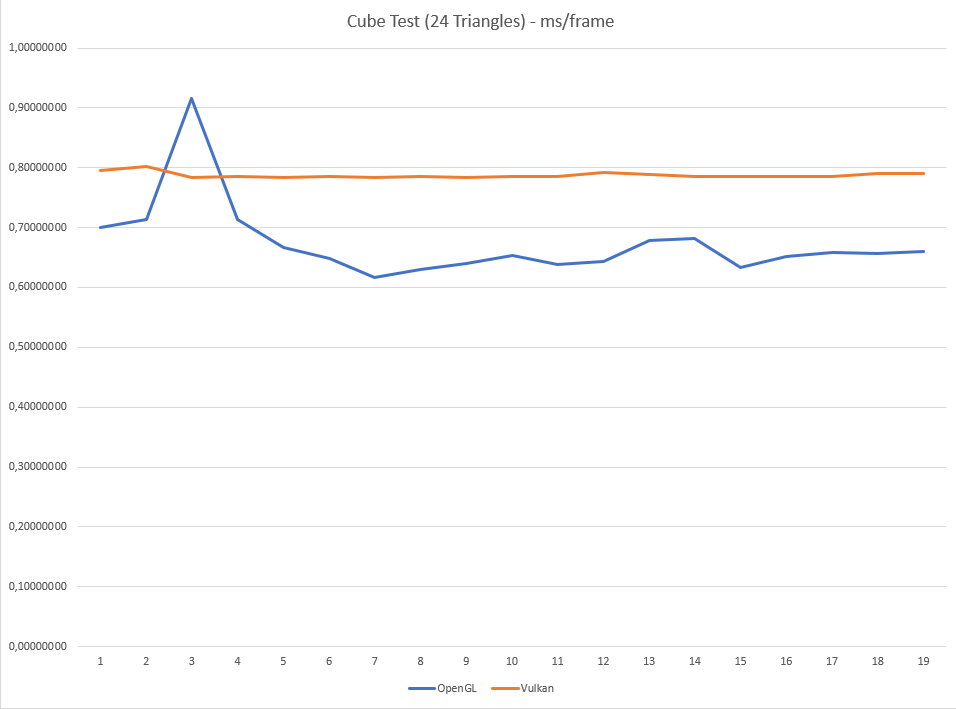
The reason behind this is may be our code in the Vulkan. For example, if we were able to prerecord the draw commands, I believe that the Vulkan’s speed will be much faster.
Teapot Model
Here is the videos of the two programs with teapot model (2.3k Triangles).
Your browser does not support the video tag.
Above is the Vulkan Implementation.
Your browser does not support the video tag.
Above is the OpenGL Implementation.
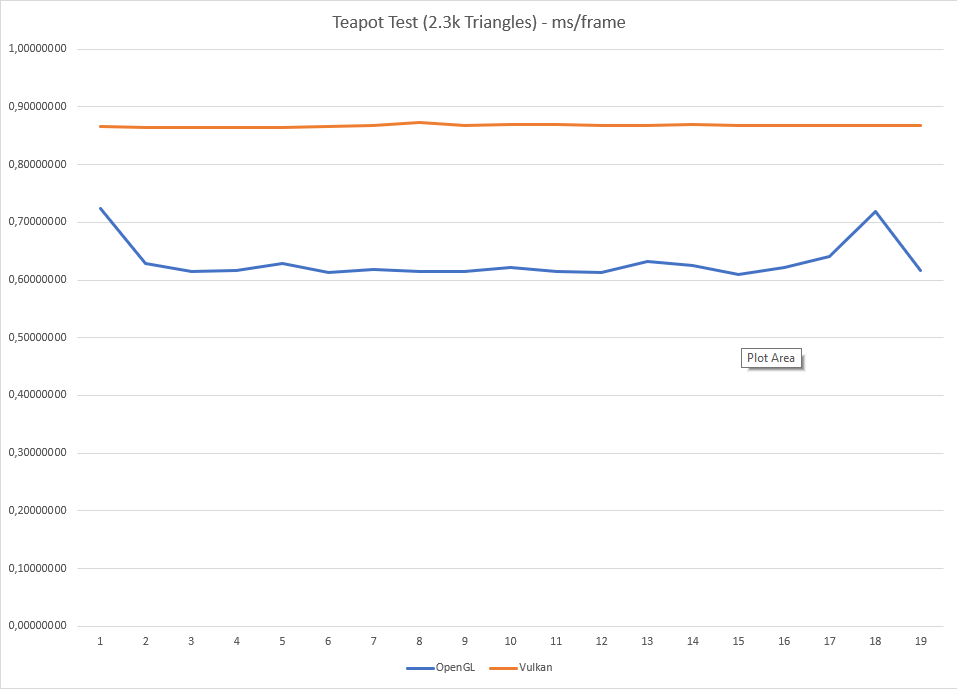
With these two tests, we can see that spikes and other fluactiations doesn’t occur in Vulkan. This is also an important thing, becuase in graphics applications little changes in the FPS will be appearent.
Hover Model
Here is the videos of the two programs with hover model (480k Triangles).
Your browser does not support the video tag.
Above is the Vulkan Implementation.
Your browser does not support the video tag.
Above is the OpenGL Implementation.
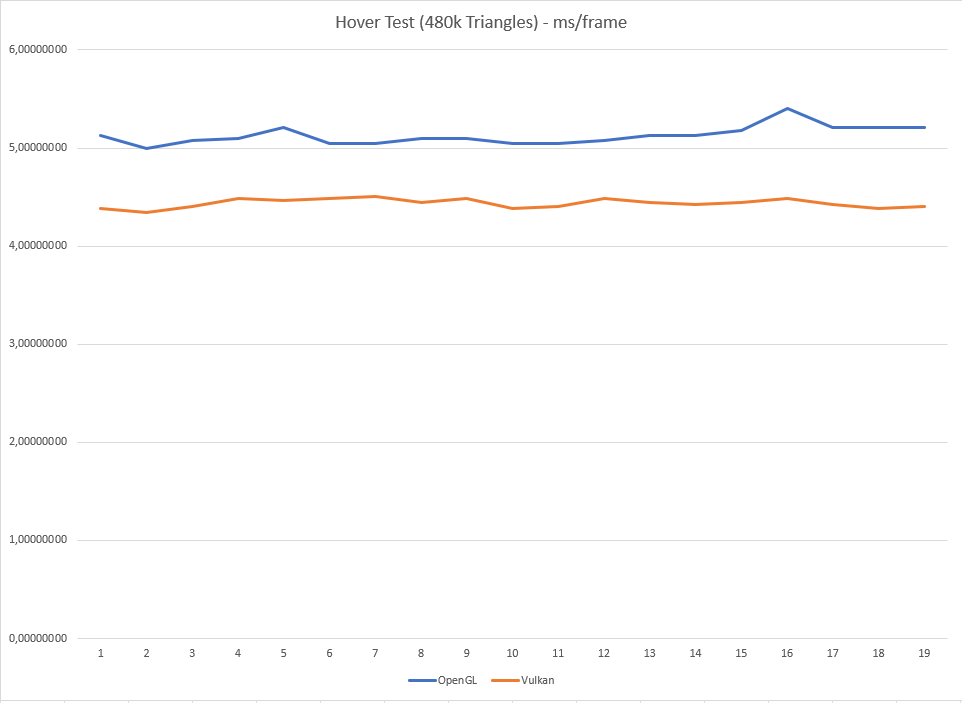
The reason behind this is may be the Vulkan has some fixed time to get the necessary information and create objects but it is efficient when drawing higher number of polygons.
Conclusion
We saw that creating basic graphic applications in Vulkan is very different than OpenGL in the details. In the both API the core of the things are the same, however internal details is much more appearent in the Vulkan. In the Vulkan, you can feel that you are very close to the GPU. This means if you know what are you doing, you can write optimized codes for spesific purposes. In our scenario, after learning OpenGL, Vulkan made us learn the finer details in the pipeline of a graphics application.
In the end, we saw that even with our un-optimized code, Vulkan is faster that OpenGL in high polygon counts. However, with low polygon count OpenGL’s speed can help when creating a prototype with the addition of the rather more understandable codes.
OpenGL vs Vulkan

OpenGL and Vulkan are both APIs (Application Programming Interfaces) used to develop and render 2D and 3D graphics applications. OpenGL is an older technology, while Vulkan is newer and aims to provide higher performance and more control over the GPU. Both APIs have their own set of pros and cons, and choosing between them depends on the specific needs of a project. In this article, we will compare the features, performance, and use cases of OpenGL and Vulkan, to help you make an informed decision.
In this article I will only discuss these two as their aim is to cover most cross-platfrom development. There are other more targetted APIs like DirectX for Windows or Metal for Apple platforms. These APIs are limited only to that platform though.
Table of Contents
OpenGL
- Wide Support: OpenGL is one of the oldest and most widely adopted graphics APIs, which means it has widespread support from hardware and software vendors. This makes it easier to develop cross-platform applications, as OpenGL is available on a variety of platforms, including Windows, Linux, and macOS.
- Ease of Use: OpenGL has a relatively simple and straightforward API, which makes it easier for developers to get started with and learn. This can help reduce development time and increase productivity, especially for smaller projects or prototypes.
- Large Community: Due to its widespread use, OpenGL has a large and active community of developers and users who can provide support and share their experiences. This can be a valuable resource for developers who are looking for help or inspiration.
- Performance: While OpenGL is suitable for many applications, it is not as fast or efficient as more modern graphics APIs, such as Vulkan. This can be a limitation for demanding applications, such as high-end games, where performance is critical.
- Limited Control: OpenGL provides less control over the GPU, which can be a disadvantage for more advanced applications. For example, OpenGL does not provide explicit control over the GPU pipeline, which can limit the ability to optimize performance and reduce CPU overhead.
Is OpenGL Dead?
No, OpenGL is not dead. Although it is an older technology, it is still widely used in many applications and has a large and active community of developers and users. In fact, many industries, such as automotive, aerospace, and scientific visualization, still rely on OpenGL for their graphics needs.
OpenGL has evolved over the years to keep up with advances in graphics hardware and software. The latest version of OpenGL, OpenGL 4.6, provides a wide range of features for modern graphics applications and supports the latest hardware and operating systems.
While newer graphics APIs, such as Vulkan, have been introduced to provide higher performance and more control over the GPU, OpenGL continues to be a popular choice for many applications due to its ease of use, wide support, and large community.
So, while OpenGL may not be the newest or most cutting-edge technology, it is still very much alive and well, and will likely continue to be used in many applications for the foreseeable future.
Vulkan
- High Performance: Vulkan is designed for high-performance applications, and provides more control over the GPU pipeline. This makes it possible to optimize performance and reduce CPU overhead, which is critical for demanding applications, such as high-end games.
- Cross-Platform Support: Like OpenGL, Vulkan supports a wide range of platforms, including Windows, Linux, and macOS. This makes it possible to develop cross-platform applications with consistent performance.
- Fine-Grained Control: Vulkan provides fine-grained control over the GPU pipeline, which allows developers to optimize performance and reduce CPU overhead. This makes it possible to achieve higher performance and lower latency compared to OpenGL.
- Steep Learning Curve: While Vulkan provides more control and performance, it also has a steeper learning curve compared to OpenGL. This can make it more difficult to get started with and increase development time, especially for smaller projects or prototypes.
- Limited Community: While Vulkan has a growing community of developers and users, it is still relatively small compared to the OpenGL community. This can make it more difficult to find support and resources, especially for developers who are just starting out.
Conclusion
In conclusion, choosing between OpenGL and Vulkan depends on the specific needs of a project. For small projects or prototypes (or for developers who are just starting out) OpenGL may be a good choice due to its ease of use and large community. However, for demanding applications (such as high-end games) Vulkan may be a better choice due to its high performance and fine-grained control over the GPU pipeline. Ultimately, the choice between OpenGL and Vulkan should be based on a careful evaluation of the project requirements and the resources available to the development team.
One more important note to add is that OpenGL is the basis for WebGL which is the current graphics API for the browser. You can check out my article about compiling for the web for more information on how you can develop C++ games using this technology. WebGPU is an emerging technology that would replace WebGL at some point but is still highly experimental and not available for mainstream users.
OpenGL vs Vulkan
The following article provides an outline for OpenGL vs Vulkan. OpenGL is a cross-platform API where API refers as application programming interface and focus on rendering of 2D as well as 3D vector graphics with effective result. For accelerated hardware rendering it interact with graphics processing unit (GPU). The plus point about this is it an open source and free API. Vulkan is also cross platform software which works as 3d graphics as well as computing software not only this but it also deals with programming of video games and multimedia elements. Both software has also most same work even though they are different from each other. Today in this article we will find out what are those things which make this two software different from each other although their developer is same.
Head to Head Comparison Between OpenGL vs Vulkan (Infographics)
Below are the top 6 differences between OpenGL vs Vulkan:
3D animation, modelling, simulation, game development & others
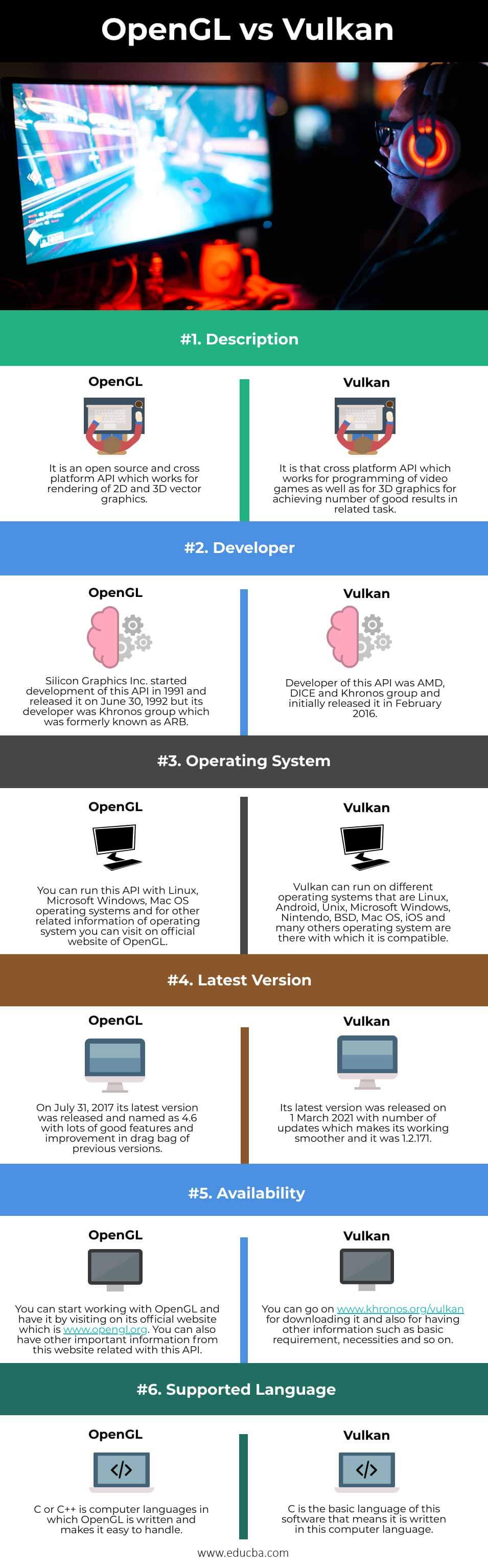
Key Difference Between OpenGL vs Vulkan
Let us discuss some of the major key differences between OpenGL vs Vulkan:
- Both OpenGL and Vulkan are open source cross platform API that means both are free for using them with lot of good features and you need not to worry about any subscription and plans for having anyone of them for your use. Both API developed by same developer and Vulkan introduce in 2015 as non-profitable API by Khronos group at GDC and it is initially refer as ‘next generation OpenGL initiative’ or OpenGL next’ but later on it changed to Vulkan.
- Vulkan provides numbers of advantages because it offers powerful direct control over the GPU, lower the usage of CPU as well as lower overhead pressure on it. In short its overall concept and features are similar to Mantle which was also adopted by Direct3D 12 of Microsoft Windows and Metal of Apple. OpenGL generate commands buffers for multiple threads and simultaneous processing for the same to a command pipeline and due to this reason developer need not to work for maintenance of framework or if it want to do then it can do by little effort.
- OpenGL creates its own Complier for GLSL which is high level language of it and this language writes shaders which forces OpenGL driver for implementing its own complier for this language and execute application runtime for translating the program’s shaders into the GPU’s machine code. Whereas Vulkan has shaders which already translated into intermediate binary format and it is called SPIR-V (standard portable intermediate representation).
- With Vulkan you have better tools integration in comparison with OpenGL because you can enable validation and diagnostics of layers independently. Because of no hard API difference between mobile and PC versions of both software, porting of games between these cross platform is ease.
- In future new extensions will added in OpenGL which is same to Vulkan and this extension is NV_command_list which is same as ‘GPU feeding paradigm’ of Vulkan and it will enhance game ability of OpenGL. As Vulkan introduced as next generation of API of OpenGL so you will have more feature as well as improved techniques for doing different type of task related to its field for having best result in your project work. So you can explore Vulkan functions over OpenGL easily.
OpenGL vs Vulkan Comparison Table
Let’s discuss the top comparison between OpenGL vs Vulkan:
| OpenGL | Vulkan | |
| Definition | It is an open source and cross platform API which works for rendering of 2D and 3D vector graphics. | It is that cross platform API which works for programming of video games as well as for 3D graphics for achieving number of good results in related task. |
| Developer | Silicon Graphics Inc. started development of this API in 1991 and released it on June 30, 1992 but its developer was Khronos group which was formerly known as ARB. | Developer of this API was AMD, DICE and Khronos group and initially released it in February 2016. |
| Operating System | You can run this API with Linux, Microsoft Windows, Mac OS operating systems and for other related information of operating system you can visit on official website of OpenGL. | Vulkan can run on different operating systems that are Linux, Android, Unix, Microsoft Windows, Nintendo, BSD, Mac OS, iOS and many others operating system are there with which it is compatible. |
| Latest Version | On July 31, 2017 its latest version was released and named as 4.6 with lots of good features and improvement in drag bag of previous versions. | Its latest version was released on 1 March 2021 with number of updates which makes its working smoother and it was 1.2.171. |
| Availability | You can start working with OpenGL and have it by visiting on its official website which is www.opengl.org. You can also have other important information from this website related with this API. | You can go on www.khronos.org/vulkan for downloading it and also for having other information such as basic requirement, necessities and so on. |
| Supported Language | C or C++ is computer languages in which OpenGL is written and makes it easy to handle. | C is the basic language of this software that means it is written in this computer language. |
The points which we seen above are most important points because it gives basic requirement, capability, needs as well as working ability of both software and helps us for taking decision about which one will be good for us.
Conclusion
OpenGL and Vulkan are familiar word for you and you can easily understand them for exploring your idea in field related to this software. Will suggest you if you start working in this field with these API then you must try both of them one by one so that you can find pros and cons of these software itself.
Recommended Articles
This is a guide to OpenGL vs Vulkan. Here we discuss OpenGL vs Vulkan key differences with infographics and comparison table respectively. You may also have a look at the following articles to learn more –
OpenGL vs. Vulkan: What are the Key Differences?

The first issue every newbie in the Graphics API world faces is the choice of the right API. When it comes to open-source multi-platform APIs, OpenGL and Vulkan are the main considerations.
How do they differ, and which one is worth going for? This article answers these questions with an in-depth analysis of the differences between the two APIs.
OpenGL vs. Vulkan: A Side-by-Side Comparison
| OpenGL | Vulkan | |
|---|---|---|
| Purpose | Rendering 2D and 3D vector graphics | Programming video games and rendering 3D graphics |
| Focus | Graphics | Computing and graphics |
| Language Level | High level | Low level |
| Supported Languages | C and C++ | C |
| Abstraction | High | Low |
| Supported OS | Windows, Linux, Mac OS | Windows, Linux, Mac OS, BSD, Unix, Nintendo, Android, and iOS |
| Official Website | www.opengl.org | www.khronos.org/vulcan |
| API Versions | It has a different API for mobile platforms | It has a single API for desktop, mobile, and console platforms |
OpenGL vs. Vulkan: What’s the Difference?
Definition
OpenGL
Silicon Graphics released the Open Graphics Library, OpenGL, in June 1992 as an open-source API to provide an interface for graphics programming. Over the years, improvements and the introduction of other extensions saw it evolve into a cross-language API.
The turning point was in the introduction of the version 4.2 extension that allowed the use of compute shaders, which made thread synchronization and memory sharing possible. It transformed OpenGL into what it is today, an API for the hardware-accelerated rendering of 2D and 3D vector graphics.
Vulkan
The Khronos Group, AMD, and DICE released Vulkan in 2016 as a cross-platform open-source API that provides an interface for programming and rendering video games and other real-time 3D graphics applications. It was to be a modern version of OpenGL, one that would meet the fast-changing needs of the gaming industry while also exploiting the full capability of modern GPUs. It was initially known as Next Generation OpenGL before being renamed Vulkan.
Vulkan is an open-source API for programming video games and 3D graphics applications.
Design
The design of OpenGL made it suitable for graphics workstations that have direct renders. As a result, it could not be suitable for desktop platforms, irrespective of the OS. The threading model inhibits parallel command generation and execution. Consequently, it could not run on certain platforms such as tablets, smartphones, and consoles.
Unlike OpenGL and other APIs before it, Vulkan is primarily designed to run on diverse platforms, especially mobile and consoles. Its layered design allows code validation, profiling, and debugging without affecting the performance; hence it can sustain innovative use of cross-vendor GPU tools.
Due to its layered design, Vulkan offers direct control of the GPU, a capability that most sophisticated game engines demand. It also relies on command buffers, which are pre-generated commands, thereby eliminating the need to compile or validate during each render loop. As a result, it significantly reduces CPU overhead.
CPU Utilization
In OpenGL, executed calls are not cached; so, many calls to the kernel mode are required to change and validate the driver’s state. On the other hand, Vulkan uses command buffers, thus improving CPU resource utilization.
The second difference is Vulkan’s parallel buffer generation feature. With it, Vulkan harnesses the power of all the CPU cores, something that OpenGL struggled with, given that it was designed at a time when multiple-core processors were unheard of. With modern processors having at least eight cores, Vulkan is the only API that can suitably make use of the possibilities they offer.
Shader Compilers
Compute shaders help make the most of the GPU’s (Graphic Processing Unit) power instead of depending only on the power of the system’s CPU. However, these APIs manage these shaders differently.
OpenGL uses C++, a high-level language, with a GLSL compiler. The compiler runs at the driver level and writes the shaders, which are then translated by the application runtime into machine code for the GPU.
Vulkan, however, shortens the process using a standard portable intermediate representation, SPIR-V. It has a compiler-source translator for GLSL, HLSL, and LLVM that converts the codes from all the other high-level APIs into SPIR-V. Vulkan then takes the ready-to-execute binary-intermediate input and utilizes it in the shader stage. In addition to GLSL, Vulkan supports various domain-specific languages, tools, frameworks, and OpenGL C kernels.
Predictability
The level of abstraction is very high in OpenGL, as most of the operations occur behind the scenes. They include resource management, error checking and validation, pre-compiling shaders, and some synchronizations.
This implicit design ensures that the developer does not need to write codes for every action, but also makes it less predictable; you never know if your code will do what it is supposed to do until it does. Also, the driver schedules the submissions of jobs for processing, which leads to rendering interruptions.
Vulkan is different. It is an explicit API, which means the driver does not track resources or define their relationships. This is done at the application level and requires the developer to write code for every process.
The advantage of this is that jobs are submitted upfront for execution. As a result, job processing in Vulkan is predictable, streamlined, and uninterrupted. Thus, rendering in Vulkan does not suffer lags and hitches as is common in OpenGL.

OpenGL is less predictable than Vulkan as you don’t have to write code for every action, whereas for Vulkan, you do.
Driver and Application Layer
OpenGL, as an implicit API, leaves the responsibility of resource management and state tracking to the driver layer. As a result, the application layer is very thin in OpenGL. Rendering takes longer than it would if most of the resource allocation tasks were done at the application layer.
On the other hand, Vulkan is designed to be as close to the graphics hardware as possible. To achieve this, it leaves the management of resources, logic, and states to the applications.
By letting the application layer do the resource allocation, Vulkan gives the application developer full control of the computer resources of the host system. Hence, allowing the software to access the graphics processor directly makes the GPU render as fast as possible and improves the processor’s performance.
Applications Developer Control
Another key difference between the two APIs is the level of control that the developer has over the system’s memory. In OpenGL, such control is nonexistent as the drivers use internal heuristics to allocate the system’s resources, including memory. The main challenge with this memory control mode is that it varies with the vendor and can result in suboptimal allocations or hitches when the resource is moved.
Vulkan exposes the various available memory types on the system and lets the developer allocate and deallocate the memories at their discretion. The application programmer must select the memory type best for the intended purpose.
In addition to memory types, Vulkan also grants the developer access to available extensions, command buffer queues, and physical devices. Therefore, since there is no interference by the driver, the developer can modify the behavior of Vulkan to meet the game’s demands.
Multithread Scalability
OpenGL has very poor multithreading capacity making it difficult to take advantage of the processing power of modern CPUs. Due to this, it also has high CPU overhead.
Here again, Vulkan takes the opposite trajectory. It is specifically designed to exploit the full multithreading capacity of the CPU in an explicit manner. Through its intentional resource control, jobs are separated into different threads, from creation to execution.
Cross-Platform Game Porting
Game porting between desktop and mobile platforms is impossible in OpenGL. Instead, there are two separate versions of the API; the desktop-based API (OpenGL) and OpenGL ES, an embedded API for mobile platforms. Even then, priority is often given to desktop platforms. Also, the GL APIs have evolved considerably slower than GPU hardware and technology; hence even the latest implementations are often only suitable for the GPUs of the previous generation.
Vulkan has a unified API for all platforms as it integrates both desktop and mobile rasterizers. It also has better integration tools than OpenGL, as the developer can independently enable the diagnostics and validation layer. All these make the API’s desktop and mobile versions similar, making gaming porting across the platforms possible. Also, unlike OpenGL, Vulkan places priority on mobile platforms.
Error Checking
In OpenGL, error checking is an automatic function of the driver layer. As a result, applications that are running well might suffer when error-checking is not triggered during execution. Excessive and random error checks also overburden the PC.
Whereas, in Vulkan, error checking comes as an add-on that can be turned on and off when necessary by enabling or disabling error-checking and other validation layers. Ideally, for debugging purposes, these layers are enabled on Vulkan during the development phase and then disabled during the release phase.
API Size
Vulkan is generally a thinner API than OpenGL. The advantages of a thin API are low overhead and a high level of resource management control. As such, developers on Vulkan can add frameworks and helper libraries to the application layer. Also, due to its low overhead, products built on top of it lose very little performance and control of the API. In fact, it is possible to build OpenGL on top of Vulkan.
Developer’s Hours
The main advantage of OpenGL over Vulkan is that it saves the developer some hours as the driver layer does the resource allocation behind the scenes. On Vulkan, however, the developer must write code for every intended action, choosing the memory type, memory size allocation, thread, etc. As a result, Vulkan requires more lines of code for the same application than OpenGL.
Most people use this to justify why machine-level coding is not worth it. However, for those to whom high hardware efficiency is the holy grail, the extra hours are worth it. Besides, in the real sense, you need to do this only once and not for every application due to the creation of command buffers.
Also, Vulkan offers a layered ecosystem for developers to choose the level of programming they can handle. Vulkan experts and those who need maximum flexibility and control will settle for using Vulkan directly. Those who wish to speed up the development phase go for libraries and layers. The majority of Vulkan users fall in this category. Then, there is the final category of those who use Vulkan to optimize ready-made game engines.
OpenGL vs. Vulkan: 5 Must-Know Facts
- The initial version of OpenGL was released in 1992, whereas Vulkan’s first version was released in 2016.
- Vulkan’s biggest merit is that it supports a variety of platforms.
- Leading game engines such as Unreal Engine 4, Unity, and CryEngine have full Vulkan support.
- Vulkan features batching to prioritize on-chip memory tanks and reduce CPU load.
- Many essential operations are hidden on OpenGL while they are accessible in Vulkan.
OpenGL vs. Vulkan: Which One is Better? Which One Should You Use?
If you must choose between the two APIs, your decision will depend on the following factors:
- Your level of expertise: If you are new to the Graphics world, you will probably be developing simple and small applications. In that case, start with OpenGL. As your skills grow, consider learning Vulkan. It is the API for anyone who desires to build an application for modern GPUs.
- The target OS and hardware: OpenGL is suitable if you only care about Windows and Linux OS or intend to use the compute shaders on iOS. Also, the target hardware is a critical consideration when using some tools, such as AMD’s integrated GPU profiler, that work only with DirectX and Vulkan.
- Required control levels: If you need to have control over resource management as a developer, then Vulkan is the API to use. It is also vital to consider if your application is CPU-bound and distributes its operations on different cores.
- New projects: Vulkan is the best API for those working on a new project, especially on mobile platforms.
OpenGL was released at a time when GPUs were just graphic devices. Time has changed; today, most GPUs focus on accelerating computations and reducing CPU loads. As such, future-facing APIs such as Vulkan are the way to go.
Nonetheless, it is worth keeping in mind that Vulkan is a more complex API than OpenGL, and due to its high verbosity, the learning curve is very steep. It also requires a high level of responsibility and more maintenance to run effectively. But then, high performance has always come at a premium price.
OpenGL vs. Vulkan: What are the Key Differences? FAQs (Frequently Asked Questions)
Can Vulkan be used outside the gaming industry?
Vulkan is the only modern industry-defined API that clearly meets the safety critical certifications requirements of other industries such as avionics, automotive, and industrial.
What is the relationship between OpenGL and OpenCL?
OpenCL is one of the compute APIs aimed at improving the computation ability of GPUs. It is interoperable with OpenGL.
What are the benefits of building frameworks on Vulkan?
For sophisticated algorithms such as neural network inferencing, the application layer can leverage the higher-level platforms, while for algorithms that require a high degree of resource management, it interacts directly with Vulkan.
What is the difference between Vulkan and Mantle?
The Mantle is the foundation of Vulkan. Therefore, Vulkan offers all that Mantle promised: reduced CPU overhead and improved GPU performance and efficiency. However, Vulkan is not hardware-restricted as Mantle is to AMD GCN. It works on GPUs from all vendors and different operating systems.
Can I use OpenGL for animations?
OpenGL can perform several functions, and animations is one of them.
About the Author
Erica Ullevig
More from History-Computer
Meta Quest 2 vs Oculus Quest 2: Is There a Difference?
Nvidia RTX 3080 vs. 3080-Ti: Full Comparison With Specs, Price, and More
8GB vs 16GB RAM: Full Comparison & Winner!

The 10 Largest Chip Manufacturers in the World and What They Do

The 10 Largest and Most Important Battery Companies in the World

Echo vs. Echo Dot: Full Comparison and Winner
Sources
- Packt Available here: https://subscription.packtpub.com/book/application-development/9781786469809/1/ch01lvl1sec8/vulkan-versus-opengl
- EDUCBA (1970) https://www.educba.com/opengl-vs-vulkan/
- Developers (1970) https://www.toptal.com/api-developers/a-brief-overview-of-vulkan-api
- Github (1970) https://github.com/RippeR37/GL_vs_VK
- SaasHub Available here: https://www.saashub.com/compare-opengl-vs-vulkan
- Khronos Group Available here: https://www.khronos.org/news/permalink/handling-differences-between-vulkan-and-opengl-coordinate-system
- OpenGL Available here: https://www.khronos.org/opengl/wiki/FAQ
Recent Posts
- 10 Reasons to Skip the iPhone 13 Mini Today
- How to Like and Comment on Threads Posts
- The 6 Best-Paying Tech Jobs in North Carolina
- Understanding Exception Handling in Python, With Examples
- 5 Reasons to Buy an Apple 10.2-Inch iPad Today
Bringing you news and information about computers, people, inventions, and technology.
As an Amazon Associate I earn from qualifying purchases. Learn more about us & read our affiliate disclosure.