Как удалить элемент из массива в JavaScript
Подпишись на наш канал с тестами по HTML/CSS/JS в Telegram!
Перевод статьи «Remove element from an array».
 Photo by Anne Nygård on Unsplash
Удалить один или большее число элементов из уже существующего массива — распространенная задача в программировании. В JavaScript есть несколько вариантов ее решения, от простых до более сложных. Выбор подходящего решения зависит от ваших нужд. Нужно ли вам решение, изменяющее исходный массив? Надо ли удалить элемент по значению или по индексу? Нужно убрать один или несколько элементов? В общем, давайте посмотрим, какие у нас есть варианты.
Удаление любого элемента при помощи метода filter
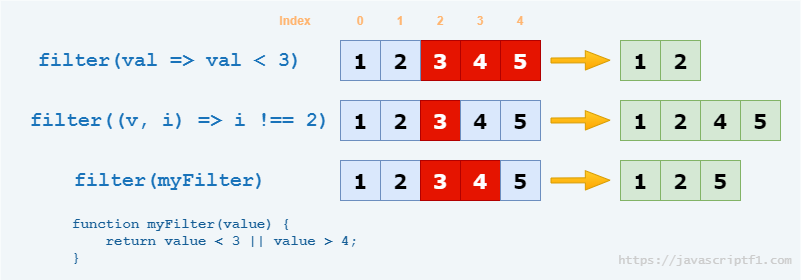
Метод filter() — самое универсальное решение. С его помощью можно удалить как один, так и несколько элементов, причем хоть по значению, хоть по индексу. Это неизменяемое решение. С его помощью, собственно, не элемент удаляется, а создается новый массив, из которого отфильтровываются нежелательные элементы. Этот метод широко поддерживается, даже в Internet Explorer. Совместимость можно проверить здесь.
Метод filter() принимает в качестве параметра функцию обратного вызова, которая будет вызываться со следующими аргументами:
- Значение (value) элемента (этот аргумент обязательный).
- Индекс (index) элемента — опционально.
- Исходный массив — тоже опционален.
Результирующий массив будет содержать элементы, для которых возвращаемое значение callback-функции будет истинным.
Метод filter() можно применять в компактном виде — с использованием стрелочных функций. Это можно делать, если для вас не важна поддержка IE.
Удаление конкретного объекта

Даже если ваш массив содержит объекты, а не базовые типы данных, метод filter() все равно сработает. Просто нужно определить callback-функцию соответствующим образом.
Удаление первого элемента

Пожалуй, самый простой вариант удаления элемента из массива — удаление первого элемента. Для примера можно взять FIFO-очередь. В этом случае для удаления первого элемента можно воспользоваться методом shift(). Этот метод возвращает удаленный элемент, так что вы сможете как-то его обработать при желании. В отличие от filter(), метод shift() изменяет исходный массив.
Удаление последнего элемента

Очень похожий вариант, только для случаев удаления элемента из LIFO-стека. Для удаления последнего элемента массива можно использовать метод pop(). Работает он аналогично методу shift(), который мы разбирали в предыдущем разделе.
Удаление конкретного элемента по индексу

Если вы хотите удалить из массива какой-то определенный элемент, можно воспользоваться методом splice(). Этот метод умеет не только удалять элементы, но и добавлять новые.
При помощи метода splice() можно удалить и больше одного элемента за раз. Для этого в качестве первого параметра укажите начальный индекс. Вторым параметром идет число элементов, которые вы хотите удалить. Этот второй параметр опционален. Если вы его не укажете, метод удалит указанный в первом параметре элемент, а также все элементы справа от него.
Поскольку метод splice() использует индексы массива, если вы захотите удалить элемент по значению, сначала придется найти его индекс.
Использование delete

Использование метода delete может быть очевидным, но он работает не так, как вы, вероятно, ожидаете. Он не удаляет элемент, а стирает его значение. Длина массива останется той же, а на позиции, которую вы очистили, будет неопределенное значение.
How to Remove an Element from a JavaScript Array – Removing a Specific Item in JS

Ilenia Magoni

You will often need to remove an element from an array in JavaScript, whether it’s for a queue data structure, or maybe from your React State.
In the first half of this article you will learn all the methods that allow you to remove an element from an array without mutating the original array. In fact, this is what you will want to do most often. For example, if you don’t want to mutate your React State. Or the array is used in other parts of your code, and mutating it would cause unexpected issues.
Always better to avoid mutations!
But, for completeness, the second half of the article will list methods to remove an item from an array in place. These methods do mutate the array itself.
Here you can find a handy summary of the article content, if you want to navigate to a section in particular.
How to remove an element from an array without mutating the array
If you have an input array, like as a function parameter, best practices dictate that you should not mutate the array. Instead you should create a new one.
There are a few methods you can use to remove a specific item from an array without mutating the array.
To avoid mutating the array, a new array will be created without the element you want to remove.
You could use methods like:
- Array.prototype.slice()
- Array.prototype.slice() together with Array.prototype.concat()
- Array.prototype.filter()
- A for loop and Array.prototype.push()
Let’s see in detail how you could use each one of these to remove an element from an array without mutating the original one.
Remove the first element of an array with slice
If you want to remove the first element in an array, you can use Array.prototype.slice() on an array named arr like this: arr.slice(1) .
Here is a complete example, in which you want to remove the first element from an array containing the first 6 letters of the alphabet.
The slice method can take a single number as argument, and in this case it copies from that index to the end of the array. So using arrayOfLetters.slice(1) will create a copy of the arrayOfLetters array that excludes the first element.
Remove the last element of an array with slice
If the element you want to remove is the last element of the array, you can use Array.prototype.slice() on an array named arr in this way: arr.slice(0, -1) .
Here is a complete example using the same alphabet array from above, starting with an array of the first 6 alphabet letters.
The slice method takes up to two parameters. The first index of slice indicates from which index to start the copy, and the second argument says up to which element to copy – but it’s not inclusive.
slice accepts a negative index to count from the end. This means that writing -1 would mean the last index. So from 0 to -1 means to create a copy from index 0 up to (but not including) the last index. The end result is that the last element is not included in the copy.
Remove an element at any position of an array with slice and concat
If you want to create a copy that is missing an element at any index you can use Array.prototype.slice and Array.prototype.concat together in this way: arrayOfLetters.slice(0, n).concat(arrayOfLetters.slice(n+1)) where n is the index of the element you want to remove.
This use of slice is a way to put together the two previous uses.
The first use of slice will create an array from the beginning to just before the element you want to remove.
The second use of slice creates an array from after the element you want to remove to the end of the array.
The two arrays are concatenated together with concat to form an array that is similar to the starting one, but without a particular element.
Remove an element of a certain value with filter
If you want to remove an element with a certain value, you can use Array.prototype.filter() . Let’s take the same arrayOfLetters and create a copy without the d .
filter takes a callback, and tests all the elements of the array with that callback. It keeps the elements for which the callback returns true (or a truthy value) and excludes the elements for which the callback returns false (or a falsy value).
In this case, the callback checks letter !== «d» so it returns false for the letter d and true for all others, resulting in an array that doesn’t include the letter d .
The callback to filter is passed three arguments, in order: the element itself, the index of the element, and the whole array.
You can create more complex conditions than this example, as complex as you need.
Remove an element from an array with a for loop and push
A final method to remove an element from an array without mutating the original array is by using the push method.
With these simple steps:
- Create an empty array
- Loop through the original array
- Push to the empty array the elements you want to keep
The condition of the if statement can check both the index ( i ) and the value of the element for more complex statements.
Remove the first element of an array with destructuring and the rest operator
Array destructuring and the rest operator are two concepts that are a bit confusing.
I suggest this article that covers how to destructure an array if you want to go deeper on this topic.
You can remove the first element using destructuring – let’s say of an array named arr – and create a new array named newArr in this way: const [ , . newarr] = arr; .
Now, let’s see a practical example on how to use destructuring and the rest operator.
Putting a comma before the rest operator says to avoid the first element in the array, and all the others are copied in the arrayOfCulinaryFruits array.
How to remove an element from an array while mutating the array
In some cases it might be appropriate to mutate the original array. In these cases you can also use one of the following mutating methods.
- Array.prototype.pop()
- Array.prototype.shift()
- Array.prototype.splice()
Remove the last element of an array with pop
You can remove the last item of an array with Array.prototype.pop() .
If you have an array named arr , it looks like arr.pop() .
The pop method is used on the array, and it changes the array by removing the last item of the array.
The pop method also returns the removed element.
Remove the first element of an array with shift
The shift method can be used on an array to remove the first element of an array.
If you have an array named arr it can be used in this way: arr.shift() .
The shift method removes the first item of the array.
It also returns the removed element.
Remove an element at any index with splice
You can remove the element at any index by using the splice method.
If you have an array named arr it can be used in this way to remove an element at any index: arr.splice(n, 1) , with n being the index of the element to remove.
The splice method can accept many arguments.
To remove an element at any index, you need to give splice two arguments: the first argument is the index of the element to remove, the second argument is the number of elements to remove.
So, if you have an array named arr , in order to remove an element at index 4, the way to use the splice method would be: arr.splice(4, 1) .
The splice method then returns an array containing the removed elements.
Conclusion
There are many different ways to do the same thing in JavaScript.
In this article you have learned nine different methods to remove an element from an array. Six of them do not mutate the original array, and three of them do.
You will probably use all of them at one point or an other, and maybe you will learn even more methods to do this same thing.
How can I remove a specific item from an array in JavaScript?
How do I remove a specific value from an array? Something like:
Constraints: I have to use core JavaScript. Frameworks are not allowed.

150 Answers 150
Find the index of the array element you want to remove using indexOf , and then remove that index with splice .
The splice() method changes the contents of an array by removing existing elements and/or adding new elements.
The second parameter of splice is the number of elements to remove. Note that splice modifies the array in place and returns a new array containing the elements that have been removed.
For the reason of completeness, here are functions. The first function removes only a single occurrence (i.e. removing the first match of 5 from [2,5,9,1,5,8,5] ), while the second function removes all occurrences:
In TypeScript, these functions can stay type-safe with a type parameter:
Edited on 2016 October
- Do it simple, intuitive and explicit (Occam’s razor)
- Do it immutable (original array stays unchanged)
- Do it with standard JavaScript functions, if your browser doesn’t support them — use polyfill
In this code example I use array.filter(. ) function to remove unwanted items from an array. This function doesn’t change the original array and creates a new one. If your browser doesn’t support this function (e.g. Internet Explorer before version 9, or Firefox before version 1.5), consider polyfilling with core-js .
Be mindful though, creating a new array every time takes a big performance hit. If the list is very large (think 10k+ items) then consider using other methods.
Removing item (ECMA-262 Edition 5 code AKA old style JavaScript)
Removing item (ECMAScript 6 code)
IMPORTANT ECMAScript 6 () => <> arrow function syntax is not supported in Internet Explorer at all, Chrome before version 45, Firefox before version 22, and Safari before version 10. To use ECMAScript 6 syntax in old browsers you can use BabelJS.
Removing multiple items (ECMAScript 7 code)
An additional advantage of this method is that you can remove multiple items
IMPORTANT array.includes(. ) function is not supported in Internet Explorer at all, Chrome before version 47, Firefox before version 43, Safari before version 9, and Edge before version 14 but you can polyfill with core-js .
Removing multiple items (in the future, maybe)
If the "This-Binding Syntax" proposal is ever accepted, you’ll be able to do this:
Reference

I don’t know how you are expecting array.remove(int) to behave. There are three possibilities I can think of that you might want.
To remove an element of an array at an index i :
If you want to remove every element with value number from the array:
If you just want to make the element at index i no longer exist, but you don’t want the indexes of the other elements to change:

It depends on whether you want to keep an empty spot or not.
If you do want an empty slot:
If you don’t want an empty slot:
And if you need the value of that item, you can just store the returned array’s element:
If you want to remove at either end of the array, you can use array.pop() for the last one or array.shift() for the first one (both return the value of the item as well).
If you don’t know the index of the item, you can use array.indexOf(item) to get it (in a if() to get one item or in a while() to get all of them). array.indexOf(item) returns either the index or -1 if not found.

A friend was having issues in Internet Explorer 8 and showed me what he did. I told him it was wrong, and he told me he got the answer here. The current top answer will not work in all browsers (Internet Explorer 8 for example), and it will only remove the first occurrence of the item.
Remove ALL instances from an array
It loops through the array backwards (since indices and length will change as items are removed) and removes the item if it’s found. It works in all browsers.
There are two major approaches
splice(): anArray.splice(index, 1);
delete: delete anArray[index];
Be careful when you use the delete for an array. It is good for deleting attributes of objects, but not so good for arrays. It is better to use splice for arrays.
Keep in mind that when you use delete for an array you could get wrong results for anArray.length . In other words, delete would remove the element, but it wouldn’t update the value of the length property.
You can also expect to have holes in index numbers after using delete, e.g. you could end up with having indexes 1, 3, 4, 8, 9, and 11 and length as it was before using delete. In that case, all indexed for loops would crash, since indexes are no longer sequential.
If you are forced to use delete for some reason, then you should use for each loops when you need to loop through arrays. As the matter of fact, always avoid using indexed for loops, if possible. That way the code would be more robust and less prone to problems with indexes.
Изучаем удаление элемента из массива JS
В JavaScript удалить элемент массива можно несколькими методами. К ним относятся методы pop и shift . Метод pop удаляет первый элемент из заданного массива. Метод shift удаляет последний элемент из заданного массива.
Можно задать длину массива 0, если требуется удалить все элементы из данного массива. Но что, вам нужно удалить определенный элемент?
Можно использовать метод splice . Он возвращает новый массив удаленных элементов. А первоначальный массив содержит оставшиеся элементы.
Посмотрите приведенную ниже демо-версию, чтобы узнать, как использовать метод JavaScript splice и другие способы удаления определенных элементов.
Демонстрация удаления конкретного элемента с использованием метода splice
В этой демо-версии создается массив чисел. Первоначально в массив добавляются пять элементов. После этого используется метод splice для удаления третьего элемента. Таким же образом в JavaScript можно удалить первый элемент массива.
Элементы числового массива отображаются до и после использования метода JavaScript splice следующим образом:

Посмотреть онлайн демо-версию и код
Код JavaScript с методом splice :
Вы заметили, что я использовал для JavaScript удаления элемента массива два параметра. Первый указывает индекс элемента, который нужно удалить. Второй – сколько элементов нужно удалить после указанного ключа.
В следующей демо-версии показан случай, когда мы используем второй параметр.
Что делать, если второй параметр не указан в JavaScript-методе splice?
Использование того же кода, но без второго параметра в методе splice :
Код и результат:

Посмотреть онлайн демо-версию и код
Как видите, здесь были удалены и все элементы перед указанным номером индекса. Кроме этого метод splice возвращает массив удаленных элементов.
Использование функции delete для удаления элемента массива
Также, чтобы в JavaScript удалить элемент массива, можно использовать функцию delete . Но она сохраняет пустое место, и если вы вернете этот массив после использования функции, то удаленный элемент будет отображен как undefined .
Рассмотрим демо-версию, в которой используется функция delete :

Посмотреть онлайн демо-версию и код
Вы видите, что для третьего элемента отображается undefined после его удаления с помощью функции delete .
Примечание . Вы должны указать номер индекса в квадратных скобках.
Чтобы в JavaScript удалить элемент массива, рекомендуется использовать splice . Метод delete может привести к возникновению сложностей по мере того, как количество undefined элементов будет увеличиваться.