Circular
Контролируйте и улучшайте свой сон, активность и хорошее самочувствие с помощью Circular.
Последняя версия
Circular APP
Circular — это самая передовая в мире платформа для мониторинга здоровья, которая произвела революцию в области личного здоровья. Круглосуточно отслеживайте свои жизненно важные показатели и все, что вы делаете, 24 часа в сутки, 7 дней в неделю. С приложением Circular раскройте весь потенциал данных.
Приложение Circular позволяет легко понять, что происходит в вашем теле и как улучшить сон, активность, восстановление и общее самочувствие в долгосрочной перспективе.
Каждая функция называется кругом.
• Круг будильника: бесшумно просыпайтесь под вибрацию, создайте процедуру пробуждения, активируйте функцию интеллектуального будильника, чтобы просыпаться в самой легкой стадии сна, используйте функцию интеллектуального повтора, чтобы никогда не опаздывать, и просматривайте свое подробное ежедневное пробуждение. счет.
• Круг наблюдения за сном: всеобъемлющая оценка качества сна с подсчетом множества подробных показателей, а также простые для понимания графики с подробными тенденциями.
• Круг наблюдения за физической активностью: всеобъемлющий показатель энергии с подсчетом множества подробных показателей, ежедневные физические показатели и простые для понимания графики.
• Управляемый дыхательный круг: ваши самые популярные дыхательные упражнения, управляемые вибрацией кольца с оценкой ваших биометрических данных во время сеанса.
• Круг измерений в реальном времени: просматривайте метрики на месте с точными данными о частоте сердечных сокращений, вариабельности сердечного ритма, насыщении крови кислородом и данными об интенсивности активности.
Приложение Circular готово к размещению дополнительных кругов через раздел «Управление моими кругами». Вы сможете легко активировать новые круги через обновления приложения.
• Таймер: заставьте ваше кольцо вибрировать в конце таймера.
• Режим полета: переведите кольцо в спящий режим, чтобы отключить передачу данных.
РАСШИРЕННАЯ СИСТЕМА ОЦЕНКИ
Собранные показатели подвергаются перекрестному анализу с помощью машинного обучения для создания систем оценки на основе ваших привычек и профиля.
Количественно оценивайте влияние изменений вашего поведения, образа жизни и окружающей среды на ваше здоровье с помощью анализа на основе данных, чтобы принимать обоснованные решения каждый день.
Погрузитесь в 14-дневный период калибровки, в течение которого Кира, ваш личный компаньон, узнает вас, чтобы дать персональные рекомендации.
• Кира настраивает для вас значения ссылок, базовые уровни, профили и хронотипы.
• Ежедневные вопросы от Киры о вашем образе жизни
• Ваш личный помощник обучает основам и показателям личного здоровья и объясняет, как Circular может помочь
ЛИЧНЫЕ РЕКОМЕНДАЦИИ И ПОМОЩНИК
Понимайте, как никогда раньше, что происходит с вашим телом, и получайте действенные идеи и рекомендации. Сделано легко для всех. Больше не нужно быть экспертом в корреляции данных и анализе графиков:
• Автоматическая корреляция дневных и ночных перекрестных данных
• Персональные и действенные рекомендации
• Проверка событий с помощью Киры, которая взаимодействует с вами для выработки более точных предположений.
КАЛЕНДАРЬ И ЛИЧНЫЙ ДНЕВНИК
Следите за своей жизнью и обнаруживайте дополнительные корреляции:
• Добавляйте заметки к определенному дню
• Быстро визуализируйте свой общий счет и то, что происходит
• Узнайте, как окружающая среда и образ жизни влияют на ваше здоровье, и внесите изменения в свое поведение.
Бросьте вызов себе и получайте удовольствие
Поделитесь своими оздоровительными достижениями и почувствуйте себя готовым соревноваться с лучшими людьми в сообществе Circular.
• Полосы и значки
• Продолжительное использование Bluetooth в фоновом режиме может значительно сократить срок службы батареи.
• Доступ к этому мобильному приложению возможен только с Circular Ring. Мобильное приложение совместимо только с Circular Ring.
What Is Circular Android System App?
Some software is so obscure in names that they go over the general understanding of most Android users. And “Circular” is one of them that has no description to know it better. So, what is circular android system app? Is it spyware or malware?
Circular is a pre-installed icon package for Android app icons. The manufacturers have installed it on most OS. Furthermore, it provides the software icons with a circular or squircle backdrop. Therefore, the default home screen icons look similar in shape.
If you want to distinguish the icons by their stock shapes and logos, the default features of the app are not for you. Fortunately, I am here to show you how to change its default settings. Let’s start reading!
Table of Contents
What Is Circular Android System App?
Circular android system app is a pre-installed software that provides OEM devices with circular icons for all the apps on Android. To break it down, upon opening the home screen of the phone, the icons or logos of the apps look constrained in circular shapes. It happens because of the Circular theme pack.
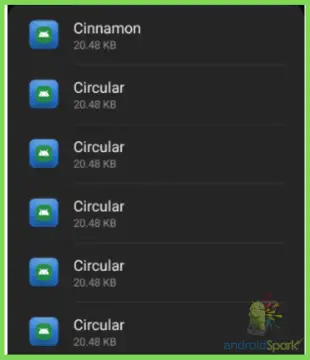
Since Google has rolled out the adaptive icons update, some Android OS displays their icons in squircle (a shape between a circle and a square) frames. Whereas, other OS displays the software icons in circular shapes.
And without the pre-installed Circular app, it is not possible for the OS to give the icons such backgrounds or frames.
Is Circular Android System App Spyware?
These days, Spywares are so good at disguising them as system apps. And according to Sophos, malicious apps or spyware mostly use the name Google Youtube, Google, Chrome, Or system updates to stay unsuspicious on the home screen.
So, I can guess why Android users doubt Circular upon encountering its existence. The good news is the app is totally harmless.
Device manufacturers pre-install the Circular app to make icon customization easy on Android. On its info page, there is no uninstall button, which is the case with all pre-installed software. So, as long as the Circular app is not from any third-party site or source, it is pretty much safe.
Can You Change the Icon Shapes from Circular App?
It is not possible to do anything within the Circular app as Android has removed the feature to change shape icons from the home settings. So, to change the default shapes here is the method to look for –
1. Developer Options
The Circular app package does come with the feature to change the default shapes of the icons. But for that, advanced “Developer Options” have to be activated. And these are the steps to that:
Step 1: Open “Advanced” Settings
Expand the default Settings page and scroll down to the “Advanced” section. In some phones, the latter section can be under the System header. From the Advanced entry, open About Phone to find the Build Number.
Step 2: Access “Developer Mode”
Continuously tap the Build Number header until the screen popup confirms that you are a developer. Note that phone security might require the PIN or lock pattern before activating the developer mode.
Step 3: Find Developer Options
Upon unlocking the developer mode, the system will incorporate the Developer Options in the Settings entry. To find it, jump back to the Settings page and expand the System entry. Then, from the “Advanced” section, click on Developer Options.
Step 4: Change the Circular Theme
After toggling the Developer Options slider, scroll down to click the Icon Shape. It will open the built-in circular shapes menu available to choose from.
Select the preferred shape for the icons to give them a new look apart from the default one. Just a reminder that the options are not very lucrative here. So, for numerous options, follow the next section.
Is There Any Way to Remove Circular System App Features?
Android pre-installed apps like Circular reduce the theme or icon setup tasks for most android users. But not everyone wants the boring looks of the icons the app provides.
But, why sigh over the limited features of the system app when Android supports third-party apps to custom the icon shapes? Here is more to it-
1. Moonshine
Not up for the icons constrained in default frames and want the icons to appear without any background? Then, the Moonshine app is just about the perfect choice. The 1 million and growing subscribers are proof of it.
All apps are unique in their logos and shapes. And to feature them on the home screen in their actual shape without any pre-installed frames, get the Moonshine app from the Play Store. Because it has a feature to change the default shapes to the stock icons or logos of the installed apps.
2. Zwart
For Android users with a preference for monochromatic looks of icon shapes, Zwart is the answer. This app is compatible with almost all versions of OS and third-party launchers.
After downloading and choosing Zwart as the default icon pack, the circular app features will no longer work in the background. And the apps’ icons will appear in their stock logos or shapes in a black-and-white theme.
Frequently Asked Questions (F.A.Q’s):
Is Disabling the Circular App Safe?
It is not easy to install a pre-installed package like Circular. But using third-party icon package apps will safely disable its functions.
Can You Uninstall the Circular App?
Circular does not come with an uninstall button. So, without rooting or PowerShell commands, it is almost impossible to delete the app.
Why Do the Icons Look Circular on My Phone?
As per the new update of Google, the icons will have circular or squircle shapes around them. It makes the icon look organized.
Conclusion
Even if you use your phone every day, there are some apps on it that you know nothing about! And going through the system apps list will introduce you to the “circular app” sooner or later. That’s where the question arrives – What is circular android system app?
In a nutshell, it is pre-installed software that provides a united background shape to the app icons. Sophos experts suggest that there is nothing to freak out about the app as long as you have not downloaded it from a third-party site. So, no need to remove it.
Hi there, I’m Biajid, a devoted tech lover who specializes in tackling technical difficulties related to Android phones and operating systems. Over the years, I’ve gained extensive experience in resolving complex issues and have become a seasoned expert in the field. I’m delighted to have you on my website, and I’m confident that the resources and solutions provided here will prove to be valuable to you
Recent Posts
Most Android users are concerned about their privacy. Sometimes users allow microphone permission for some apps which may create privacy issues. Are you also concerned about your voice privacy on.
In Android devices, applications need different types of permissions to run properly. Some applications need storage permission to work properly. You have to allow external storage permission to use.
About Me
Hi there, I’m Biajid, a devoted tech lover who specializes in tackling technical difficulties related to Android phones and operating systems. Over the years, I’ve gained extensive experience in resolving complex issues and have become a seasoned expert in the field. I’m delighted to have you on my website, and I’m confident that the resources and solutions provided here will prove to be valuable to you
What Is Circular App on Android [FAQs]
This article has been fact checked by a third party fact-checking organization.


Circular is an app that was created to help users track their health and fitness. The app is available on Android and has a variety of features that can help users stay on track. Some of the features include a fitness tracker, a food journal, and a calorie counter. The app also has a community aspect, so users can connect with others who are also using the app.
Starting off
Circular app is a mobile app that is available for Android devices. It allows users to share photos, videos, and other content with others.
Why Do I Have So Many Circular Apps on My Phone
- Some phones come with a circular theme pack pre-installed -This theme pack provides circular icons on Android phones -Circular icons look nicer than square icons on phones -Themes with circular icons are more popular than themes without circular icons -People like circular icons because they look nicer on phones

Can You Tell if Your Cell Phone Is Being Tracked
Cellular phone tracking is a controversial topic. Some people believe that it is an invasion of privacy, while others believe that it is a necessary security measure. There is no easy answer, as the benefits and drawbacks of cellular phone tracking are complex and highly debated.
One of the benefits of cellular phone tracking is that it can help law enforcement track down fugitives. By tracking a fugitive’s cellular phone, law enforcement can identify where the fugitive is and determine their whereabouts. This is especially useful in cases where the fugitive is using a fake identity or has multiple aliases.
Another benefit of cellular phone tracking is that it can help prevent terrorist attacks. By tracking a terrorist’s cellular phone, law enforcement can detect any suspicious activity and prevent a terrorist attack. This is especially useful in cases where the terrorist is using a fake identity or has multiple aliases.
However, there are also drawbacks to cellular phone tracking. One drawback is that it can be a violation of a person’s privacy. By tracking a person’s cellular phone, law enforcement can access the person’s private information, such as their location and phone calls.
Another drawback is that it can be a violation of a person’s Fourth Amendment rights. By tracking a person’s cellular phone, law enforcement can access the person’s personal information without a warrant.
Overall, cellular phone tracking is a controversial topic. There are pros and cons to each type of tracking, and it is ultimately up to each individual to decide whether or not they believe that cellular phone tracking is a necessary security measure.
How Do I Unhide Hidden Apps on Android
There are several ways to unhide apps on Android. One way is to locate the Apps option and make sure the All apps option is selected. This will display all installed apps on your Android device, including some hidden apps. Another way is to access the app’s Settings. Often, hidden apps are hidden within the app’s Settings.
Why Do I Have 2 Phone Icons on My Phone
Some people might have two phone icons on their phone because they cleared the cache files on their phone. Clearing the cache files can sometimes cause the phone to show duplicate phone icons. To fix this, people need to go to Settings and clear the data for the app that is causing the problem.
What Is a Cinnamon App
Cinnamon is an AI-based video platform that is designed for content creators. It has a detailed toolkit that makes it easy to create videos, and it also has native cross-app sharing and fair monetization. This makes it a great platform for anyone who wants to create content, and it is perfect for anyone who wants to monetize their content.
How Do I Remove Unwanted Apps From My Samsung Phone
To uninstall an app on your Samsung phone:
Open the Google Play Store app.
At the top right, tap the Profile icon.
Tap Manage apps & devices.
Tap the name of the app you want to uninstall.
Can I Disable Meta App Manager
To disable meta app manager updates on your mobile phone, you will need to open device settings, find Application Manager or Apps, and then find Meta App Installer. From here, you can disable updates or enable them.
To sum it up
Circular is a great app for tracking your health and fitness. It has a variety of features that can help you stay on track, including a fitness tracker, a food journal, and a calorie counter. The app also has a community aspect, so you can connect with others who are also using the app. Overall, circular is a great app for keeping track of your health and fitness.
Circular
Una aplicación PARA EL TRANSPORTE DE GRANOS Y OLEAGINOSAS.
Ahora disponible para sacar turnos en COFCO PGSM . Descargá la aplicación y sacá turno para hacer más rápido en Cofco Timbúes, Cofco PGSM, Cargill Punta Alvear y Cargill Quebracho, y ayudar a evitar la aglomeración en los puertos.
Circular es una plataforma de comunicación y gestión de transporte de cargas para el sector agro potenciada por inteligencia artificial. Agiliza las interacciones entre productores, acopios, transportes, camioneros y exportadores.
Es muy simple de usar: ¡funciona como una aplicación de chat!
**Con la app de Circular vas a poder:**
— Reservar turnos para descargar en el puerto y reducir los tiempos de espera
— Recibir y gestionar encargos de viajes de tu transportista, círculo de camioneros, cooperativa o acopios.
— Recibir ayuda a través del chat.
**CIRCULAR cuenta con:**
— Un sistema de notificaciones que te va a avisar cada vez que recibas un nuevo encargo de viaje.
— Un panel de viajes desde donde vas a poder consultar todos los viajes pendientes que aceptaste.
— Un sistema de turnos para reservar uno antes de llegar a la planta.
— Un canal de mensajería instantánea para conectar a los distintos agentes que participan en el transporte.
— Un Asistente Virtual para atender todas sus consultas 24/7.
* Por el momento la plataforma está abierta solo para sacar turnos en Cargill Punta Alvear y Quebracho y en CofcoTimbúes. Si recibís una invitación de tu cooperativa, círculo de camioneros o empresa de transporte vas a poder usar el resto de las funcionalidades. *
* Si sos transportista o camionero y querés probar la aplicación, envianos un mensaje e intentaremos darte acceso lo antes posible.*