What does “Time to Live Exceeded” mean? TTL Explained

As a network administrator, I occasionally hear the question, “What does it mean when I get an error message that says “Time to Live exceeded”?” People often ask this question when they are having connectivity problems. This error message may appear while using the ping or traceroute command to diagnose one of these problems..
“Time to Live exceeded” is an error message indicating that a data packet has traveled through too many routers on the way to its destination, and has been discarded. This can be caused by temporary ISP problems, misconfigured routers, or an offline destination host.
TTL: A background on IP networks
In an IP packet, the Time to Live (TTL) field is a crucial but sometimes misunderstood topic. It details the most hops a packet is permitted to complete before being rejected. The TTL field is used to ensure that packets are delivered to their intended locations without using excessive amounts of network resources and to prevent packets from circling indefinitely in a network.
The TTL value in the Internet Protocol (IP) is a field in the header of an IP packet that indicates how many hops a packet can make before being rejected. A packet is given a certain TTL value when it is sent, which is often a low number like 64 or 128. The TTL value is decreased by one each time a packet travels through a router. The router discards the packet and notifies the sender that the “Time to Live” limit has been reached when the TTL value drops to zero.
What does the error message “Time to Live exceeded” actually mean?
Generally speaking, it denotes that a data packet was unable to reach its destination within the allowed number of hops. This error most frequently occurs because the BGP routing protocol used by the internet contains inaccurate information about how to reach a particular target network. In this case, it’s likely that router A believes router B is the best router to send the packet to in order to get it closer to the destination, while router B believes router A is the ideal router to send the packet to. This is known as a routing loop. This frequently occurs when the host or destination network is unavailable. In this situation, it is impossible to get to the desired location, and occasionally internet service providers will mistakenly transmit traffic back and forth to one another in the mistaken belief that the other network can still get there.
What to do about it?
The BGP internet routing system may take some time to update in order to reflect the most effective path to a specific network. As a result, transient “routing loops” like the ones mentioned above might happen even when no action is required to fix them; they will go away in a few seconds or minutes. If the issue continues after this, remedial action might be required.
As a result, if you encounter this error notice, there may be an issue with the network or the destination host. You would have to investigate the issue if you were in charge of the destination network. Otherwise, if the issue has persisted for longer than a few minutes, it is recommended to do a MTR test, report the findings to your internet service provider, and request that they fix the issue.
Anyone who uses networks, whether they are network engineers, system administrators, or just regular users of the internet for work, can benefit from understanding the TTL field and how it functions. Understanding this idea and knowing how to address TTL field-related problems will help you make sure that your data gets to where it needs to go and that your network functions properly.
Do You Love Servers?
We do! As a dedicated server hosting company, IOFLOOD is aware of the need of dependable networking. We can assist if you require a dependable connection and a dedicated server. Our team of skilled network engineers is committed to offering premium hosting services and making sure that your data gets to where it needs to go.
Ttl exceeded mikrotik что это
Данная тема создана для обмена информацией по вопросам и проблемам настройки MikroTik RouterOS
Тема в варезнике
последняя устаревшая версия: 4. 17
последняя стабильная версия: 5. 11
Официальная документация:
Обмен опытом пользователей MikroTik RouterOS: http://wiki.mikrotik.com/wiki/Main_Page
2. Поднял бы срц-нат для исходящего интерфейса (10-го) для ип с адресным диапазоном 172.24.2.0/30 (т.е в этом сегменте есть действительные адреса 172.24.2.1 и 172.24.2.2) — для того, чтобы никто, окромя прокси и 1200 железки, не выходил в интернет через этот нат.
3. Проверил бы с компа с прокси доступ в интренет:
наш трасроуте на 8.8.8.8
4. Настроил бы простые роутигни для всех сетей: типа для 10.100.103.0/24 искать через 192.168.168.2 (вообще правильно бы использовать что-то более верное для такого случая… ОСПФ к примеру)
5. Для остальных используемых интерфейсов разрешил бы верную маршрутизацию (у меня в базовых парвилах всё лишнее дропается). Естественно надо проверить, чтобы пакеты ихз одной сети в другую ходили так как надо.
______
На этом этапе все кто у себя в ИЕ/Опере (или что там у них) поставят в настройках проксисерверов адрес твоего прокси (172.24.2.2) смогут ходить в инет и без заковыристой маршрутизации на твоей железке.
______
6. Настроил бы маршрутизацию пока только для входящего ин-са ВПН-1:
/ip firewall mangle
chain=prerouting action=mark-routing new-routing-mark=LAN-2-Web passthrough=no src-address-list=LAN dst-address-list=!gray-adress in-interface=VPN-1
(адресные листы LAN — списки локалок, gray-adress — «серые» адреса не маршрутизируемые в интернет — это все допустимые локалки и адреса широковещательной рассылки)
7. Добавил бы маршрут с моей пометкой:
/ip route
add check-gateway=ping comment="" disabled=no distance=50 dst-address=\
0.0.0.0/0 gateway=172.24.2.2 routing-mark=LAN-2-Web scope=30 \
target-scope=10
8. Проверил бы выход в интернет из сети 10.100.103.0/24 (твоя ВПН-1)
наш трасроуте на 8.8.8.8
9. Копированием создал бы под все остальные нужные интерфейсы правила пометки маршрутов из п.6.
(Может так и не столь красиво, но лучше видно)
10. Проверил бы работу правил из остальных сетей.
Добавлено:
rosalin, с 0:9 до 0:9:25 (т.е. на 25 секунд в 9 минут первого) во все дни недели доступ к 80 порту микротика (т.е. http://адрес_микротика):
Оказался затык в правиле мангл.
Теперь я схему упросил до минимума.
В качестве прокси сейчас стоит freebsd со включенным роутингом между интерфейсами.
Сниффером я вижу что пакеты с клиента тестБ до 8.8.8.8 приходят на ЛАН интерфейс и уходят через ВАН интерфейс. Тоесть все правильно.
Все лишние правила фаервола на роутерА я отключал последовательно проверяя где проблема.
Как оказалось проблема в самом первом правиле.
/ip firewall mangle add chain=prerouting src-address-list=local dst-address-list=!local action=mark-routing new-routing-mark=route_to_proxy in-interface=!ether9
Написал в суппорт микротика, наши прибалтийские товарищи попросили таблицу маршрутизации с роутерА и замолчали.
пробовали совсем ручками проследить "тестовый" пакет по всему маршруту? навскидку — любой возвращающийся к пользователю пакет не заворачивается ли обратно на прокси, вне зависимости от того, откуда пришёл.
"пробовали совсем ручками проследить "тестовый" пакет по всему маршруту? навскидку — любой возвращающийся к пользователю пакет не заворачивается ли обратно на прокси, вне зависимости от того, откуда пришёл. "
Нет не заворачивается, я вместо прокси временно воткнул машинку с фрей и роутингом меж интерфейсами и смотрел тцпдампом.
Да и судя по логу форвардинга самого микротика все проходит как надо.
"з.ы. для src-NAT использовать предварительную маркировку маршрута — шикуете? сделайте out-interface=WAN action=masquerade — и будет вам счастье. "
помогло
скрипт
/ip proxy access disable [/ip proxy access find comment="scheduled based on time"]
/ip proxy access enable [/ip proxy access find comment="scheduled based on time"]
Вот откуда берется этот хоп я так и не понял
3 192.168.168.1 1ms 1ms 1ms
(сдается мне происходит следующее: пакет форвардится в соответствии с правилом на прокси, форвардится проксей, попадает на 9й интерфейс и там почему-то попадает сразу в 2 таблицы маршрутизации)
Других объяснения я все равно не придумал.
Цитата:
| Вот откуда берется этот хоп я так и не понял |
это адрес роутера — ведь пакет два раза проходит через роутер, до и после прокси
При трассировке адрес хопа это адрес интерфейс на который пришел пакет и через который он был смаршрутизирован.
Тоесть следующим хопом после ЛАН прокси, должен быть IP микротика в транзитной сети ВАН прокси.
Тоесть 172.24.2.1.
Вот на всякий случай таблица маршрутизации с роутера А
>> 0 A S dst-address=0.0.0.0/0 gateway=10.1.1.2
>> gateway-status=10.1.1.2 reachable ether8 distance=1
>> scope=30
>> target-scope=10 routing-mark=route_to_proxy
>>
>> 1 X S dst-address=0.0.0.0/0 gateway=172.24.2.2
>> gateway-status=172.24.2.2 inactive distance=1 scope=30
>> target-scope=10 routing-mark=From_NAT
>>
>> 2 ADS dst-address=0.0.0.0/0 gateway=10.0.3.1
>> gateway-status=10.0.3.1 reachable ether10 distance=0
>> scope=30
>> target-scope=10 vrf-interface=ether10
>>
>> 3 ADC dst-address=10.0.3.0/24 pref-src=10.0.3.107
>> gateway=ether10 (Это линк до Провайдера.)
>> gateway-status=ether10 reachable distance=0 scope=10
>>
>> 4 ADC dst-address=10.1.1.0/24 pref-src=10.1.1.1 gateway=ether8
>> gateway-status=ether8 reachable distance=0 scope=10
>>
>> 5 A S dst-address=10.100.103.0/24 gateway=192.168.168
>> gateway-status=192.168.168.2 reachable ether6 d
>> target-scope=10
>>
>> 6 ADC dst-address=172.24.2.0/24 pref-src=172.24.2.1 g
>> gateway-status=ether9 reachable distance=0 scop
>>
>> 7 ADC dst-address=192.168.168.0/24 pref-src=192.168.1
>> gateway-status=ether6 reachable distance=0 scop
Обратите внимание, никаким образом таблица маршрутизации не ведет пакет 8.8.8.8 обратно к роутеруБ
"видимо, у вас обратный пакет всё же не маркируется для перебрасывания на ван прокси (чтобы через проксю вернуться), поэтому при натировании пакеты имеют адрес прокси, маршрут на который прописан в таблице main (как connected); а при отключенном на прокси натировании пакеты возвращаются напрямую к пользователю, минуя проксю. дальше — по обстоятельствам (правила фильтра, етц). "
А вот это уже более похоже на правду, НО и в таком случае трассировка должна проходить.
Логика такая:
1) клиент с src 10.100.103.254 отправил пакет на dst 8.8.8.8
2) пакет отправляется на гейт клиента 10.100.103.1 (роутерБ)
3) гейт клиента в соответствии с дефолтным маршрутом отправляет пакет на 192.168.168.1 (роутерА)
4) роутерА в промаркировав пакет форвардит его на IP прокси 172.24.1.2
5) прокси роутит пакет меж интерфейсами и отправляет на свой дефолт 172.24.2.1
6) Пакет на ether9 маркируется, отправляется на НАТ и затем во вне.
7) Обратный пакет пройдя нат с src 8.8.8.8 и dst 10.100.103.254 раутится обратно.
"вот я про седьмой пункт и говорю. первые шесть — да, всё вроде правильно"
Цитата:
| Я собственно хотел сказать о том, что обратный пакет даже не проходя через прокси как это задумывалось, все равно будет доставлен адресату тоесть клиенту тестБ. В таком случае все равно должны быть пинги и работать интернеты. |
ну, правил фильтра файрвола я не видел, а об их отсутствии никто не упоминал
"что вы называете словом "встретиться"? роутер два раза отправляет клиенту пакет "TTL Exceeded", два раза на один и тот же адрес — адрес клиента. почему он первый раз должен выбрать один адрес, второй — другой. ведь в маршруте на клиента pref-src не меняется"
Коллега, может мы друг друга недопонимаем?
Клиент 10.100.103.254 отправляет трассировку до 8.8.8.8
1) первый пакет с ттл = 1 прилетает на 10.100.103.1 (роутерБ) который отвечает ICMP Time Exceeded
2) второй пакет с ттл = 2 прилетает на 192.168.168.1 (роутерА) который отвечает ICMP Time Exceeded
3) пакет с ттл = 3 форвардится на 172.24.1.2 (лан прокси) который отвечает ICMP Time Exceeded
4) пакет с ттл = 4. и куда (и как) он должен прилететь чтоб ICMP Time Exceeded ответил 192.168.168.1
? ( и это с учетом того, что этот пакет я вижу сниффером исходящим с ВАН интерфейса прокси сервера)
Вот у меня в голове не сростается никак. Может я заработался, но механизм данного действа я понять не могу.
Спасибо за ответы кстати.
Ну так это Вы начали утверждать что роутер для ответа выберет preferred source.
На деле современные маршрутизаторы сейчас далеко не всегда соблюдают rfc 1812 (и микротик кстати тоже), и это правильно я считаю. Позволяет строить более точную карту маршрута.
Оказывается что пакеты из локальных сетей уходят "неотначенные"
chain=prerouting action=mark-routing new-routing-mark=To_NAT src-address-list=local dst-address-list=!local passthrough=yes in-interface=ether9
chain=srcnat action=masquerade routing-mark=To_NAT src-address-list=local dst-address-list=!local out-interface=ether10
Вроде все просто и правильно. Ан нет.
Что может быть не так?
PS пожалуйста обратите внимание на маленький ньюанс.
В такой конфигурации пакеты инициированные самим прокси сервером натятся без проблем.
Не натятся ТОЛЬКО транзитные пакеты.
Ttl exceeded mikrotik что это
TTL (Time To Live) And Fun With Mikrotik TTL Mangle
In a nutshell TTL is a field in the IP header that sets how many routers a packet can traverse. If you have a routing loop and TTL didn’t exist, then the packets could indefinately loop. What’s the problem with that? Packets can travel between two routers with virtually no delay. As the packet races in a loop from router to router it consumes bandwidth and CPU resources…no good-o!
So here’s my test setup:
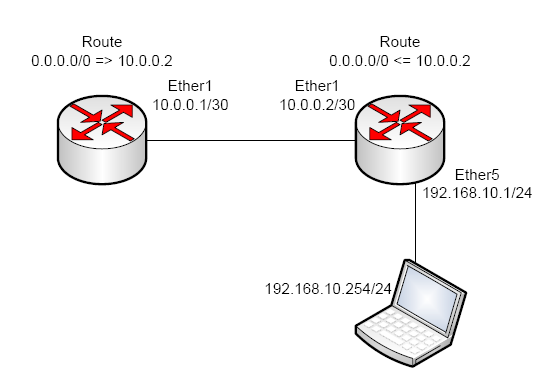
It’s like looking at some Davinci
As a packet moves through a router the forwarding router reads the packets TTL, subtracts one from it and then forwards it on. If a packet has a TTL of one as it reaches a router it will be dropped before it has an opportunity to forward the packet. In the Mikrotik, the TTL is decremented first thing in the forward chain.
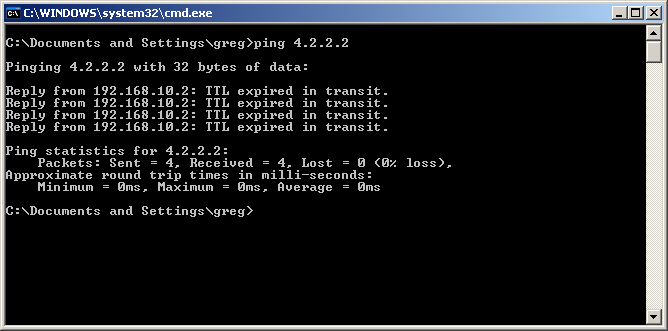
What a ping message shows for an expired TTL packet.
This would be the normal operation, but Mikrotik has a little trick up it’s port. There is a mangle rule that can be created to adjust the TTL to whatever value you want! I was thinking how fun it would be to create a routing loop…so I did. You might be surprised at how adversely a single ICMP packet can affect a router in an infinite loop. (Excuse the screaming children and the random cat noises hehe)
Screenshots for the mangle rules to set TTL to 10:
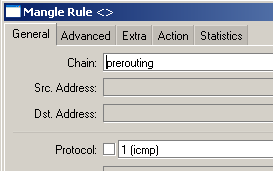
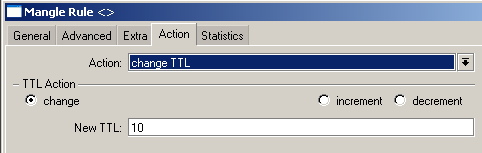
The action I set to change TTL. Increment/Decrement will use specified value to adjust by.
Here’s the code version:
/ip firewall mangle add action=change-ttl chain=prerouting comment="" disabled=no new-ttl=set:10 protocol=icmp
So what would be an advantage of adjusting the TTL manually? You can adjust the TTL down to a lower value so that specific traffic won’t have the opportunity to travel any farther than you want. You could set the TTL on a packet to 1 as it exits the router so that only a host can exist behind your equipment.
Ttl exceeded mikrotik что это
Подписаться на новые статьи.
7 комментариев:
Спасибо дорогой человек!
Не знаю как, но одно, технологическое устройство имело ttl=0 и не маршрутизировалость по vpn. Твоя подсказка помогла решить проблему. Пью кофе, отменяю поездку на объект!)
increment зачем? увеличить на один везде?
во первых это правило супер требовательное получится к процу.
не проще поставить на постороутинг выход из роутера в ван, чендж ттл на 64 и делов
/ip firewall mangle add action=change-ttl chain=postrouting new-ttl=set:64 out-interface-list="WAN" passthrough=yes
оно может и проще, но в таком варианте трассировка из вашей локалки до любого узла в интернету будет иметь два прыжка — первый ваш роутер, второй конечный узел. промежуточные узлы не покажутся. это не всегда удобно.
Time to live exceeded ping error
Every packet of data that is sent out includes a TTL value within the IP packet header. This refers to the number of hops data can go through before it is discarded. Based on network traffic between hosts, it is possible to predict what OS is running on a system. Every operating system has its own unique way to implement the TCP/IP stack. A very simple but effective passive method is to inspect the initial time-to-live (TTL) in the IP header:
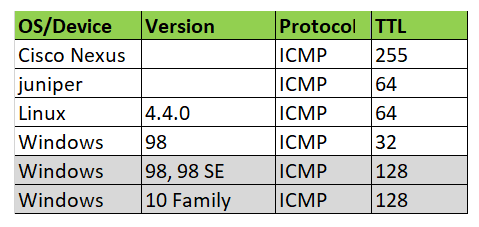
“Time to live exceeded” this ICMP ping error is due to the time to live (TTL) field reaching a zero value or there is a timeout for the reassembly of segments. As a solution, I will recommend increasing the TTL (Time To Live) value (the highest is 255).
Solution
For example, run traceroute to ipaddress 8.8.8.8 (Google’s publc DNS server). And find number of hops to the destination.
For me its 6 hops to 8.8.8.8. So a minimum TTL value of 6 is required to reach icmp packets to 8.8.8.8 and get ping replay. And cannot ping to 8.8.8.8 with a TTL value of 5 or less.
Ttl exceeded mikrotik что это
I'm seeking your expertise for a problem I encounter while connecting with SSH to a raspberry.
First, my setting is as follow :
Both my computer and the Raspberry (which is connected by ethernet on the Netgear router) are on separate trunk VLANs managed by the pfsense router.
When I connect with SSH to the Raspberry, after a short while, I lose the connection. This problem does not happen when I connect to the PfSense wifi.
With Wireshark, I can see that there are "Time-to-live exceeded" messages before the connection get lost.
I was wondering what kind of setting I could change in PFSENSE to solve this issue. I do not receive TTL exceeded messages with connections to the internet.
Ttl exceeded mikrotik что это
Смена TTL бывает нужна на 3G/4G-LTE операторах, которые делают ограничение по раздаче интернета за счет проверки TTL, который при прохождении каждого маршрутизатора уменьшается на 1
А так же других операторов, для сокрытии цепочки раздачи интернета соседям.
Стандартный TTL для Linux (а это все телефоны от Android до iOS) равен 64. При раздаче Интернета появляется дополнительный hop, который уменьшает этот TTL до 63
Фиксация TTL на выходе
/ip firewall mangle
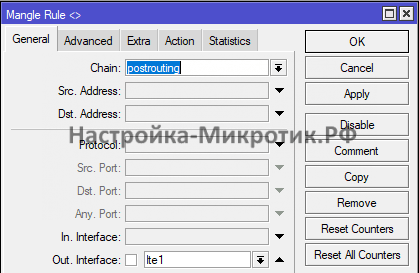
Выбираем исходящий интерфейс
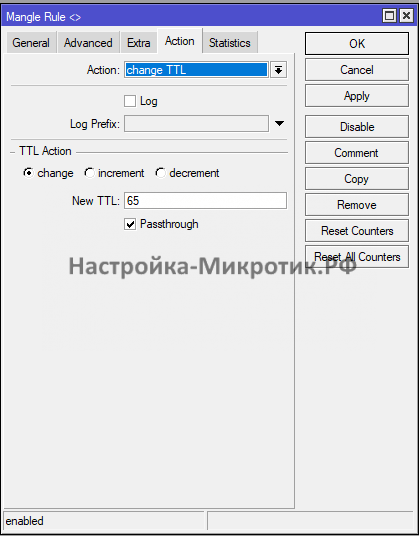
На выходе меняем ttl на 65
Теперь оператор видит от нас TTL 64. Эту схему рекомендую применять при раздаче интернета кому-либо еще.