Быстрый обзор Symantec Endpoint Protection и пошаговая инструкция по установке.

Symantec Endpoint Protection — мощный программный защитный комплекс корпоративного уровня. Обеспечивает усиленную защиту от всех типов атак для физических и виртуальных систем.
Symantec Endpoint Protection доступен для ОС:
- Windows
- Windows Server
- Windows Embedded
- MacOS
- Linux
Защита Symantec Endpoint Protection основана на пяти основных направлениях:
Файловая защита – в режиме реального времени контролирует все события в системе, относящиеся к защите от вирусов. Все файлы сканируются на наличие вредоносного кода во время их открытия, создания или запуска.
Сетевая защита – обеспечивает безопасность устройства из вне. Позволяет определять случаи, когда как известные, так и неизвестные уязвимости используются для входа в систему пользователя.
Поведенческий анализ – обнаруживает новые, неизвестные угрозы, для блокирования их вредоносной деятельности.
Проверка репутации – позволяет определить надежность/ненадежность файлов на основе основных критериев:
- возраст файла
- происхождение
- путь файлв
- местонахождение файла
Удаление угроз – позволяет надежно изолировать угрозу, устранить вредоносную активность.
Symantec Endpoint Protection использует технологии Insight, которая позволяет ему на раннем этапе и с большей точностью обнаруживать неизвестные угрозы, по сравнению с решениями, реализующими проверку сигнатур или анализ поведения.
Установка и администрирование Symantec Endpoint Protection.
Защитный комплекс Symantec Endpoint Protection, поставляется в двух вариантах для установки и администрирования.
1. Упавляемый клиент. Управляемые клиенты подключаются к Symantec Endpoint Protection Manager. Клиентскими компьютерами можно управлять из консоли Symantec Endpoint Protection Manager. С помощью консоли можно обновлять программное обеспечение клиента, политики безопасности и описания вирусов на управляемых клиентских компьютерах.
Управляемый клиент может получать обновления содержимого от Symantec Endpoint Protection Manager, поставщиков обновлений группы, через Интернет или LiveUpdate.
2. Неуправляемый клиент. Администрирование клиентского компьютера осуществляется основным пользователем этого компьютера. Неуправляемый клиент не подключается к Symantec Endpoint Protection Manager и не может управляться из консоли. В большинстве случаев неуправляемые компьютеры подключаются к сети время от времени или не подключаются вовсе. Основной пользователь компьютера должен самостоятельно обновлять на нем ПО клиента, политики безопасности и описания вирусов.
Неуправляемый клиент может получать обновления содержимого через Интернет и LiveUpdate. Содержимое потребуется обновить отдельно на каждом клиентском компьютере.
Кому подойдет Symantec Endpoint Protection?
В первую очередь, защитный комплекс Symantec Endpoint Protection создан для крупных компаний, в которых 100 и более пользователей. Symantec Endpoint Protection работает с единым агентом (центром управления/управляемым клиентом), что позволяет ему обеспечить централизованное управление безопасностью в физических и виртуальных конечных системах Windows и Mac. Для корпоративных клиентов, есть возможность использовать пробную версию на протяжении 60 дней, с управляемым клиентом. При этом, если вам не нужна возможность единого управления защитным комплексом Symantec Endpoint Protection на всех устройствах, вы можете установить и использовать его без управляемого клиента.
При этом, защитное ПО Symantec Endpoint Protection можно использовать на домашних компьютерах, благодаря отличной защите от вирусов, неизвестных угроз. Для использования в домашних условиях, можно использовать неуправляемый клиент – без ограничений по сроку. По основному функционалу, неуправляемый клиент ничем не отличаются от управляемого клиента. Единственное, без управляемого клиента, вы не сможете управлять одновременно всеми настройками безопасности, на которых установлен Symantec Endpoint Protection. Вам придется на каждом устройстве, настраивать отдельно Symantec Endpoint Protection. Таким образом, для домашнего использования, можно рассматривать данный продукт, полностью функциональным и удобным.
Symantec Endpoint Protection имеет русскую локализацию. Есть полная официальная документация, на официальном сайте.
Тестирование Symantec Endpoint Protection 14.3 RU1
Из результатов тестирования видно, что Symantec Endpoint Protection справился практически со всеми угрозами. Примечателен и результат защиты от вирусов-шифровальщиков в Symantec Endpoint Protection, где на тестовой машине, все файлы не были повреждены и/или зашифрованны. При этом, защита антивируса была настроена на средних настройках для обеспечения минимального количества ложных срабатываний. Все это дает нам понимание того, что у Symantec Endpoint Protection большой потенциал и высокий уровень защиты от неизвестных угроз. При более тонко настройке антивирусного комплекса, можно достичь максимальной защиты. Результаты защиты от ПНП/PUP (потенциально нежелательных программ), будут дополнительным аргументом использовать данный антивирус на домашних устройствах, а не только в корпоративной среде.
Как установить Symantec Endpoint Protection (неуправляемый клиент) на ОС Windows?
Официальный сайт Symantec Endpoint Protection.
Скачиваем Symantec Endpoint Protection по ссылке. На момент создания заметки, была самая последняя версия Symantec Endpoint Protection: 14.3
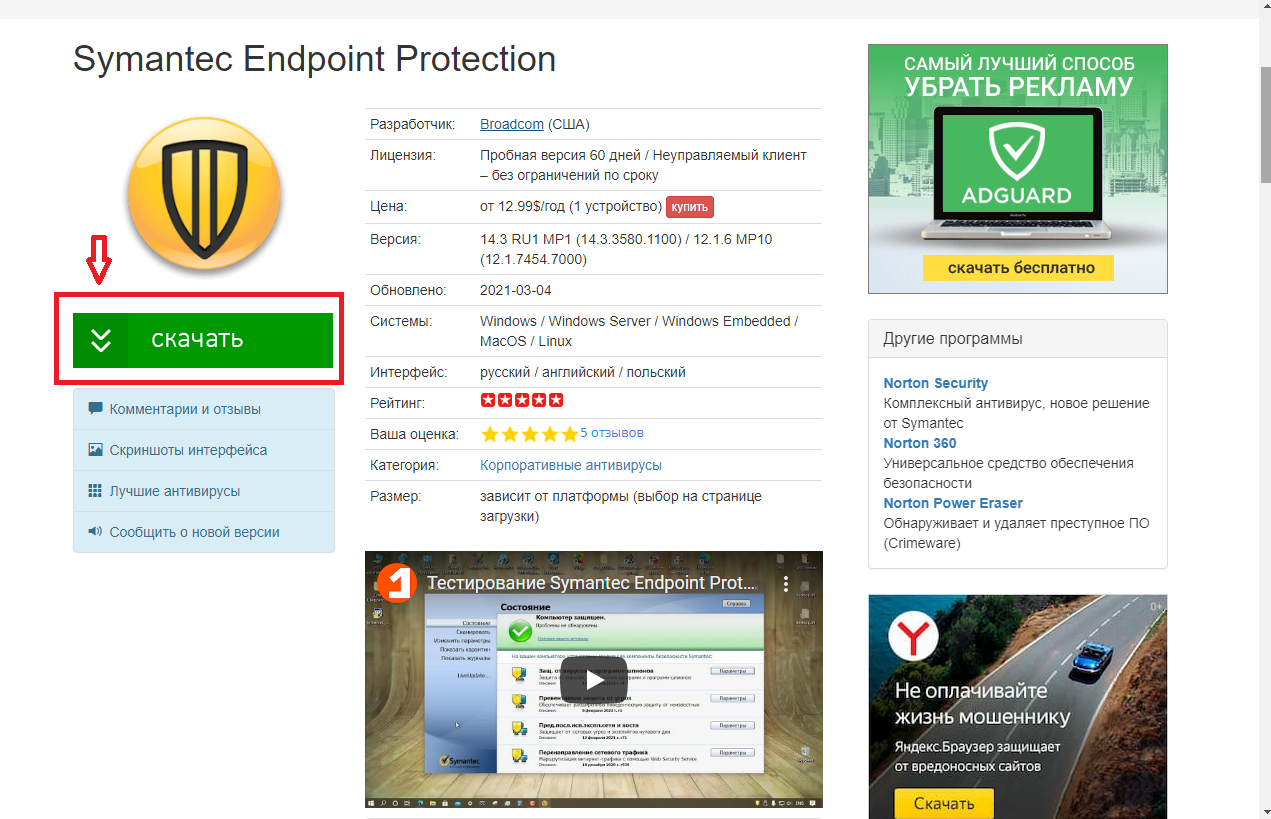
Вы можете выбрать нужную версию и скачать Symantec Endpoint Protection:

После загрузки, запустите установочный файл. Установщик в автоматическом режиме, произведет распаковку установочных файлов:
Подготовит меню установки:
Проверит установочные файлы:

После, у нас появиться возможность приступить к установке Symantec Endpoint Protection, где нужно нажать «Далее»:

Принимаем условия лицензионного соглашения и нажимаем «Далее»:
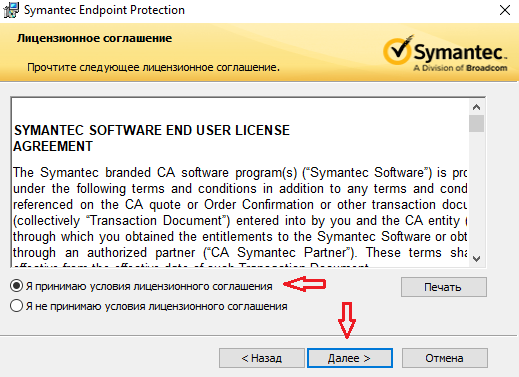
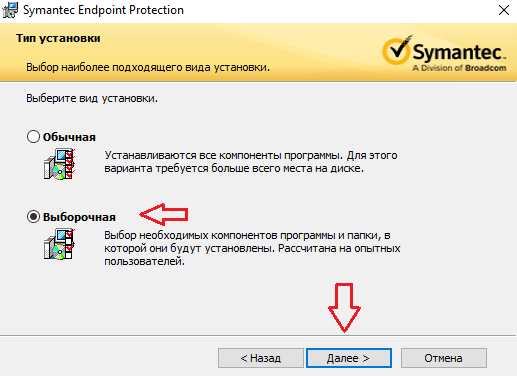
Выбираем тип установки* «Клиент даркнет» и нажимаем «Далее»:

В окне «Выберите компоненты программы для установки», щелкаем напротив значка «Базовые файлы» и в открытом выпадающем списке, выбираем второй пункт «Весь компонент будет установлен на локальный жесткий диск» и нажимаем «Далее»:

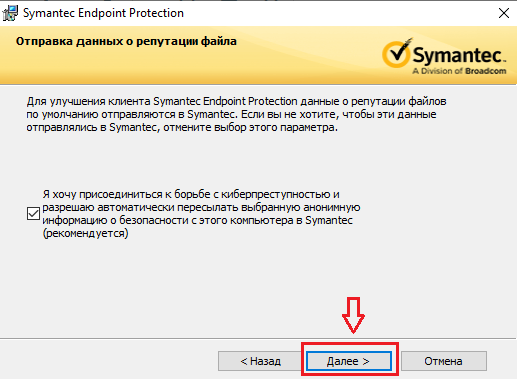
Для более детального анализа неизвестных угроз (меньшего числа ложного срабатывания), лучше не снимать галочку напротив пункта отправки анонимных данных о файлах в компанию (по умолчанию включено):
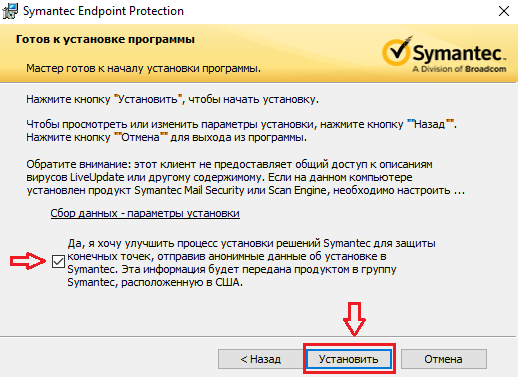
Вы можете убрать галочку с пункта, если не хотите отправлять информацию в компанию, о ходе установки ПО на свое устройство и нажимаем «Установить»:
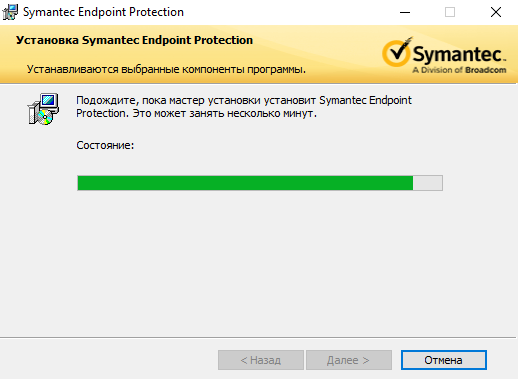
Ждем окончания процесса установки Symantec Endpoint Protection:
После успешной установки на устройство, появиться сообщение и нажимаем «Готово»:

Теперь, перезагрузите свое устройство. После перезагрузки, можно приступать к настройке Symantec Endpoint Protection. Стоит обратить внимание, что установщик Symantec Endpoint Protection не создает ярлык на рабочем столе. Открыть настройки Symantec Endpoint Protection, можно через «Пуск» «Установленные программы» или на панели задач (в трее справа, где часы).
Symantec VIP Access Manager Chrome Extension
Symantec VIP Access Manager Google Chrome Extension Download
Is it available for Android?
Symantec VIP Access Manager Google chrome Extension overview
symantec vip access manager.
symantec vip access manager add-On for use with your enterprise sam instance.
About SAM: sam provides single sign On into all cloud, web, and internal applications for your business.
It offers an easy configuration process for your existing applications, 2 factor authentication through Symantec VIP, and many other integrations to Symantecs extensive security portfolio.
— user context based policy access control — AD, LDAP, SAML, and oracle db user stores — On-Premise and Cloud deployment — Connect to On-premise user stores through the SAM Bridge — local user store and more!
Learn at http://www.symantec.com/pages.jspid=identity-protection-cloud
How to install Symantec VIP Access Manager chrome extension in chrome Browser
You can Follow the below Step By Step procedure to install the Symantec VIP Access Manager Chrome Extension to your Chrome Web browser.
- Step 1: Go to the Chrome webstore https://chrome.google.com/webstore.
- Step 2: Now search for the Symantec VIP Access Manager in Chrome Webstore Search and click on the search button.
- Step 3: click on the Symantec VIP Access Manager Chrome Extension Link
- Step 4: in the next page click on the Add to Chrome button to Download and Install the Symantec VIP Access Manager extension for your Chrome Web browser .
Symantec VIP Access Manager Chrome extension Download
It is the Symantec VIP Access Manager google chrome extension download link you can download and install google chrome Browser.
Introducing Symantec Web Protection
Experts agree that the requirements of a secure workforce have changed. While not a surprise, it does signal the need to evaluate your security posture to ensure you are prepared for success moving forward. Some studies indicate that a much larger number of employees are now likely to work remotely at least some of the time post-pandemic and that CFOs now plan to shift some employees to working remotely on a permanent basis.
These shifts and others we have seen in this year like no other, are great reasons to evaluate which tools you will need to protect your workforce and your business. The introduction of Symantec Web Protection comes at the perfect time for the Enterprise, allowing a flexible deployment with a uniform experience.

The new Symantec Web Protection enables customers to benefit from a leading Secure Web Gateway (SWG) foundation with entitlement to deploy on-premises, in the cloud or a hybrid consumption. Customers are offered a single, straightforward Per User, Per Year price along with many complementary features and services that until now would have otherwise incurred their own separate and incremental charges.
Symantec Web Protection gives organizations advanced cloud-delivered (SaaS model) Secure Web Gateway licenses and leading on-premises SWG software licenses – both of which can operate seamlessly together with a centralized management, reporting and policy control interface.
What’s included:
- SWG Software Subscription: (On-prem software, private cloud and cloud-native): Symantec SWG software extends the security capabilities of Edge Proxies to allow businesses for better web security and enforcement of corporate and regulatory compliance using virtual infrastructure on a common platform, reducing costs and IT resource requirements. Every user is also entitled to Web Security Service (WSS) providing the same proactive web protection capabilities delivered by the market’s leading on-premises Secure Web Gateway, Symantec ProxySG, but delivered as a resilient and performant cloud security service.
- Intelligence Services- Advanced: Real-time web content protection, security categorization and web application control. The web filtering service automatically filters and categorizes billions of URLs into over 80 predefined categories, including 12 security categories that can be easily managed by IT administrators. SWG users get the most accurate and granular web application control policy engine for web and cloud access protection.
- High Risk Isolation: Administrators can set policies to isolate websites that are unknown or assessed a Risk Level 5 and above (1-10 scale). High Risk Isolation (HRI) then executes the web content remotely and sends only safe rendering information to users’ browsers. Administrators can set sites as read-only for added protection. HRI is available with cloud deployments, and on-premises software SGOS 7.3.1 and higher.
- Deep File Inspection: File-based malware detection and emulation is integrated with Symantec Proxy, ASG, WSS, Endpoint Protection, ATP Platform, Secure Message Gateway, CASB, Email Security Service, & WAF.
- Centralized Management and Reporting: Our centralized management and reporting capabilities for SWG infrastructure to enhance web security, mitigate cloud access risks and reduce operational costs. Users can host logs in the cloud, providing the visibility of all user traffic from any location with longer standard reporting and retention periods. Role-based access is available from any browser.
What About SASE?
Many of our customers indicate that their company wants to adopt a SASE framework, but don’t know where to begin and need to do it at a pace that’s right for them. Getting your traffic to the cloud is the critical first step for SASE adoption and a Secure Web Gateway is your foundation. Symantec Web Protection gives you both.
Isn’t Moving to the Cloud Expensive?
Another area that comes up for Enterprise businesses is that they need to deploy a Cloud SWG for remote workers, but expect they will always need an on-premises solution in the future. They just don’t have the people or financial resources to manage two network and security stacks. Symantec Web Protection gives customers the full set of on-premises SWG capabilities they enjoy today and also includes Cloud SWG (Web Security Service) licenses for all users at no additional cost. The best of both worlds.
Can I Have Flexibility?
The other concern we hear from customers is they know they need to invest in an on-premises SWG infrastructure but they know it will evolve over the next few years and flexibility is important. They need a solution that can adjust with company needs and won’t require a new budget or contracts if they need to modify their approach. With Symantec Web Protection, you can continue to invest in your trusted on-premises SWG but give others in your organization peace-of-mind knowing that your decision has protections to “future-proof” your investment if there is concern. As your needs adapt, your investment can too.
Requirements of a secure workforce have changed. Symantec Web Protection gives you the technology, flexibility and confidence to change too – on your own terms.
Solvusoft: Microsoft Silver Certified Company
Компания Solvusoft имеет репутацию лучшего в своем классе независимого поставщика программного обеспечения,
Microsoft признал Solvusoft в качестве ведущего независимого поставщика программного обеспечения, который достиг максимального уровня компетентности и совершенства в разработке ПО. Тесные отношения Solvusoft с Microsoft в качестве сертифицированного серебряного партнера позволяют нам предлагать лучшие программные решения в своем классе, оптимизированные для работы на устройствах с операционными системами Windows.
How is the Silver Competency Level Attained?
To achieve a Silver competency level, Solvusoft goes through extensive independent analysis that looks for, amongst other qualities, a high level of software expertise, a successful customer service track record, and top-tier customer value. As a Silver Certified Application Developer, Solvusoft is able to provide the highest level of customer satisfaction through delivering top-level software and service solutions, which have been subject to a rigorous and continually-audited approval process by Microsoft.