Тестируем технологию Nvidia Max-Q Dynamic Boost
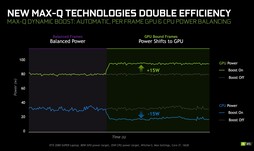
Так как большинство современных ресурсоемких приложений нагружают в основном видеокарту, центральный процессор склонен простаивать зря. В Nvidia решили извлечь из этого пользу, добавив интересную возможность в свои видеокарты Super Max-Q серии. Сразу оговоримся, что поддержка данной технологии зависит от производителя ноутбука и потому будет не у всех моделей с новыми видеокартами. Как можно видеть на графиках ниже, Dynamic Boost (именно так называется технология) может динамически изменять значение TDP процессора и видеокарты. К примеру, данная технология может уменьшить TDP процессора на 15 Вт и "передать" их видеокарте (то есть, увеличить ее TDP на 15 Вт). Мы решили протестировать работу данной технологии на примере ноутбука Gigabyte Aero 15 OLED — 15-дюймовой модели с Core i7-10875H, GeForce RTX 2070 Super Max-Q и 16 ГБ ОЗУ DDR4, работающей в двухканальном режиме.

Бенчмарки
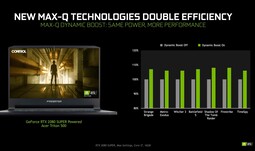
Начнем с хорошей новости: Dynamic Boost точно не является выдумкой маркетологов. Технология действительно дает ощутимые изменения в показателях, но вот заметить их на практике будет довольно сложно. Так, в 3DMark 11 и различных тестах 3DMark 13, Dynamic Boost обеспечил прирост графической производительности на 4 — 6%.
В играх ситуация примерно такая же, как в синтетических бенчмарках. Вне зависимости от разрешения — FHD или 4K — частота кадров в Witcher 3 повысилась примерно на 5% при включении Dynamic Boost. Соответственно, если ваш ноутбук поддерживает эту технологию, то ее стоит включить — найти ее можно в панели управления Nvidia.
Бесплатные fps в играх — не миф? Технологии повышения производительности ноутбука
Говорят, есть мифические технологии, обеспечивающие дополнительные fps в играх: железо не меняется, а производительность растёт. Реально ли это? Давайте изучим вопрос.
Дефицит комплектующих коснулся всех, и для большинства геймеров единственным вариантом для апгрейда стали ноутбуки. При этом немало пользователей находится в плену стереотипов 10-летней давности: мол, лэптопы только греться, шуметь и тормозить могут, а играть на них невыносимо. Железо современного геймерского ноутбука не уступает в производительности десктопным аналогам. А новые технологии позволяют видеокарте делать больше, затрачивая меньше ресурсов. В разновидностях бесплатных fps и будем сегодня разбираться.

NVIDIA REFLEX — реагируем как можно раньше
В напряжённых ситуациях, например в киберспортивных шутерах, важно каждое мгновение. Несколько миллисекунд задержки ввода могут решить судьбу хедшота или проигрыша в матче. Задержка между вводом и отображением картинки на мониторе может испортить впечатление даже от топовых дисплеев с высокой герцовкой. Ведь помимо реакции матрицы (времени в миллисекундах, за которое матрица обновит изображения в следующем кадре) есть задержка времени кадра.
NVIDIA предложила решение этой проблемы, создав технологию Reflex.

Как функционируют игры без неё? Вы что-то сделали на экране — железо посчитало реакцию и добавило в очередь кадров на отрисовку итог вашего взаимодействия с виртуальным миром. В зависимости от параметров игры и того, как написан движок, задержка между реакцией на события и выводом картинки может составлять 1-3 кадра. В итоге теряется отзывчивость управления. Reflex устраняет эту очередь, так как позволяет движку захватывать управление и готовить реакцию для следующего кадра за несколько миллисекунд до окончания отрисовки текущего. То есть вы увидите результат своих действий в игре гораздо раньше. Технология даёт преимущество на любом железе (начиная с GTX 900-й серии), но в полной мере раскрывается на современных ноутбуках и ПК с видеокартами RTX.

Как заметно по графикам, использование NVIDIA Reflex сокращает задержки почти в 2 раза. Среди игр с поддержкой Reflex — Apex Legends, Call of Duty: Warzone, Fortnite, Overwatch, Rainbow Six: Siege, Rust, Valorant, Warface и не только. Полный список доступен по ссылке.
NVIDIA DLSS — не делаем лишнего
Deep learning super sampling (DLSS) — технология апскейла изображения с помощью нейронной сети. Она повышает разрешение картинки с минимальными потерями и увеличивает фреймрейт на высоких пресетах графики. При этом ПК меньше греется. Магия?
Наука! Тензорные ядра, используемые в RTX-серии, позволяют применять аппаратное ускорение к работе нейросетей.
Сперва на суперкомпьютере нейросеть обучают собирать, как пазл, пиксели из кадров низкого разрешения на примерах изображений в сверхвысоком разрешении. Затем прокачанная нейросеть трудится в вашем компьютере!
Смысл в том, что игра создаёт новые кадры в пониженном разрешении, затем нейросеть DLSS восстанавливает картинку, добавляя пропущенные пиксели из предыдущих кадров (ранее восстановленных до более высокого разрешения). Итоговое изображение не отличается от нативных 4K или 1440p, а нагрузка на GPU получается заметно ниже.
Технологии NVIDIA Max-Q
Графические процессоры NVIDIA GeForce RTX обеспечивают возможность создания невероятно быстродействующих, тонких и бесшумных ноутбуков с потрясающим временем автономной работы. Это возможно благодаря NVIDIA Max-Q, расширенному набору технологий на базе ИИ, которые оптимизируют производительность, мощность и уровень шума вашего ноутбука для достижения максимальной эффективности.
Технологии Max-Q 5-го поколения
DLSS 3
Теперь оптимизирована для ноутбуков и встроена в технологии Max-Q, повышая производительность до 4 раз, а акустические характеристики и время автономной работы — до 2 раз.
Высокоэффективная внутрикристальная видеопамять
Переработанная высокоскоростная память значительно повышает энергоэффективность за счет удвоенной пропускной способности, более чем в 10 раз большего объема и улучшенной технологии запрета подачи тактовых сигналов.
Видеопамять GDDR6 со сверхнизким напряжением
Повышение энергоэффективности видеокарты благодаря видеопамяти с самым низким напряжением.
Трехскоростное управление памятью
Графический процессор может динамически переключаться на новые состояния видеопамяти с меньшим энергопотреблением.
Up close with Nvidia’s Dynamic Boost feature for gaming laptops

The future of gaming laptops, it seems, is largely focused around managing the limited thermal budgets between the two hottest components: The CPU and GPU. AMD has SmartShift and Intel has Dynamic Power Share, but both technologies are designed to work exclusively with their own hardware. Now Nvidia’s joined the party with its own Dynamic Boost, which aims to leverage the “unused” thermal budget in a laptop.
For example, if a laptop has a thermal budget of 115 watts with 35 watts for the CPU, and 80 watts for GPU—why not take any additional power the CPU isn’t using to increase performance when gaming?
That’s the idea behind Nvidia’s answer to AMD’s SmartShift and Intel’s Dynamic Power Share. How it works the company isn’t detailing, but it is limited to DirectX gaming right now. We’d guess Nvidia has created algorithms to dynamically jack up the GPU’s power usage under certain loads, and dynamically gate the CPU’s performance to the point where it doesn’t injure the frame rate performance.

Nvidia
Originally, it was thought the feature would only be brought to the GeForce RTX 2070 Super and GeForce RTX 2080 Super announced earlier this year. Nvidia tells us it can be supported on any Turing-based laptop—but it’s up to the laptop maker to implement it. The laptop should also be built around a shared heat pipe design, because dedicated heat pipes would mean there’s no point to try to share.
We recently got a chance to see how just well it works on an Acer Predator Triton 500 configured with an Intel Core i7-10750H and GeForce RTX 2080 Super. The feature is on by default, but you can turn it on or off inside the Nvidia control panel. You can set it globally, and as an option to trigger on or off for particular applications as well.
To try Dynamic Boost, we ran the laptop in its default cooling profile but turned off G-sync (which can make benchmark results a little wacky sometimes) and also set the laptop to always have the discrete GPU on. The laptop features a shared heat pipe design and at 18mm thick, making it the poster child for a shared boost technology.
We used an Acer Predator Triton 500 with 6-core Core i7-10750H and Nvidia GeForce RTX 2080 Super Max-Q inside of it to look at the Dynamic Boost feature.
Dynamic Boost Gaming Results
To test Dynamic Boost we ran the Predator Triton 500 through multiple games as well as a few synthetic graphics tests. We typically saw performance increases from 5 percent to 9 percent, which is inl line with Nvidia’s previous claims about Dynamic Boost. We’ve highlighted the percent change in green for performance boosts we consider worthwhile, yellow for results that probably fall within the margin of error, and red for decreases in performance. Yes, we said decrease, but you’ll have to wait a bit longer to see why.
Looking at the synthetics first, you get a taste for where Dynamic Boost is working the most. 3DMark’s Port Royal, for example, is a ray tracing benchmark that’s particularly intensive for GPUs. There we see a 9.4-percent advantage with Dynamic Boost.
Nvidia’s Dynamic Boost feature works best on very graphically intense gaming loads.
When we step back to 3DMark’s Time Spy, we can see a 7.9-percent increase in performance on the graphics side but a slight decrease in the physics. Why? 3DMark is benchmark created to measure 3D gaming performance, breaking down its tests into graphics and then a physics test. Each test uses the CPU, of course, but the scoring is constructed to ignore CPU performance for the graphics portion but score it higher for the physics test.
While Time Spy isn’t as harsh as Port Royal, it’s still a fairly heavy graphics test. You can’t say the same for 3DMark Sky Diver. Sky Diver is like Time Spy with both a graphics test, and a physics test. But unlike Time Spy, it’s made to see how well a laptop with integrated graphics can play games. In its graphics test, we actually see a fairly decent 8.5-percent boost but the physics test actually sees its score drop by 6.6 percent.
Nvidia said it was unable to reproduce our results, but we suspect Dynamic Boost’s clamp on the CPU’s was just enough to cause a drop in Sky Diver’s Physics test.
The harsher the load, the better Dynamic Boost works
Games don’t typically work like a synthetic test. The CPU and GPU behavior is affected by a stew of unknowns that is prone to change. Still, we do see a similar pattern as 3DMark’s where games that are largely bottlenecked by GPU performance seem to gain the most.
For example, the fully path traced Quake II RTX gives us a 9.4-percent increase with Dynamic Boost on. Metro Exodus with its DirectX Ray Tracing support flipped on gives us 8 percent. Strange Brigade coughs up 7.4 percent with other games, such as Shadow of the Tomb Raider, giving us “only” 5 percent gains.
Again, Nvidia doesn’t say how Dynamic Boost works, but the results suggest that the gains are tied to just how much a game leans on the GPU performance and CPU performance. Sometimes, both can be fairly balanced, such as Far Cry New Dawn and Rise of the Tomb Raider.
We tried to look into that by using the same game set to its maximum image quality and its lowest image quality settings. The results mostly matched up.
Strange Brigade on its highest setting yields about 7.4 percent, but set it to its lowest graphics setting which should make the game less reliant on the GPU, we saw the performance increase drop to 4.2 percent.
We also saw that with Shadow of the Tomb Raider, which “only” gives us 5.1 percent on its highest setting using DXR—but on its lowest setting, performance is basically the same with Dynamic Boost.
We see the same thing with Metro Exodus, but in one of the few cases, performance goes from an 8 percent-increase to 5-percent decrease. We’re again going from a heavy, heavy GPU load with ray traced global illumination and frame rates in the 50-fps range, to frame rates in the 160 to 170 range with the game at to its lowest quality setting. Nvidia officials said they were looking into this one decrease in performance but when the GPU isn’t the bottleneck, you’re now more at the mercy of the CPU’s boost clocks which just might throw everything out of whack on occasion.
This isn’t a deal breaker to us, because it was the one title that exhibited it. We also think few will play a game that showcases all of the advanced graphics bells and whistles with them turned off. And as we said, even games that you would play at high frame rates didn’t lose performance. The CPU-heavy Counter Strike: Global Operations was within the margin of error and didn’t gain anything from boosting the GPU’s clock speeds. One result we do want to show is for Red Dead Redemption II. The game exhibited a pretty huge increase of 14 percent by switching on Dynamic Boost.
While our results are real, Nvidia hasn’t claimed double-digit performance increase at all. Our 14-percent increase might come from running the game using the DirectX12 API rather than using the Vulkan API which the game defaults to. Basically don’t expect that huge of a gain most of the time.
Finally, we sorted our results from the best gains to the worst. This makes it easier to see that the more graphically intense the load is, the more performance you get.
Sorted by performance gains, you can see that Dyanmic Boost performance gains generally skews toward graphics-heavy settings with results diminishing as you get to lighter loads.
Here’s how Dynamic Boost looks
Nvidia has said Dynamic Boost increases the GPU thermal budget by 15 watts, and that looks to largely be true. We used HWInfo to log GPU and CPU during runs to see if that was occurring or not. Below you can see a 3Dmark Time Spy run and how much wattage is consumed by the graphics chip. The first hump is during the graphics portion, with the second portion showing the physics portion of the test. The blue is the wattage the GeForce RTX 2080 Super Max-Q uses on the Predator Triton 500 with Dynamic Boost off, while green is with Dynamic Boost on.
You can see with Dynamic Boost on that the GeForce RTX 2080 power consumption goes from 80 watts to 95 watts.
Looking at the wattage of the CPU during the same 3DMark run you can see the CPU’s power consumption in blue is indeed lowered from the mid 20s to the low teens during the graphics portion of the test. Its power budget is also reduced during the physics test.
You can see the CPU’s power consumption is reduced with Nvidia’s Dynamic Boost on (green) versus when it’s off (blue).
We also wanted to look at GPU power during a gaming run so we also recorded it during Metro Exodus with the ray tracing features turned on. You can see that it mostly matches 3DMark, with the GPU given 15 watts more during the three distinctive runs of the built-in benchmark in Metro.
Dynamic Boost on (green) vs. Dynamic Boost off (blue)
Moving on to the CPU, we can see that the CPU’s is running with a budget of just under 20 watts with Dynamic Boost on. With Dynamic Boost off, the CPU would use about 45 watts of the thermal budget.
Dynamic Boost on during Metro Exodus gates the CPU’s to under 20 watts instead of 45 watts.
To see how much clock speed the CPU lost while limited to under 20 watts, we looked at that with Dynamic Boost on and off. Below you can see where the CPU’s clock speed takes maybe a 100MHz hit throughout the three benchmark runs.
The CPU runs at a slightly slower clock speed when Dynamic Boost is on.
Getting back to our previous talk about just what happens when you crank a game from its most intensive graphics settings to its lowest, we did that for Metro. Comparing it to the Metro run with all the bells and whistles on, the low setting shifts more of the burden to the CPU.The clock speeds are very close overall, but you can see the second and third humps representing the 2nd and 3rd runs are at a lower clock speed. The clock speeds throughout the runs are also closer to about 2GHz, which is about 600MHz to 700MHz higher than when the game is mostly GPU.
Set to its low setting, Metro sees the CPU running at much higher clock speeds.
Conclusion
Going forward, Nvidia will find itself jostling for attention between AMD and Intel, as both rivals offer proprietary power sharing routines likely closed off to Nvidia. AMD’s own SmartShift also promises single-digit performance gains, and we’ve seen that in some of the testing we’ve done (Our long overdue look at SmartShift is in the works.)
While AMD is likely to squeeze Nvidia on the mid-range and up (we’d imagine with mobile parts based on its RDNA2), Intel is likely to squeeze Nvidia on the entry level with its own Dynamic Power Share with Xe Max GPUs and 11th-gen CPUs.
Through this prism, we can say that Dynamic Boost is overall pretty impressive nonetheless. Using what looks like mostly software technology, Nvidia is able to squeeze very solid performance gains even though it lacks the keys to control the CPU as deeply as AMD or Intel would.
What the smart-shifting-sharing world looks like in 12 months, though, is anyone’s guess.