What does the adminservice.exe file do?
The adminservice.exe process is also known as Windows Setup API or, as the case may be, AdminService Application and is a part of Dell WLAN and Bluetooth Client or, as the case may be, Qualcomm Atheros Bluetooth Suite. This software is produced by Windows� Win (Version 7 DDK provider) or, as the case may be, Atheros Commnucations. An obsolete or defective version of adminservice.exe can cause problems for your computer that can range from slowness to error messages such as these:
- Windows Setup API has stopped working. Windows is checking for a solution to the problem. (Windows 10, 8, 7)
- Windows Setup API has stopped working. A problem caused the program to stop working correctly. Windows will close the program and notify you if a solution is available. (Windows 10, 8, 7)
- adminservice.exe has encountered a problem and needs to close.
- Access violation at address FFFFFFFF in module adminservice.exe. Read of address 00000000.
Free PC Check
Scan your computer today at no charge with the Windows Repair Tool. This tool helps repair Windows and helps it run faster.
More information about Outbyte and Unistall. Please review Outbyte EULA and Privacy Policy. Outbyte scanner and repair are free. An advanced version must be purchased.
What you should know about adminservice.exe Windows Setup API
adminservice.exe is not part of Windows, but it is important nonetheless. The file adminservice.exe is found in a subdirectory of «C:\Program Files». Frequently occurring are file sizes such as 312,448 bytes (15% of all these files), 319,104 bytes as well as 35 other variants .
It is the AtherosSvc service: Atheros BT Stack Service Agent.
The adminservice file is not part of the Windows operating system. The program executes in the background, and can only be terminated using Windows Task Manager. It possesses a digital signature from Verisign.com, which should confirm its trustworthiness. To remove the file and its related software from your computer, click Programs in Control Panel Adminservice.exe is capable of supervise programs. For this reason, 27% of all experts consider this file to be a possible threat. The probability that it can cause harm is high.
A adminservice.exe file has a 0% certainty of being dangerous if it is found in the C:\Windows\System32 directory. In this case, the file size is usually 174,080 bytes. The adminservice file contains Microsoft’s digital signature. This confirms its authenticity. This process does not have a visible window, and does not appear on the taskbar. The adminservice file is not part of the Windows operating system.
If you see this file on your hard drive or in Windows Task Manager, please make sure that it is not a malicious variant. It’s a fact that many trojans try to cloak their true identity by calling themselves adminservice.exe. With the above information or by using tools like Security Task Manager you can determine if, in your case, the file is an undesirable variant.
What do other computer users say about adminservice?
| It can also be related to FedEx ship mangager Nick |
| Ther version of adminservice.exe on my computer is started by the FedEx Shipmanager shipping program. Joseph L. |
| in program files/ bluetooth Richard |
| It’s part of a bluetooth administration suite — Asus bluetooth drivers. wwwparker |
| If located in «c:\Program Files\» or «c:\Program Files(x86)\» then 95% is safe. File size is 74,912 bytes OR 105,120 bytes. If located in c:\Windows\ or c:\windows\System32\ then most likely malware. Thanks! — ParticIe ParticIe |
| For me it is used by my dell blutooth, It seems safe and is taking 0% of cpu. Im pretty sure it’s fine, at least in mycase. Wolfgang |
Summary: 3 users judge adminservice.exe to be an essential file that should not be touched. 3 users consider it harmless. source: file.net
How to uninstall Dell WLAN and Bluetooth Client or Qualcomm Atheros Bluetooth Suite
To remove Windows Setup API from your computer, please follow the manual instructions below or use an automatic uninstaller product.
- Click the Windows Start Button. You find it in the lower left corner of the taskbar.
- Type the word uninstall.
- Click Add or remove programs.
- Now locate Dell WLAN and Bluetooth Client or Qualcomm Atheros Bluetooth Suite in the list of displayed applications.
- Click the program, and then click Uninstall.


How to tell if adminservice.exe (Windows Setup API) was uninstalled cleanly
After uninstalling, restart your computer. Then start Windows Explorer and see if there is still a folder with the name of the software under C:\Program Files. Be sure to check the Registry as well for remnants of Windows Setup API. To do this, start «Regedit», then look under «HKEY_LOCAL_MACHINE» > «Software» for Windows Setup API or the name of the producer. Always keep in mind that only a computer professional should ever directly delete entries in the Windows Registry.
What to do if a program does not uninstall
The easiest way to remove any kind of software cleanly and accurately is to use an uninstaller tool. Because the uninstaller automatically creates a backup, there is no risk of anything going wrong.
Windows Setup API Process Consumes Too Much CPU Resources
I have an Acer Aspire laptop which often hangs in the middle of my work. When I started checking the actual reason for this, I found a few processes which consumes too much CPU resources. So, most of the time, my laptop CPU usage is 100%. One of the main culprits is a process named Windows Setup API. This article explains the process Windows Setup API and how to prevent it from consuming too much CPU.
My Acer Aspire laptop runs on Windows 10 Operating System. I started Task Manager to check the reasons for the continued freezing of my Acer Aspire laptop. The below photo is a screenshot of my Task Manager.
The screenshot shows how much the Windows Setup API process demands CPU resources.

While at the time of taking the screenshot, Windows Setup API was consuming 57.2% of the total CPU usage. But most of the times, it demands more CPU usage and let other processes suffer.
Another point I have noted is the 100% Disk usage.
How to Solve Windows Setup API High CPU Usage Problem?
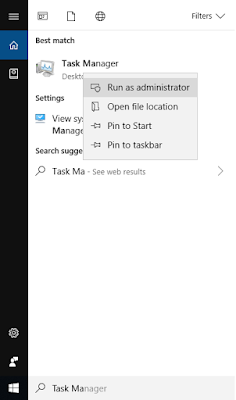
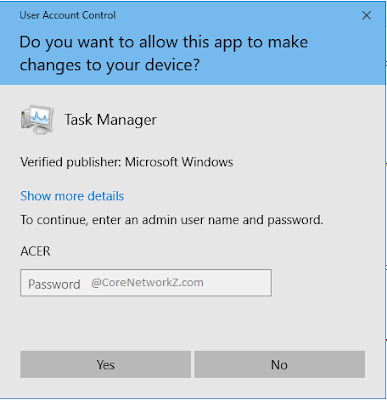
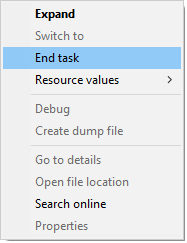
You can solve the high CPU usage of the process Windows Setup API by killing that process from Task Manager.
-
Type Task Manager on Windows Search
What is Windows Setup API and Its Uses?
According to the Microsoft database, the Setup API provides a set of functions that a setup application calls to perform installation operations.
However, Microsoft says they no longer use it for the installation process of software applications on a Windows 10 computer.
Windows Setup API грузит процессор при включении ПК Windows 10 Pro x64 — как исправить?
Как только я перезагружаю свой компьютер, я каждый раз замечаю такую странную активность.
В то же время на моих 2 (более новых) ноутбуках и 2 моих других (старых) ПК такого нет.
Ровно через 8 минут 40 секунд, по таймеру диспетчера задач компьютера, это действие полностью исчезает.


Абсолютно все компьютеры с Windows 10 обновлены с Windows 8.1 со всеми сохраненными данными.
Все полностью авторизовано! Заранее спасибо за помощь.
Выполните чистую загрузку: (запускайте аналогично W8)
Щелкните правой кнопкой мыши по кнопке «ПУСК» — в открывшемся меню — щелкните по командной строке (администратор)