Visual Studio vs Visual Studio Code – What's The Difference Between These IDE Code Editors?

Kolade Chris
The first time I heard about “Visual Studio”, I thought it was the same as “Visual Studio Code”. I don’t know why Microsoft decided to confuse everyone with the names of those two development tools. But that’s a story for another day.
“Visual Studio” and “Visual Studio Code” are not the same thing. Visual Studio is an integrated development environment (IDE) and Visual Studio Code is a rich text editor like Sublime Text and Atom.
But the difference between the tools is more than just IDE and text editor.
An IDE is a robust tool for writing, editing, debugging, and running your code. A text editor only lets you write and edit your code. You might have to step out of a text editor to run your code or download plugins to help it do the running for you.
In this article, you’ll learn the main differences between Visual Studio and Visual Studio Code. But firstly, we need to know what “Visual Studio” is and what “Visual Studio Code is” before diving into those differences.
What We’ll Cover
What is Visual Studio?
Visual Studio was first released in 1997 by Microsoft. It’s an integrated development environment (IDE) for developing, editing, and debugging websites, web, and mobile applications as well as cloud services.
Because it’s an IDE, programming utilities like a debugger, compiler, intellisence, and more are all bundled into it for you.
Visual Studio comes with built-in support for C# and .NET. It also supports other programming languages like C, C++, Python, F#, web languages (HTML, CSS, JavaScript), and a lot more. Support for Java was removed back in Visual Studio 2017.
Visual Studio runs on Windows and Mac. It has 3 editions – community, professional, and enterprise. The community version is free, while the professional and enterprise are not.
The installation is quite a bit more robust on Windows than Mac. So, on Windows, you might have to download more than 42 GB depending on what you want to do.

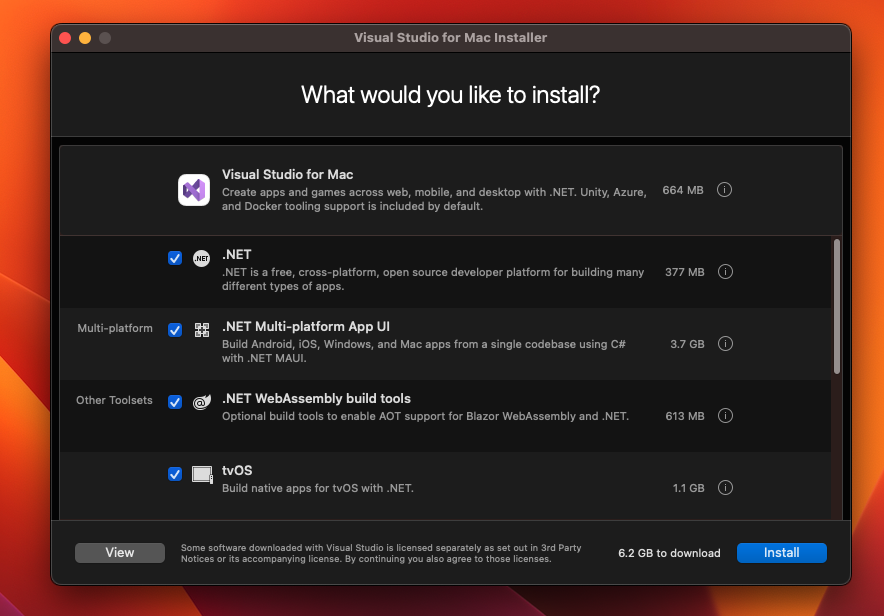
But on Mac, as of the time of writing this article, you need around 6.2 GB of disk space.
What is Visual Studio Code?
Visual Studio Code (also called VS Code) is like the mini version of Visual Studio. It is an open-source and lightweight text editor available on Windows, Mac, and Linux. There’s also the web version available at https://vscode.dev/ .
VS Code comes with built-in support for JavaScript, TypeScript and Node JS, but you can use it to code in any language you want. All you need to do is download the relevant extensions.
Some of the extensions are made by Microsoft, but a lot of others are third-party extensions.
Unlike Visual Studio, you don’t need much space to download VS Code. You might not need more than 200 MB of disk space to download it.
Since it supports JavaScript, TypeScript, and Node JS by default, you get a debugger and intellisence, too. But to get intellisence, a compiler, and debuggers for other languages, you have to download relevant extensions.
Now you know that Visual Studio is an IDE and Visual Studio Code is a text editor. So let’s summarize their main differences next.
What is the Difference between “Visual Studio” and “Visual Studio Code”?
| Basis | Visual Studio | Visual Studio Code |
|---|---|---|
| Type | Visual Studio is a full-fledged IDE | VS Code is a text editor (AKA Code editor) |
| Platform | Visual Studio runs on Windows and Mac | VS Code runs on Windows, Mac, and Linux |
| Size | Visual Studio is relatively large. You might have to download more than 40 GB on Windows and over 6 GB on Mac | VS Code does not require more than 200 MB on any platform |
| Support | Visual Studio has built in support for C# and .NET, alongside several common languages apart from Java | VS Code supports JavaScript, Typescript, and Node JS out of the box. It also supports other programming languages – as long as there’s an extension(s) for that |
| Pricing | Visual Studio Community Edition is free, but the professional and enterprise editions code $45 and $250 per month respectively. | VS Code is free. Most of the extensions are also free but there are freemium ones |
| Extensions | Visual Studio does not have as many extensions as VS Code | VS Code has numerous professionally and curated extensions for various purposes |
Which should you Choose between “Visual Studio” and “Visual Studio Code”?
There has been a long-running debate about which is better and which to choose between Visual Studio and Visual Studio Code. Well, it depends on what you are doing.
If you’re developing exclusively with a language supported by Visual Studio such as C#, C, C++, Python, and others, Visual Studio or other relevant IDEs are likely the best option for you.
But even if you’re developing in those languages but you require a React, Vue, or Angular frontend, VS code might be the best option for you.
If you’re working in a team, they might provide you with the enterprise version of Visual Studio, or any other IDE that correlates with the language you are working with. For example, PyCharm for Python and IntelliJ Idea for Java.
If you’re using Linux, you have to choose Visual Studio Code or some other IDE apart from Visual Studio. That’s because Visual Studio does not run on Linux.
If you’re the kind of person that likes to customize your editor to your taste, just go for VS Code because it’s highly customizable. You also should probably choose VS Code if you are mixing technologies.
Conclusion
This article showed you the differences between Visual Studio and VS Code, and also what they both are separately.
The debate should never be which one is better than the other, but which is best for what you want to do, or what you need. That’s why we looked at some scenarios that might encourage you to choose one over the other.
Learn The Visual Studio vs Visual Studio Code Difference
Deciding between Visual Studio vs Visual Studio Code is not as easy as choosing between a lightweight editor and a heavyweight IDE. Visual Studio is a cross-platform IDE with some of the most powerful tools for web and mobile application development. Visual Studio Code is a lightweight code editor that can be used on Windows, macOS, and Linux.
The code editor Visual Studio Code is an integral part of the Visual Studio suite. It supports IntelliSense (automatic completion of code based on context), debugging, Git integration, and more. On the other hand, Visual Studio is more of an all-in-one tool for everything related to software development, including testing, coding, debugging, and project managing.
Visual Studio Code has all the features developers need in their day-to-day development work with JavaScript or TypeScript. It can easily handle projects, too. Thanks to its fantastic Git integration system. Before we jump straight into the Visual Studio and Visual Studio Code differences, let us explain each term individually first.
For all those individuals who are confused about which one to choose between Visual Studio vs Visual Studio Code, here will explain everything. First, let us start with the definition of both the terms before discussing the Visual Studio Code vs Visual Studio.
What Is Visual Studio?
Table of Contents
The current Visual Studio version is Microsoft’s premier IDE (Integrated Development Environment) for macOS and Windows. With Visual Studio, you can generate, examine, debug, test, help, and use your software.
Visual Studio currently has 17 workloads on Windows. Workloads are a major enhancement to the installation process of Visual Studio because a full Visual Studio installation and download can take hours, especially an SSD.
As compared to the Windows version, the Visual Studio installation process for Mac is less complicated because it does not support as many targets. It enables you to develop for the web, desktop, mobile, and with .Net, Azure, Unity, and Docker support added by default. The Android, .Net Core, macOS, and iOS targets are optional.
Features Of Visual Studio:
- Open technology platform for cross-stack development
- Availability of Community and Professionally developed Plugins
- Cross-Platform installation
- Debug Tools for Generic usage
- And more
What is Visual Studio Code?
It is a lightweight but robust source code compiler that works on your PC and is available for Linux, Windows, and macOS. It comes with a built-in assistant for JavaScript, Node.js, and TypeScript. It has a strong ecosystem of extensions for different languages (C sharp, C++, Java, PHP, Python, and Go) and runtimes (Unity and . Net). It has IntelliSense code completion for procedures, variables, and imported plugins. Aside from the entire concept of being lightweight and starting quickly, it has other useful editing features, such as snazzy code navigation and refactoring. It has a built-in source code command, including Git support. Most of this has been translated from Visual Studio technology.
Visual Studio Code is developed and regularly updated using Node.js, Electron shell, TypeScript, and LSP(Language Server Protocol). The update of extensions is done frequently as per requirements.
Features Of Visual Studio Code:
- Project Explorer
- Project Builder for C sharp and .NET apps
- Build Environment and Output
- Azure Cloud integrations
- Debugging Tools and Break Points
- Test Development Integrations etc.
Visual Studio vs Visual Studio Code: Which Have High Demand
As we discussed above Visual Studio is a cross-platform IDE (Integrated Development Environment) with some of the most powerful tools for web and mobile application development. Visual Studio Code is a lightweight code editor that can be used on Windows, macOS, and Linux. If you compare both Visual Studio vs Visual Studio Code, both are high in demand. But here the question is which has high demand? As you can see in the graph below, the demand for Visual studio was high as compared to Visual Studio Code. But now both are equally in demand. Here the blue line indicates Visual Studio, and the red line denotes Visual Studio Code.
| Visual Studio Visual Studio Code |
Now let us start with the difference between both Visual Studio vs Visual Studio Code…
Difference Between Visual Studio vs Visual Studio Code
Visual Studio:
- Visual Studio is extensively used on .NET projects. The community version is free, but it is not free if you wish to make the most of it.
- As the name intimates, it is an integrated development environment (IDE), and it includes all the characteristics needed for project development. Like code debugger, auto-completion, database integration, configurations, server setup, and so on.
- Visual Studio is a perfect solution frequently used by and for .NET developers. It includes everything from source control to bug tracker to deployment tools, etc. It has everything required to develop.
- In the most advanced version of VS, you can develop a cross-platform application without departing the IDE. And Visual Studio takes disk space of more than 8 GB.
- Visual Studio is intended to be the world’s best-integrated development environment, which gives full-stack development toolsets. One of them is an important code completion component named IntelliSense, a debugger that can debug both machine code and source code, everything about ASP.NET development and SQL development.
- Visual Studio is the latest development environment, and it’s considerably heavy.
Visual Studio Code:
- As a lightweight source code editor, it is used to view, edit, run, and debug source code for applications.
- Visual Studio does not have any scaffolding support.
- It is largely oriented around files, not projects.
- Developers mainly use it on a Mac that deals with client-side technologies (HTML, JS, and CSS)
- Visual Studio is an emulator of Sublime Text or Atom on Electron.
- It is based on the Electron framework, which is used to build web technologies and cross-platform desktop apps.
- Visual Studio doesn’t have support for the version control system Microsoft Team Foundation Server.
- It has defined IntelliSense for Microsoft file types and similar characteristics.
Visual Studio vs Visual Studio Code: Comparison Table
We hope you are clear with the difference between Visual Studio vs Visual Studio Code. Now to make it easy for you so that you can easily decide which one to choose from Visual Studio vs Visual Studio code, we have given a comparison table on both the terms:
| Visual Studio | Visual Studio Code |
| The visual Studio version is Microsoft’s premier IDE (Integrated Development Environment) | Visual Studio Code is a code editor where you can edit your codes. |
| Visual Studio is a slow cross-platform because it processes slower. | As compared to Visual studio code it is faster. |
| Visual Studio is used for compiling the codes. | But in Visual Studio Code, the compiling feature is not available. |
| It has a free editor and also has a paid IDE. | Visual Studio Code is an absolutely free & open-source text editor. |
| It is important to go through Visual studio If the user needs to work on multiple windows. | Working on multiple windows is not possible with Visual Studio Code. |
| Visual Studio takes disk space of more than 8 GB | It does not require a large download size if you compare it with Visual Studio. |
| Users encounter various challenges with the setting and preferences of Visual Studio. | It is quite easy to use preferences in Visual Studio Code as compared to that of Visual Studio. |
| The visual studio uses excellent and advanced IntelliSense. | It has the least IntelliSense. |
| Visual Studio is used for .NET, C/C++ (Windows), C sharp projects along with databases, SQL Server, etc. | Visual Studio Code shows off HTML / JavaScript support over C++/C. |
Top Companies Using Visual Studio and Visual Studio Code
| Companies Using Visual Studio | Companies Using Visual Studio Code |
| Accenture | Microsoft |
| Alibaba Group | Alibaba Group |
| Microsoft | CRED |
| Via Varejo | HENNGE |
| Intuit | KAVAK |
| Agoda | Hepsiburada |
| Oxylabs | Freetrade |
| Starbucks | trivago |
Tools integrate with Visual Studio Code and Visual Studio
| Tools integrate with Visual Studio | Tools integrate with Visual Studio Code |
| .NET Core | GitHub |
| Azure DevOps | .NET Core |
| Windows | Windows |
| TSLint | TSLint |
| Azure Functions | Azure Functions |
| Sauce Labs | Snyk |
| Snyk | Anaconda |
| Anaconda | Visual Studio Live Share |
| Visual Studio Live Share | SonarLint |
Is Visual Studio code better than Visual Studio?
Deciding between Visual Studio Code vs Visual Studio for any software development task is not easy if you don’t have complete knowledge of both. Visual Studio Code can be configured to be pretty close to an Integrated Development Environment for several programming languages.
Visual Studio, for example, will work straight out of the box if your development methodology is test-driven. On the other hand, Visual Studio Code has 15 test-driven development extensions that support Node.js, Go,.Net, and PHP. Similarly, Visual Studio excels at working with databases, particularly Microsoft SQL Server and its offshoots, although Visual Studio Code includes many database extensions. Visual Studio provides excellent refactoring functionality, while Visual Studio Code only covers the basics for a half-dozen languages.
There are a few exceptions to this rule. If you’re a software engineer, for example, and you have accessibility to Visual Studio Enterprise, you’ll want to utilize it. Visual Studio is the superior choice if you need to collaborate on development or debug with other team members. Visual Studio Enterprise can help you with serious code analysis, performance profiling, and debugging from a snapshot. Visual Studio Code tends to be best in the data science community.
Visual Studio is not available for Linux, but Visual Studio Code is. Visual Studio for Windows has a Linux/C++ workload as well as Azure compatibility. For everyday development/test/debug cycles in the languages supported by Visual Studio and Visual Studio Code is mostly a matter of personal choice. Visual Studio could be a better fit if you work on a development project for several hours at a time. Visual Studio Code may make you happier if you do development for short periods.
Conclusion
To sum up, the important difference between Visual Studio vs Visual Studio Code is that f you just want something to write your code with speed and efficiency, Visual Studio Code is for you. It is lightweight and thus works on minimum configuration. And you do have the alternative to add features to it when you need them. And for languages that do not need an IDE (Integrated Development Environment), Visual Studio Code is one of the best options.
Whereas, if you are a professional programmer who requires a lot of resources to develop a project, Visual Studio will be the perfect option. And you still get all the features of Visual Studio Code in Visual Studio. But things will go more moderate and heavy on resources.
We hope you are cleared with the Visual Studio vs Visual Studio Code, in case if you need more information on any of these terms, you can take Visual Studio assignment help or Visual Studio code assignment help.
Frequently Asked Questions
Can I install both Visual Studio and Visual Studio code?
Yes, it is possible to install both Visual Studio and Visual Studio simultaneously and safely. Visual Studio Code is a lightweight but powerful source code editor.
Visual Studio vs Visual Studio Code: Are they both the same?
Visual Studio Code is an editor, whereas Visual Studio is an IDE (Integrated Development Environment). Visual Studio Code is cross-platform and quick, but Visual Studio is not as quick as VS code.
What are the differences between Visual Studio Code and Visual Studio?
Microsoft recently released Visual Studio Code and I am a little confused about its usage, since Visual Studio has lot of functional similarities with it.


14 Answers 14
Visual Studio (full version) is a "full-featured" and "convenient" development environment.
Visual Studio (free "Express" versions — only until 2017) are feature-centered and simplified versions of the full version. Feature-centered meaning that there are different versions (Visual Studio Web Developer, Visual Studio C#, etc.) depending on your goal.
Visual Studio (free Community edition — since 2015) is a simplified version of the full version and replaces the separated express editions used before 2015.
Visual Studio Code (VSCode) is a cross-platform (Linux, Mac OS, Windows) editor that can be extended with plugins to your needs.
For example, if you want to create an ASP.NET application using Visual Studio Code you need to perform several steps on your own to setup the project. There is a separate tutorial for each OS.


Visual Studio Code is an editor while Visual Studio is an IDE.
Visual Studio Code is cross-platform and fast, while Visual Studio is not fast.
Note that Visual Studio for Mac is available now but is a different product compared to Visual Studio (Windows). It’s based on Xamarin Studio and lacks support for some older .NET project types. It does successfully build solutions created in Visual Studio 2017. Visual Studio for Mac has a more limited UI (for example, no customizable toolbar). So for cross-platform work, Visual Studio Code may still be preferable.
I will provide a detailed differences between Visual Studio and Visual Studio Code below.
If you really look at it the most obvious difference is that .NET has been split into two:
- .NET Core (Mac, Linux, and Windows)
- .NET Framework (Windows only)
All native user interface technologies (Windows Presentation Foundation, Windows Forms, etc.) are part of the framework, not the core.
The «Visual» in Visual Studio (from Visual Basic) was largely synonymous with visual UI (drag & drop WYSIWYG) design, so in that sense, Visual Studio Code is Visual Studio without the Visual!
The second most obvious difference is that Visual Studio tends to be oriented around projects & solutions.
Visual Studio Code:
- It’s a lightweight source code editor which can be used to view, edit, run, and debug source code for applications.
- Simply it is Visual Studio without the Visual UI, majorly a superman’s text-editor.
- It is mainly oriented around files, not projects.
- It does not have any scaffolding support.
- It is a competitor of Sublime Text or Atom on Electron.
- It is based on the Electron framework, which is used to build cross platform desktop application using web technologies.
- It does not have support for Microsoft’s version control system; Team Foundation Server.
- It has limited IntelliSense for Microsoft file types and similar features.
- It is mainly used by developers on a Mac who deal with client-side technologies (HTML, JavaScript, and CSS).
Visual Studio:
- As the name indicates, it is an IDE, and it contains all the features required for project development. Like code auto completion, debugger, database integration, server setup, configurations, and so on.
- It is a complete solution mostly used by and for .NET related developers. It includes everything from source control to bug tracker to deployment tools, etc. It has everything required to develop.
- It is widely used on .NET related projects (though you can use it for other things). The community version is free, but if you want to make most of it then it is not free.
Visual Studio is aimed to be the world’s best IDE (integrated development environment), which provide full stack develop toolsets, including a powerful code completion component called IntelliSense, a debugger which can debug both source code and machine code, everything about ASP.NET development, and something about SQL development.
In the latest version of Visual Studio, you can develop cross-platform application without leaving the IDE. And Visual Studio takes more than 8 GB disk space (according to the components you select).
In brief, Visual Studio is an ultimate development environment, and it’s quite heavy.
Your Ultimate Guide To Visual Studio vs Visual Studio Code
Are you stuck in the vivid debate of visual studio vs visual studio code? The battle between the two will entirely depend on the work you are doing, your working style, the languages you each support, and the features you require. There are plenty of ways to decide the best for you!
If you’ve been in the same boat as all of us about choosing the right editor, it is because both are Microsoft-made. It is pretty evident since both of them have a similar name. Despite the similarity in their names, their features are pretty much different.
Microsoft’s Visual Studio, also known as Integrated Development Environment (IDE), is a full-bodied text editor for developers. It is beloved by millions of developers across the world. It comes with many robust development, debugging and collaborative features, but the Visual Studio Code is standing in its way, which is a tough competitor. You cannot simply ignore it too.
Let’s pour some water on the heated debate of Visual Studio vs Visual Studio Code by looking at their capabilities, pricing, utility, and what’s the best for you!
Table of Contents
What is Microsoft Visual Studio?
Is Visual Studio an IDE?
VS is an Integrated Development Environment and is Microsoft’s creative launching pad that developers can use to build, edit, and debug code, after which one can easily publish the app they are building.
Visual Studio’s great editing and debugging capabilities distinguish it from its competitors. Visual Studio also includes code completion tools, compilers, graphic designers, etc., to ease a developer’s process of building an app.
Visual Studio aims at being a feature-rich, robust, and comprehensive solution for building apps.
What Is Visual Studio Code?
Visual Studio Code or VS Code is a text editor that offers multiple customisable features in the form of plugins for developers to curate a pretty selective development environment. VS Code is lightweight and powerful and can be easily installed on any platform.
VS Code has built-in support for Node.js, TypeScript, and JavaScript and a feature-rich extension ecosystem for different languages like C++, Java, C#, PHP, Go, and Python.
Visual Studio Code falls in the same category as Atom, Sublime, and Text Wrangler, but with better and more robust features.
A developer branching out of .NET or C# into different comment stacks will be the ideal candidate for VS Code. It will also benefit those starting their journey of being a developer from scratch!
VS Code is centred around ease, extensibility, speed, and flexibility.
Utility
Visual Studio vs Visual Studio Code
Visual Studio aids in developing computer programs, websites, web applications, mobile applications, and web services. Visual Studio or IDE takes the help of Microsoft’s software development platform, i.e., Windows API, Windows Presentation Foundation, Windows Forms, Microsoft Silverlight, and Windows Store, to produce and manage native code.
Whereas Visual Studio Code can be used to write, edit, and debug the code, all in one place. VS Code supports many programming languages, for which a developer does not require Web Support. Everything can be found in its built-in multi-language support.
A developer can rely on Visual Studio Code for all kinds of development, as long as they pair it with the right tools. VS Code comes with built-in support for JavaScript, Node.js, and TypeScript. If this is not enough, one can easily add the necessary support for languages like Python, C#, PHP, Java, and many more by installing their extensions.
The primary reason why VS Code seems better in terms of usage in this debate of Visual Studio vs Visual Studio Code is that it offers incredible support, it can work across all platforms, and is lightweight and robust. It can do everything in just one place.
Visual Studio vs Visual Studio Code — Differences
| Visual Studio | Visual Studio Code |
|---|---|
| Visual Studio is an Integrated Development Environment, also known as an IDE. | Visual Studio Code is a code editor. A developer can easily edit their code. |
| VS is slower when it comes to performing across different platforms. The processing speed is slower. | VS Code is comparatively faster. |
| Visual Studio has a free editor for developers to use but also comes with a better and paid IDE version. | VS Code is completely free of cost and is open-source. |
| VS engages the best and the most advanced IntelliSense. | IntelliSense is comparatively not up to the mark in VS Code. |
| The overall download size is pretty large. | Compared to Visual Studio, Visual Studio Code is pretty lightweight. It doesn’t require a heavy or large download. |
| VS requires more space to work better and smoother. | VS Code comparatively does not need a lot of space to run. It can easily run on 300 MBs of ram. |
| Visual Studio only runs on macOS and Windows. | VS Code can run on macOS, Windows as well as Linux. |
| Not many professionally developed plugins are available for Visual Studio. | VS Code comes with a wide range of professionally curated plugins and extensions to meet all kinds of editing and compiling needs. |
Visual Studio vs Visual Studio Code — Pricing
When it comes to pricing, the debate of Visual Studio vs Visual Studio Code has become even more heated!
Unlike IDE or Visual Studio, Visual Studio Code is open source and free of cost. Many contributors in the Microsoft Visual Studio community work every day to ensure VS Code is working perfectly fine. The cost-saving aspects of using VS Code are incredible for smaller teams or freelance developers.
On the other hand, Visual Studio can cost $45 a month or $1,199 for the first 12 months of usage. After the first 12 months are complete, a developer must pay $799 to use it yearly to gain the perpetual license. As far as the Enterprise version of VS Code is concerned, the numbers go a notch higher — $250 a month, then $5,999/ year, and subsequently $2,569/year.
It should be noted here that the Community version of VS Code is free to use worldwide.
Why choose one over the other?
Why should VS Code be your choice?
For 90% or more developers, VS Code is a better choice for solving the never-ending debate of Visual Studio vs Visual Studio Code.
- VS Code is a cross-platform code editor that can easily run on macOS, Windows, and Linux. All the web technologies VS Codes use Electron Framework in the end, meaning the applications built through VS Code are lean and seamless when updating them.
- VS Code is comparatively much faster than Visual Studio. It can boot up faster when compared to IDE.
- Visual Studio Code is incredibly flexible. It can do pretty much whatever a developer wants it to do. Even though it is designed to be a code editor, you can replicate what an Integrated Development Environment does on the same.
- VS Code, compared to Visual Studio, is pretty simple and smooth in terms of development experience. VS Code is pretty streamlined and straightforward, so a developer does not get tangled in any complexities.
- Visual Studio Code is the best choice for web development. It offers incredible support with thousands of tools and extensions willing to work in your favour.
Why Should Visual Studio Be Your Choice?
Most of its features are insignificant for some developers, no matter how great VS Code is. For them, Visual Studio is the best choice.
- Visual Studio is functionally feature-rich. In most cases, Visual Code matches the requirements of most developers perfectly without having to rely on further extensions or plugins.
- In Visual Studio, collaborating with your entire team is pretty easy when it comes to development as well as debugging code. The workflow is super-smooth and is loaded with all kinds of features one would need in the long run.
- When it comes to heavy-duty code analysis, debugging as well as performance profiling, Visual Studio is an incredible option.
- Visual Studio is pretty commonly used in the game development industry. For instance, UNITY, a multi-platform environment integrated with Visual Studio, can work effortlessly to build cross-platform mobile gaming applications, AR/VR applications, and more!
Final Words
When deciding in this tug of war of Visual Studio vs Visual Studio Code, you should consider your particular needs. If your needs gravitate more towards .net development or C#, you should be looking forward to using Visual Studio. IDE will be excellent for your requirements.
However, if your needs gravitate towards cross-stack development, you should be using Visual Studio Code. The lightweight, premium, straightforward, feature-rich code editor will be your best friend for years to come.
Visual Studio Code, though, has replaced Visual Studio around the world for most developers. However, IDE continues ruling our developer’s community regarding fulfilling complex development needs.
If you are still confused about this never-ending Visual Studio vs Visual Studio Code debate or are looking forward to utilizing your skills on the two platforms, apply at Turing. Register with us and see what you’re missing from your life!