Найти индекс элемента в данном массиве в Java
В этом посте будет обсуждаться, как найти индекс элемента в массиве примитивов или объектов в Java.
Решение должно либо возвращать индекс первого вхождения требуемого элемента, либо -1, если его нет в массиве.
1. Наивное решение — линейный поиск
Наивное решение состоит в том, чтобы выполнить линейный поиск в заданном массиве, чтобы определить, присутствует ли целевой элемент в массиве.
⮚ Для примитивных массивов:
⮚ Для массивов объектов:
2. Использование потока Java 8
Мы можем использовать Java 8 Stream для поиска индекса элемента в массиве примитивов и объектов, как показано ниже:
⮚ Для примитивных массивов:
⮚ Для массивов объектов:
3. Преобразовать в список
Идея состоит в том, чтобы преобразовать данный массив в список и использовать List.indexOf() метод, который возвращает индекс первого вхождения указанного элемента в этом списке.
⮚ Для примитивных массивов:
⮚ Для массивов объектов:
4. Бинарный поиск отсортированных массивов
Для отсортированных массивов мы можем использовать Алгоритм бинарного поиска для поиска указанного массива для указанного значения.
⮚ Для примитивных массивов:
⮚ Для массивов объектов:
5. Использование библиотеки Guava
⮚ Для примитивных массивов:
Библиотека Guava предоставляет несколько служебных классов, относящихся к примитивам, например Ints для инт, Longs надолго, Doubles на двоих, Floats для поплавка, Booleans для логического значения и так далее.
Каждый класс полезности имеет indexOf() метод, который возвращает индекс первого появления цели в массиве. Мы также можем использовать lastIndexOf() чтобы вернуть индекс последнего появления цели в массиве.
Как вывести индекс массива java

Для вывода индекса элемента массива можно использовать цикл for в сочетании с методом length для определения размера массива. Вот пример кода:
В этом примере мы используем переменную i , чтобы проходить по всем элементам массива arr , и выводим значение каждого элемента массива вместе с его индексом в консоль:
Java Array Indexof

This article introduces how to get the index of an array in Java using different techniques.
Please enable JavaScript
Get Index of an Element in an Integer Type Array in Java
There is no indexOf() method for an array in Java, but an ArrayList comes with this method that returns the index of the specified element. To access the indexOf() function, we first create an array of Integer and then convert it to a list using Arrays.asList() .
Notice that we use a wrapper class Integer instead of a primitive int because asList() only accepts wrapper classes, but they do return the result as a primitive data type. We can check the following example, where we specify the element i.e. 8 to the indexOf() method to get its index. The result we get from getIndex is of the int type.
Get Index of an Array Element Using Java 8 Stream API in Java
We can use the Stream API to filter out the array items and get the position of the specified element. IntStream is an interface that allows a primitive int to use the Stream functions like filter and range .
range() is a method of IntStream that returns the elements from the starting position till the end of the array. Now we use filter() that takes a predicate as an argument. We use i -> elementToFind == array1[i] as the predicate where i is the value received from range() and elementToFind == array1[i] is the condition to check if the elementToFind matches with the current element of the array1 .
findFirst() returns the first element and orElse() returns -1 if the condition fails.
Get Index of an Array Element Using ArrayUtils.indexOf() in Java
This example uses the ArrayUtls class that is included in the Apache Commons Library. We use the below dependency to import the library functions to our project.
We use the indexOf() function of the ArrayUtils class to find the index of the array. indexOf() accepts two arguments, the first argument is the array, and the second argument is the element of which we want to find the index.
Rupam Saini is an android developer, who also works sometimes as a web developer., He likes to read books and write about various things.
How to Get an Index of an Array Element in Java
This guide will illustrate the methods to get an index of an array element in Java.
How to Get an Index of an Array Element in Java?
To get an index of an array element in Java, you can use the below-mentioned methods.
- Linear search
- indexOf() method
- binarySearch() method
Let’s understand the working of these methods one by one with examples!
Method 1: Get an Index of an Array Element Using Linear Search
Linear Search is simple to implement in cases when an array has fewer elements. This type of search can be performed on both single-dimensional and multi-dimensional arrays. When the index of a single array element is being fetched from an unordered list, linear search is proved more effective.
In this section, we will get an index of an array element by using a linear search with a “for” loop.
Syntax
The following syntax is used for the specified purpose:
Here, the loop starts from “0” and it will iterate until the length of the array.
Example
In this example, we will create an integer type array named “array” and initialize it with the following values:
We want to get the index of the array element “5”, so, we will store it in an integer type variable “item”:
As we know, the index of an array starts from 0, so we save “-1” in an integer type variable “index” that will increment in the loop by iterating elements in an array:
Here, we will iterate the array until the length of the array by using “for” loop and check the elements of the array to match with the variable “item” and store the matched “index” when the element of the array matches with “item”:
Finally, print the value of the “index” variable, which stores the index of the matched item:
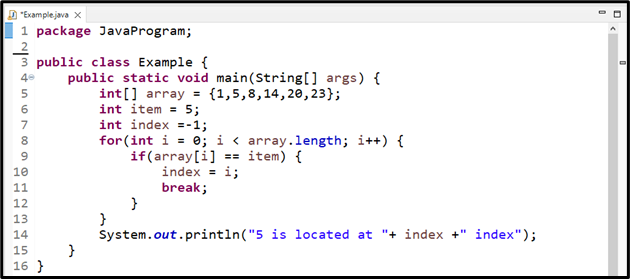
The output shows that the “5” element of an array is stored at the “1” index:

Let’s see the other methods for getting an index of an array element in Java.
Method 2: Get an Index of an Array Element Using indexOf() Method
The “indexOf()” method of the “Arrays” class belongs to the java.util package and is also utilized to determine the particular element’s index in an array. This method fetches the index of the first instance of the added element. It first converts an array into an Array List using the “asList()” method and then calls the “indexof()” method.
Syntax
The syntax of the “indexOf()” method is given as:
Here, the “aslist()” method is called using the class name “Arrays” by passing an “array” to it as an argument, which converts it to an Array List and then calls the “indexOf()” method by passing the value for which we want to get the index.
Example
Firstly, create an integer type array named “array”. Note that there is an “Integer” wrapper class array, not a primitive “int” array, because the “aslist()” method takes a wrapper class as an argument, and it returns the primitive int values:
To get the index of the “14” element, we will use the “indexOf()” method of the Array class, convert it in an Array List and then store the matched index in the “getArrayIndex” variable:
Finally, print the index of an element using the “System.out.println()” method:
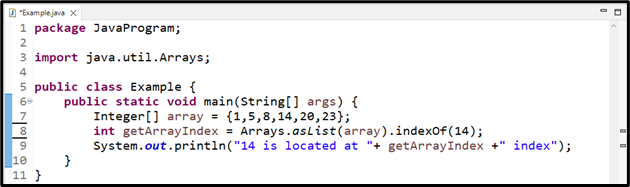
The output shows that the element “14” is placed at the “3” index of our array:

We checked the method to find the index of the element of an unsorted array. What if you have a sorted array? To get the answer to the stated question, follow the below-given sections.
Method 3: Get an Index of an Array Element in Java Using binarySearch() Method
The “binarySearch()” method is also used to get an index of the element of an array, but it is used for only sorted arrays. It is a predefined static method in Java that belongs to the Array class. It takes two parameters: an array and a value by which the index will be determined.
Note: The “binarySearch()” method is only used for the sorted array.
Syntax
Follow the below-given syntax for getting an index of an element of an array using binarySearch() method:
The specified method is called with the Array class, and it accepts a value that will be searched in the given array.
Example
Here, we have an array named “array” sorted in ascending order:
We will call the “binarySearch()” method by passing the array and the element “20” as an argument. The resultant index will be saved in the integer type variable “index”:
Lastly, we will print the index of the specified element on the console window:
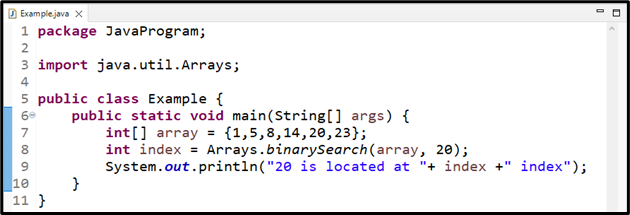
The output shows that the element “20” is located at the “4th” index of an array:

We gathered all the essential instructions for getting an index of an array element in Java.
Conclusion
For getting an index of an array element, you can use three different methods: Linear search by using a loop, indexOf() method, and binarySearch() method. The common and useful method to get the index of an element is the indexOf() method. Whereas the binarySearch() method is used on sorted arrays, and linear search can be utilized with the unsorted array. In this guide, we have illustrated the methods for getting an index of an array element in Java with detailed examples.
About the author

Farah Batool
I completed my master’s degree in computer science. I am an academic researcher and love to learn and write about new technologies. I am passionate about writing and sharing my experience with the world.