Independent Memory Mode — что это в биосе?

Приветствую друзья. Данный материал расскажет об одной функции, которую можете встретить в BIOS компьютера.
Independent Memory Mode — что это такое в биосе?
Активация независимого режима работы памяти (RAM), обеспечивает максимальную производительность, но не имеет защиты от сбоев.
- Контроллеры ОЗУ E7 v3 на серверах Lenovo поддерживают данную опцию, а также Lockstep.
- При включении опции, если система обнаруживает три подряд ошибки, то оперативка автоматически может переключаться в режим Lockstep. Это касается оборудования Lenovo, но данное поведение может быть замечено и на других производителях.
- Независимый режим может быть выставленный по умолчанию в серверных конфигурациях. Порядок установки планок DIMM при данном режиме зависит от количества процессоров (CPU) и планок оперативки.
Некоторые дополнительные рекомендации:

Активация Independent Memory Mode подразумевает что каждый канал памяти адресуется индивидуально. Данные чередуются из двух каналов, а масштабируемый буфер памяти разделяет данные. При таком подходе канал SMI2 работает с удвоенной скоростью. Также указывается, что разьемы ОЗУ могут быть заполнены в любом порядке, однако могут быть нюансы, зависит от оборудования, необходимо читать мануалы.
How to troubleshoot unexpected memory limitations?
As you know, there are limitations on the available memory depending on the version of the operating system . These limitations may be caused by BIOS, hardware or instruction set architectures (x86,x64) too. Sometimes really hard to predict and troubleshoot them . Everything looks good, but doesn’t work. Let’s analyze basic steps that I have used to solve issues in different situations.
– Check memory limits for supported Windows releases
- Check Memory Mode in BIOS (Independent, Channel Mirroring, Lockstep, Sparing). For example, Channel Mirroring decreases your memory size by default. To use the full size of memory you should check that Memory mode is independent

- During POST, notice additional information about memory testing. Full size of memory must be OK. For example, you have 4 Gb installed memory and test shows «4096MB OK» if no problems with BIOS settings or hardware

– Sometimes the reason is hardware. I had a problem on other Intel SR1670HV server system “DIMM A1 and DIMM A2 are disabled by BIOS”. Unfortunately, it’s mainboard’s bug (upgrading firmware and replacing DIMMs don’t resolve the issue)
- If your OS uses unoriginal boot configuration , check Maximum Memory option at msconfig>boot > advanced options

- I’ve had a very strange memory limitiation in my OS (Server 2008 R2 SP1 Ent). After server shutdown only 4 gb of 48 gb (6 x 8 Gb) were usable. I tried to change BIOS and OS settings plus checked firmware version. Everything was fine. I did not realize one thing. Why is only 4 gb instead 8 gb? If it was problem with DIMMs I had to get 8 x X Gb of memory. If it was problem with BIOS , I had to receive an information during POST test. So, something happened bad with OS after shutdown. I decided to change server edition using DISM utility (anyway, I had to change it because of VM’s amount) Curiously enough, changing server edition is solution. (I’m sure, simple re-activation can solve too) . To re-activate or change edition use PS and DISM.
Run Powershell. Use DISM /online /Get-CurrentEdition to get your edition


Then paste DISM /online /Get-TargetEditions to view possible target editions
Finally, to initiate an upgrade, run:
DISM /online /Set-Edition:<edition ID> /ProductKey: ___
For example, I have an Enterprise version and want to upgrade to Datacenter.
Important: You have to use KMS key before activation with own key. Get KmS key using this link http://technet.microsoft.com/en-us/library/ff793421.aspx
DISM /online /Set-Edition:ServerDatacenter /ProductKey:74YFP-3QFB3-KQT8W-PMXWJ-7M648
DISM will reboot server twice. Very strange memory limit has gone away.
Notice: After the reboot you should change the product key and activate system again.
Memory modes
Advanced ECC (Lockstep) Mode Support: In this configuration, the two channels closest to the processor are combined to form one 128-bit channel. This mode supports Single Device Data Correction (SDDC) for both x4- and x8-based memory modules. Memory modules must be identical in size, speed, and technology in corresponding slots.
Memory Mirroring Support: The system supports memory mirroring if identical memory modules are installed in the two channels closest to the processor (memory should not be installed in the farthest channel). Mirroring must be enabled in the System Setup program. In a mirrored configuration, the total available system memory is one-half of the total installed physical memory.
Optimizer (Independent Channel) Mode: In this mode, all three channels are populated with identical memory modules. This mode permits a larger total memory capacity but does not support SDDC with x8-based memory modules.
Memory mode – Independent что это?
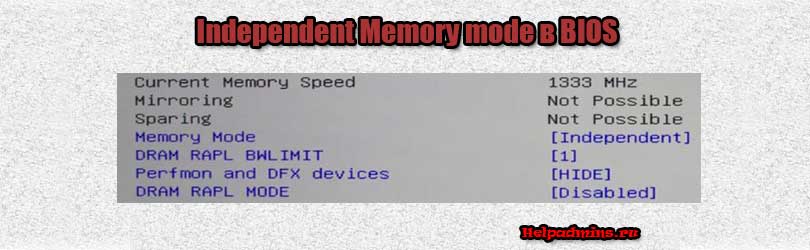
В настройках BIOS на некоторых материнских платах можно встретить параметр Memory mode для которого установлено значение Independent. В данной статье мы расскажем, что это такое и на что влияет в работе компьютера.
Режим работы памяти
Как можно догадаться из названия Memory mode задает режим работы оперативной памяти. Установленное значение Independent активирует так называемый независимый режим.
В этом режиме оперативная память работает с максимальной скоростью (должно быть установлено более одного модуля ОЗУ) благодаря индивидуальной адресации каналов памяти.
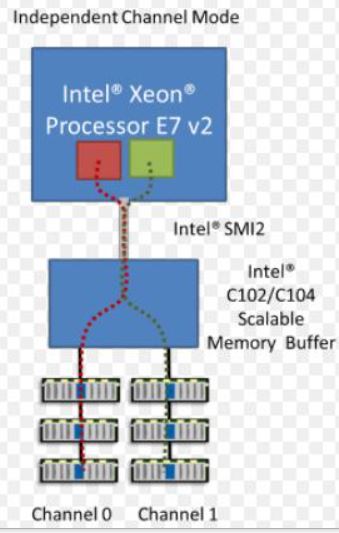
Схема работы независимого режима оперативной памяти
Минусом же данного режима является снижение стабильности работы системы, так как отключается защита от сбоев.
Поэтому при появлении проблем с работой оперативной памяти (ошибки, синие экраны смерти) рекомендуется отключить режим Independent в Memory mode.