How to Parse and Convert JSON to CSV in Python

JSON to CSV Python : In this tutorial we will show you how to convert a JSON file to a CSV file in the python programming language.
Overview
JSON literally means Javascript Object Notation. It allows to represent information in a structured way like XML for example. A Json file contains two types of structural elements:
- A set of keys/values
- Ordered lists of values (these can be objects, arrays or generic values).
To give you an idea of what a Json file represents, here is an example that will illustrate our different examples :
This file represents the pokemons as well as the characteristics associated with each one of them, if you wish to recover the complete list of the Pokedex, you will find it at this address :
We will see at the end of this tutorial how to convert this type of file to csv and see how to do it in python. Let’s go !
Parsing JSON
The first step is to load the json file into a python object. There are several ways to do this:
- Use the pandas library and its read_jsonfunction
- Use the json module to read the JSON file
Parsing Json File using Pandas
Pandas is a python library that allows to easily manipulate data to be analyzed. It is often used to read JSON files. Indeed a lot of python API returns as a result of JSON and with pandas it is very easy to exploit this data directly. To read a JSON file we can use the read_json function. Here is an example with the pokedex.json file :
Parsing Json File using JSON module
You can also use the json module to read a json file :
Converting JSON to CSV in python
The CSV format (which stands for Comma Separated Values) is the most common import and export format used for Excel spreadsheets and databases. This is a main reason why we want to convert a Json file to CSV.
Converting JSON file to CSV file using Pandas
To convert our Json file, there is a function in Pandas called to_csv() that saves our file in CSV format. Using our previous example where we parsed our JSON file into a Pandas dataframe, we can export our dataframe to CSV like this:
The CSV file has been exported in the directory you have chosen ( In the example, we have exported the file in the same directory as the python file but you can put an absolute path to store it in another directory).
Converting JSON file to CSV file using cvs module
We can also use the CSV module to export our Json file as a CSV file. Here’s an example that allows us to export only the pokemon names to the CSV file:
Output:
We were able to export the different names of the Pokémon in the CSV. To retrieve the header we need to use the keys() function which allows us to get the keys of each “Name” element of our JSON file. Of course it’s possible to get all the JSON file data.
Summary
As we have seen, it may be easy to convert a Json file to a CSV file. On the other hand, JSON files can have much more complex structures than CSV files, so a direct conversion is not always possible and will require us to rework our structure of the file concerned.
Don’t hesitate to tell me in comments if you have any concerns about the use of these codes, I would be happy to answer ��
If you want to learn more about python, you can read this book (As an Amazon Partner, I make a profit on qualifying purchases) :
I’m a data scientist. Passionate about new technologies and programming I created this website mainly for people who want to learn more about data science and programming 🙂
On 08/21/2020 at 15 h 06 min, ALAN said:
Thanks for writing a clear and easy to understand post! I found this very helpful and useful.
Convert JSON to CSV in Python
The full form of JSON is JavaScript Object Notation. It means that a script (executable) file which is made of text in a programming language, is used to store and transfer the data. Python supports JSON through a built-in package called JSON. To use this feature, we import the JSON package in Python script. The text in JSON is done through quoted-string which contains the value in key-value mapping within < >. It is similar to the dictionary in Python.
CSV (Comma Separated Values) is a simple file format used to store tabular data, such as a spreadsheet or database. CSV file stores tabular data (numbers and text) in plain text. Each line of the file is a data record. Each record consists of one or more fields, separated by commas. The use of the comma as a field separator is the source of the name for this file format.
Converting JSON to CSV
For simple JSON data consisting of key and value pairs, keys will be headers for the CSV file and values the descriptive data.
Example: Suppose the JSON file looks like this:
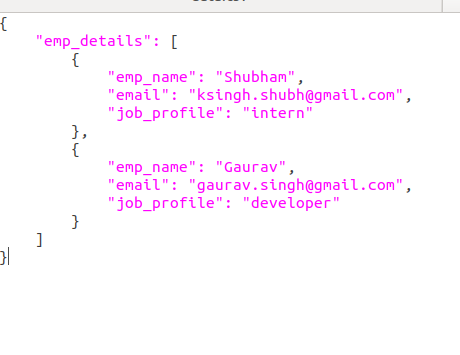
We want to convert the above JSON to CSV file with key as headers.
How to convert JSON to CSV in Python?
JSON (JavaScript Object Notation) is a popular data storing and transferring tool used in many server-side programming. Python supports JSON using its in-built package called json. We can convert a JSON structure into a comma-delimited textual structure. In this article, you will learn about the different methods to convert JSON to CSV structure.
What are CSV files?
CSV (Comma Separated Values) is a file format utilized for storing data in a tabular fashion. The structure of a CSV file can be interpreted in a spreadsheet or database format. It can store data in plain text (usually, string & number data type). Each line of a .csv file defines a data record. The record will contain one or more fields that are comma-separated values.
Converting JSON to CSV
JSON data usually contains data in key-value pairs. These keys will be the headers for the CSV file and the values as descriptive data that remain indented in json.
Method 1: Using CSV module:
It is a built-in Python module that implements classes for reading & writing tabular data in CSV structure. Using this, programmers can write this data in the format approved by Excel or read data from excel or CSV files. Programmers and developers can also represent the CSV formats recognized by other apps or define their special-purpose CSV formats. It is the most widely used module. Since it is a built-in module, you do not need to install it separately.
Program:
Explanation:
First, we will import the json and csv modules. Next, we will open the JSON file & load its data in the ‘data’ object. Next, we have to open a CSV file for writing in write mode. We assigned the count variable to zero. Then, use the for loop to fetch the data from the stud_data. Now, assign the cnt.keys() in the header. Provide the csv_writer.writerow() method and pass the header as the argument. Once you count the values, you should close the data_file.close() .
Method 2: Using Pandas Library:
It is a fast, flexible, powerful, & easy to implement open-source data analysis tool developed on top of Python language. It is a data manipulation & analysis library that worked well with conversations and various files like CSV, JSON, etc. Here, we will use the to_scv() method to convert a file to CSV.
Program:
Explanation:
First, we will import the pandas library, path, and json modules. Fetch the json file path using the Path() constructor and assign it to the jsonpath object. Next, you have to read the json file and assign it to the ‘dat’ object. Then, create the Dataframe using json_normalize() method and pass the ‘dat’ object into it as the parameter. Finally, convert the df.to_csv() method to convert the dataframe object to csv format with the filename ‘datafile.csv‘, having encoding scheme as UTF-8, and index as False.
Conclusion:
Both these methods are used to convert a JSON structure to a CSV file. But using the CSV module is beneficial because it is a built-in module and hence lighter as compare to the Pandas library. Also, the dataframe conversion takes more time making it complex. Hence, the first method should be preferred.
Экспорт файла JSON в CSV с помощью Python
JSON – это аббревиатура от JavaScript Object Notation. Это исполняемый скрипт, который позволяет нам легко хранить и передавать данные с одной платформы на другую. Мы часто сталкиваемся с ситуациями, когда нам нужно удалить данные из определенных источников. Итак, какова форма вывода очищенных данных?
Этот формат позволяет нам иметь данные в виде пар ключ-значение. Все данные хранятся в виде «строки» в формате значения ключа.
Но что, если я хочу, чтобы эти данные в JSON отправлялись дальше в базу данных для манипуляций? Самое простое решение, которое приходит мне на ум, – это экспорт файла JSON в виде файла CSV.
Итак, давайте теперь посмотрим на шаги, которые нам нужно выполнить, чтобы преобразовать и экспортировать файл JSON в формат CSV (значения, разделенные запятыми).
1. Импорт библиотеки
Чтобы работать с CSV-файлами, нам нужно импортировать встроенный модуль, доступный, как показано:
2. Сохранить значения заголовков и столбцов в списке
При работе с экспортом данных JSON в формат CSV для нас очень важно указать значения заголовков или имена столбцов для каждого столбца.
Таким образом, мы создаем отдельный список и передаем ключевые теги в созданный список, как показано ниже:
Важно отметить, что если имена столбцов, хранящиеся в созданной выше переменной, не соответствуют одному из ключевых тегов в файле JSON, это обязательно вызовет ошибку.
3. Передать путь к CSV-файлу
Теперь пришло время открыть файл CSV и указать на него объект. Далее, мы используем функцию csv.DictWriter() для записи и экспорта данных JSON в форму CSV.
Мы создаем экземпляр функции DictWriter(), а затем помещаем значения столбцов в файл CSV. В конце концов, мы должны экспортировать значения данных с помощью функции writerows(), как показано ниже.