Sorry, you have been blocked
This website is using a security service to protect itself from online attacks. The action you just performed triggered the security solution. There are several actions that could trigger this block including submitting a certain word or phrase, a SQL command or malformed data.
What can I do to resolve this?
You can email the site owner to let them know you were blocked. Please include what you were doing when this page came up and the Cloudflare Ray ID found at the bottom of this page.
Cloudflare Ray ID: 7e7cee3f694dc2b9 • Your IP: Click to reveal 155.133.78.151 • Performance & security by Cloudflare
Как дарить автомобили в Forza Horizon 5
В Forza Horizon 5 существуют десятки способов получения автомобилей, поэтому дубликаты могут накапливаться и занимать место в гараже. Их можно удалить, но более приятный способ очистить коллекцию автомобилей — подарить их другому игроку.
Подарочные дропы можно оставить для определенного типа игроков Forza Horizon 5, например, для члена Зала славы, новичка в игре или участника сообщества, но их нельзя оставить для конкретного человека. Это означает, что друзья не могут дарить друг другу автомобили.
Как дарить автомобили в Forza Horizon 5

В Forza Horizon 5 есть два способа подарить автомобили:
- Из вкладки «Мой Horizon» на экране паузы;
- Посещение ранее обнаруженного амбара.
Однако прежде чем отправить подарок с вкладки «Мой Horizon», игроки должны обнаружить хотя бы один амбар в Forza Horizon 5. Выбрав раздел подарков, игроки должны перейти к автомобилю, который они хотели бы отдать.
Чтобы легче найти конкретный тип автомобиля, нажмите Y на консолях, чтобы выбрать такие фильтры, как «Класс производительности», «Тип автомобиля» или «Тип двигателя». Использование кнопки Menu также позволяет находить автомобили по их производителю. Например, если вы ищете DeLorean DMC-12 в Forza Horizon 5, нажмите Menu, найдите «DeLorean» в списке, отсортированном по алфавиту, и выберите DMC-12, когда вкладка перейдет в этот раздел.

После выбора автомобиля игрокам будет предоставлена возможность подарить его кому угодно: новым игрокам, вернувшимся игрокам, участникам сообщества или новым членам Зала славы в Forza Horizon 5. После этого к подарку необходимо прикрепить заранее выбранную фразу, а также подпись с внутриигровым именем игрока или Gamertag. Его также можно оставить без подписи. Дарение автомобиля из ранее обнаруженного амбара происходит точно так же.
Когда другой игрок забирает подарок, ему предоставляется возможность отправить благодарность, если автомобиль ему понравился. Кудо также можно заработать, получая «лайки» за пользовательские логотипы и тюнинги. Количество полученных «Кудо» можно проверить на вкладке «Мой Horizon» в меню паузы, под плиткой Gift Drop.
Если в Forza Horizon 5 вы покупаете и продаете много автомобилей, дарение машин — хороший способ порадовать другого игрока и освободить место в гараже для новых. Однако если место нужно быстро, игроки всегда могут мгновенно удалить автомобиль из гаража, перейдя на плитку «Сменить автомобиль» на вкладке «Автомобили» в меню паузы, и выбрав автомобиль, выберите «Удалить автомобиль из гаража».
How to Gift Cars in Forza Horizon 5
Gifting items, especially in multiplayer games, has been a staple feature in games to either trade with other people, help other people who are struggling with the game, or just serve as an avenue to be a generous person towards the community.
So, it is a bit of a shocker that a Forza Horizon 5 gift cars solution wasn’t introduced until now. For the first time ever in Forza Horizon history, you will now be able to gift cars off to people instead of just selling them or getting rid of them in general with the new Gift Drops system.
So, can you gift cars in FH5? Yes, yes you can.
In this guide, we will be teaching you how to gift cars in Forza Horizon 5 via the Gift Drop system, as well as showing you the configurations you could choose in order to make that gift just a little bit more special for your recipient.
How Do You Gift a Car?
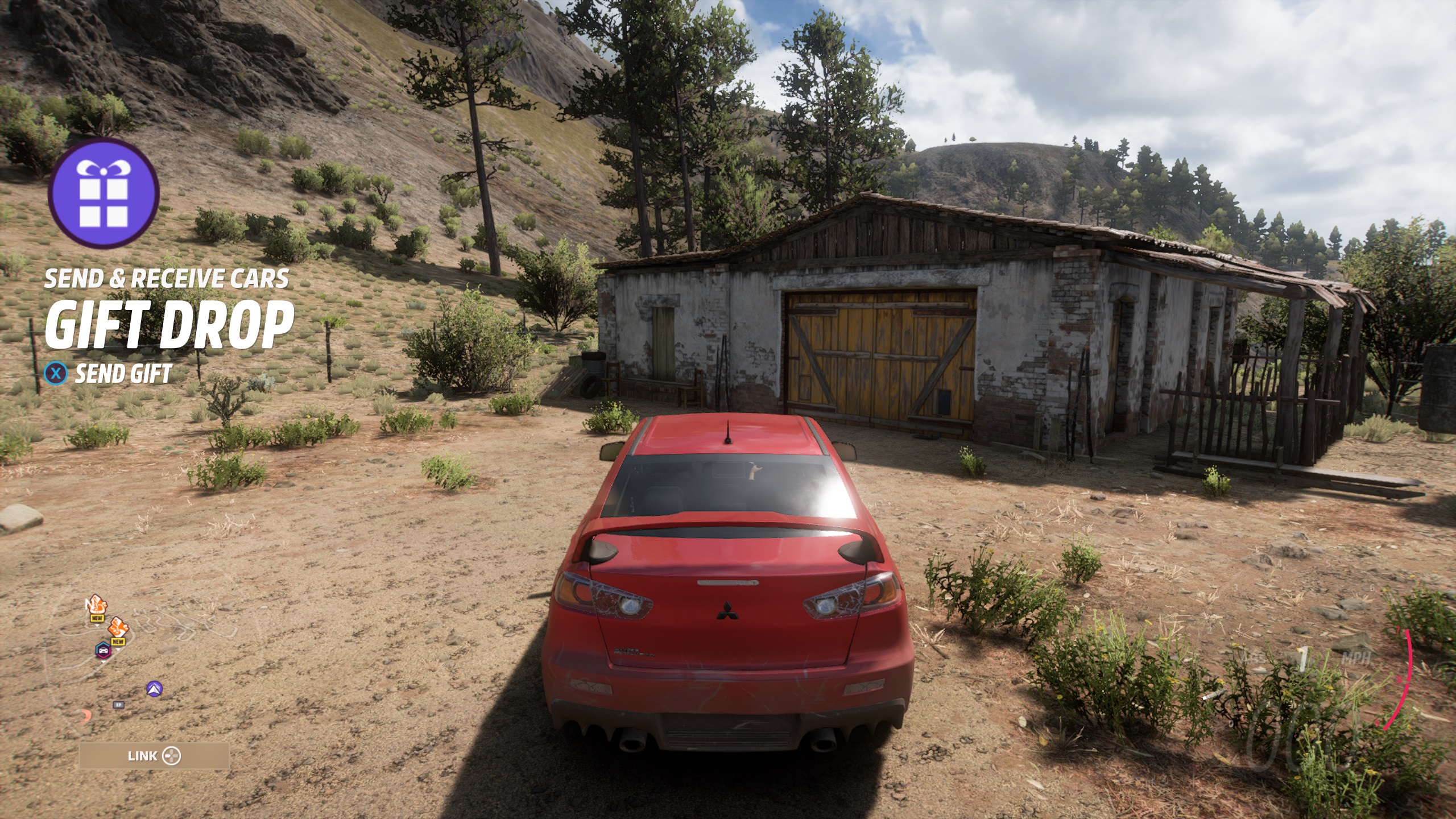
First things first, you must have a car to gift so in order to do this, you must have a minimum of 2 cars in your garage as you cannot gift the car you are already driving.
Next, you would want to make your way to the My Horizon menu which you can access in the pause menu, and select the Gift Drop option. From here you can choose which car you would want to gift.
Alternatively, you can also go to a barn find that you have already discovered and then place a car in there for other people to find. This method is definitely the more immersive one of the two.
It is important to note that the cars you will be gifting will retain the modifications, upgrades, tunes, and paint jobs that you have assigned and equipped to the car. This gives you freedom in whether you want to gift a stock car away or create something that will own the streets with your own signature choices plastered onto the car.
Choosing the Recipient of Your Gift Drop
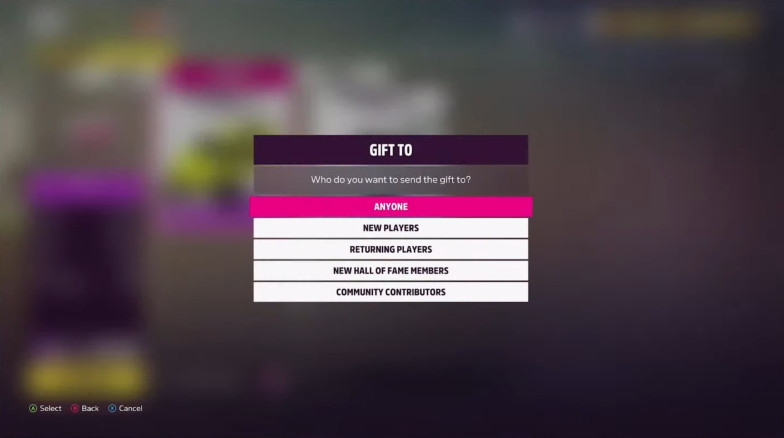
Once you have chosen which car you will want to give away, you can now choose who to gift the car to. In Forza Horizon 5, you are given a preset group of players for you to randomly give your car away to.
You can pick from 5 groups of players, which are as follows:
- Anyone – Selecting this literally bypasses all filters for selection and selects a random player to get your gift. Do this if you just feel like giving away a car without any players in mind.
- New Players – Selecting this will gift it to players who are new to the game. Any player below a certain level threshold will be eligible to receive your gift. Do this if you want to help people new to the game by giving them a head start with a fast or rare car.
- Returning Players – Selecting this option will gift your car to a person who has not logged in to their Forza Horizon 5 game in a set amount of time. Do this if you want to encourage people to prolong their stay, racing around Horizon 5’s Mexico Festival.
- New Hall of Fame Members – Selecting this option will gift your car to a person who has recently been inducted into the Forza Horizon 5 Hall of Fame. Do this if you want to send your congratulations to these people and further reward their excellence.
- Community Contributors – Selecting this option will gift your car to people who are awarded tons of Kudos for their contributions to the community, either through tunes they have shared or through tracks that they have made. Do this if you want to send further thanks to these trailblazers of the Forza Horizon community and encourage them to create more things for players to interact with.
Can I Gift a Car to My Friend?
Unfortunately, the Gift Drop system will not let you send gifts to a specific person whether they are on your friend list or not. This is a deliberate decision by the developers to deter real-money trading within the game.
Choosing a Message for the Gift Drop
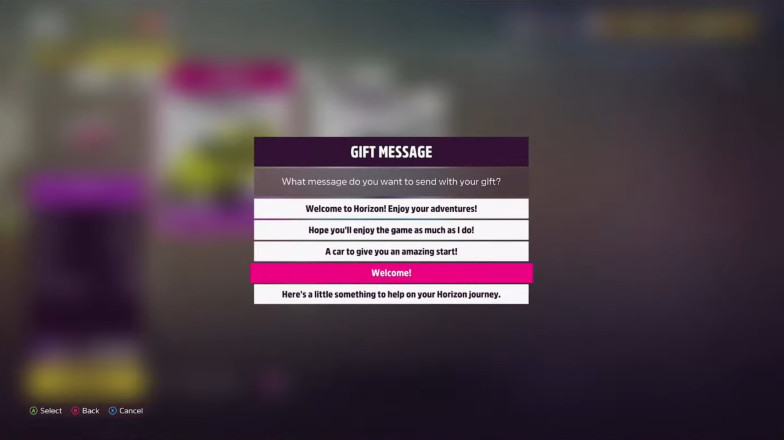
After choosing the group of players that you want your gift to drop to, you can now choose a message to accompany the gift. Each group of players will have 5 different pre-made gift messages so pick the most appropriate one you think would best fit your intention.
Can I Make My Own Message for the Gift Drop?
Unfortunately, you cannot customize or make your own message for the gift drops. Since this system relies on being random, the developers decided not to have this feature in order to avoid any unnecessary harm through verbal abuse or hate to their community.
Signing the Gift Drop
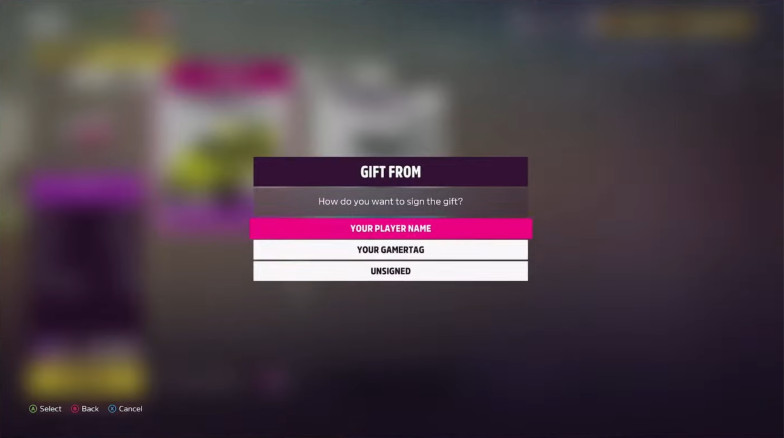
The final step in sending out your gift is to pick out the signature that will appear on the gift. This will basically let whoever receives your gift know who sent it.
There are 3 options to choose from, which are as follows:
- Your Player Name – Selecting this option signs the gift as your in-game player name. This is the name (or nickname) that you choose at the start of the game. Do this if you want to be relatively anonymous but still quite a bit personable to the person receiving the gift
- Your Gamertag – Selecting this option signs the gift with your Gamertag or Steam Name. Do this if you want your gift to be truly personalized and have the world know your name.
- Unsigned – Selecting this option will leave the signature space blank. Do this if you want to remain completely anonymous and just surprise someone without expecting anything in return.
Sending Out the Gift Drop
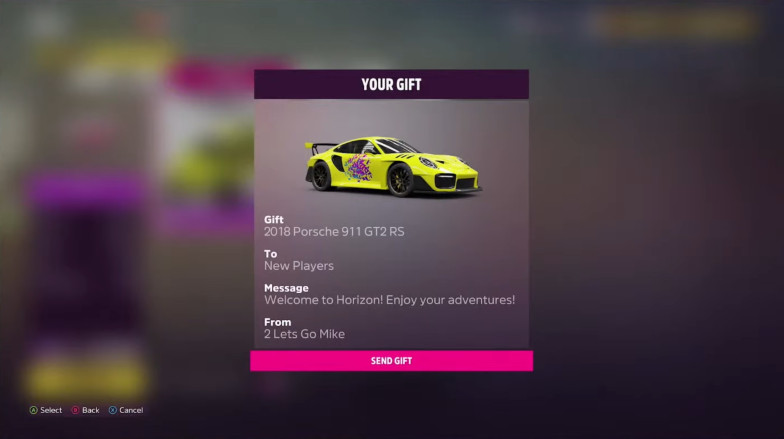
With all your options chosen and sorted out, it is time to send out your gift. A summary of your choices, from car to your signature will be displayed for you to peruse and check. Once you are sure of your selections, simply confirm the sending of the gift and make someone’s day whole!
Again, as a reminder, the car that you will be sending out will be removed from your garage forever, so make sure that you are sending out the right car before confirming.
How Will I Know When a Player Receives My Gift Drop?
You will know if a player has received and opened your Gift Drop when you receive a message yourself that the gift has been opened. From there, hopefully, your car lands in good hands and it should see many more miles and action.
Final Thoughts
It is quite a surprise that a social game like Forza Horizon 5 has only just implemented a system such as this, but I guess it is never too late to get it started. With the Gift Drop system, players both new and old will have something to look forward to when they login to their game.
Though the system itself is a bit restrictive to prevent any unwarranted abuse, it is a system that works and will bring joy to players receiving as well as giving away their prized possessions.
If you’re trying to decide which car/s to gift, our guide to the best drift cars in the game should be a good place to start.
How To Gift Cars In Forza Horizon 5 & Can I Drop Gifts To Friends?
 By Nikita Last updated Nov 14, 2021

With a roster of 500+ cars available in Forza Horizon 5, it will certainly take a long time to unlock them. Sometimes, you may end up on a rare car via wheelspin or you may have to put in a lot of effort to get it. Now, if you want to gift a car to a fellow FH5 player, that would certainly be a nice gesture. In this guide, find out how to gift cars in Forza Horizon 5, how to receive gift drops and know if you can send cars to friends as well.
Table of Contents
How to Gift Cars in Forza Horizon 5
If you have more than 1 car in your garage, you can start gifting cars to players. Now, here’s how to start the gifting process (there are two ways to do so).
Method 1
- Press the options button on your controller to get the My Horizon screen.
- You will see the Gift Drop option.
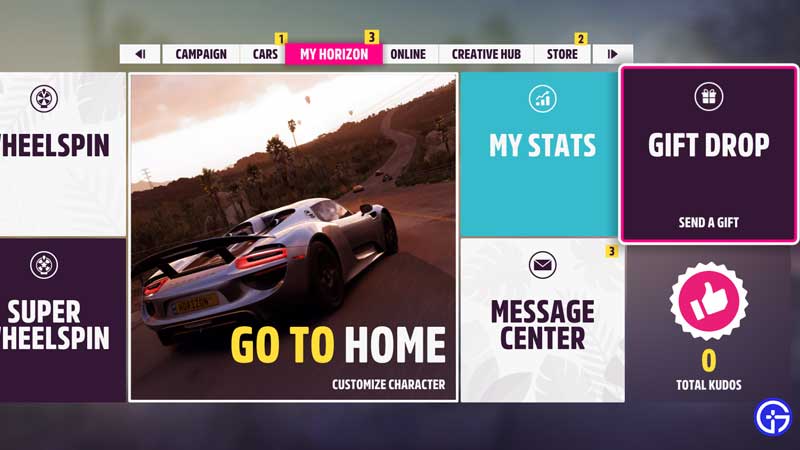
- Click on it and choose a car to gift.
- Choose who you want to gift it to – anyone, new players, returning players, new hall of fame members or community contributors.
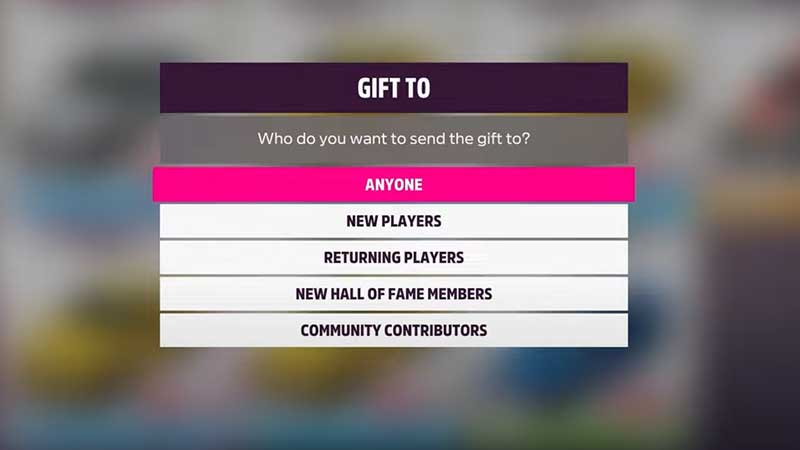
- As the titles suggest:
- Choosing ‘anyone’ will help you gift the car to a random player.
- Choosing ‘new players’ will let you gift the car to a new player, so if you have a hypercar unlocked that new players may not have access to yet, you can do that and make their day.
- When you choose ‘returning players’, those players who are coming back to the game after a while will get the car.
- ‘New Hall of Fame Members’ means that whichever players have been added to the Hall of Fame recently will have the chance to get this car.
- ‘Community Contributors’ are those who have helped the community with their tunes or any other additions. Giving them a gift can be a nice way to say thank you.
Method 2
- There’s another way to gift a car to players and that’s via barn finds.
- Head to a barn find location that you have already discovered.
- Press the X button on your controller to do your gift drop.
- Choose the car you want to give away.
- Choose who you want to gift to.
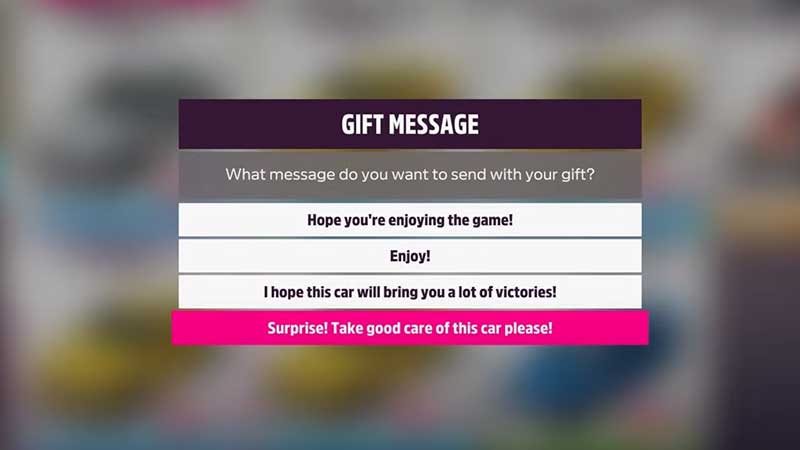
- Pick a gift message from the options shown – you cannot make your own message.
- Choose what you want as a “gift from” message – sign it with your player name, gamertag or leave it unsigned. This is how you can personalize your gift.
- Then complete the process and press SEND GIFT.
- Now, any relevant player based on your choices will get the car.
How to Receive Gift Drops in FH5?
As soon as another player has gifted you a car, you will get a message notifying the same on your screen. Find the barn find location on the map and visit it because that’s where your gift has been sent to. When you claim the gift, the sender will get a message/notification that their gift has been claimed.
How to Send Cars as Gifts to a Friend in Forza Horizon 5?
You can only gift cars to the categories of anyone, new players, returning players, new hall of fame members or community contributers. You cannot choose a specific person to receive the gift. This is good because things can go pretty wrong if you could just swap cars between friends and the gaming experience could get messed up. Moreover, players could turn to unethical ways to obtaining cars from others as well. Thankfully, this will be avoided.
With that all cleared up, here’s how to reach and get the bonus XP board on the plane wing.