MSIX от Microsoft: что это и зачем оно в Windows 10
Компания Microsoft на днях представила MSIX, новое программное решение, которое, по мнению самого разработчика, в самом ближайшем будущем станет новым стандартом для средств упаковки и заменит нынешние форматы, применяемые для распространения и установки приложений в экосистеме Windows.
Что такие MSIX?
Если в двух словах, то это новое программное средство упаковки Windows-приложений.
Фактически это тот же самый zip-архив, который называется по-другому, но так же быстро и просто распаковывается любым совместимым архиватором.
К основным преимуществам формата MSIX разработчик относит:
- предсказуемое и безопасное развертывание;
- удаляется чисто и без остатков;
- содержит решения для оптимизации дискового пространства, в частности технологию сжатия файлов;
- управляется ОС Windows (установка, обновление, удаление);
- дифференцированная поддержка обновлений для минимизации ресурса сети;
- защита от несанкционированного доступа.
Как известно, обновление программного обеспечения в Windows обновляется не централизовано. Если приложения из Windows Store апдейты получают тоже через официальный магазин Microsoft, то так называемые сторонние программы обновляются независимо и из других источников.
И только их разработчики определяют, как каждая такая программа будет обновляться: в автоматическом режиме с помощью встроенного механизма обновлений, или пользователю либо администратору следует каждый раз скачивать и устанавливать апдейты вручную.
MSIX же передает функцию управления процессами обновлений приложений операционной системе Windows. Таким образом, считают в Microsoft, процедура установки обновлений сторонних приложений не только упрощается, но и становится более безопасной и надежной. Но при этом, конечно, участие конечного пользователя в этих процессах минимизируется, равно как и возможность ими управлять.
Помимо этого, MSIX также будет использовать не вместе, а вместо нынешних «контейнеров», в которых программные продукты распространяются через Windows Store.
Согласно «дорожной карте» Microsoft, которая разработана для дальнейшего продвижения нового формата, в числе функций MSIX упомянуты улучшенная интеграция со службами управления Microsoft Intune и System Center ConfigMgr, поддержка Win32-приложений, которые в настоящее время не преобразовываются с помощью Desktop App Converter.
Поддержка МSIX включена в October 2018 Update для Windows 10. Скачать пробную версию MSIX Packaging Tool можно с Windows Store (ссылка), однако доступна она пока только для участников Windows Insider Program.
MSIX … What it means for you… and managing those Applications

Do not be alarmed if you see a file with an .msix extension to it. MSIX is the latest application installer for Windows applications. Now that you know what it is, the next question is probably, why does the world need another application installer?
Good question. After all, we already have three installer formats.
The current set of Installer Choices
The former trilogy of application installers include EXE, MSI and AppX packages. EXE installers are the most recognized and best suited for manual installs. They incorporate GUI driven wizards that guide users through the installation process. This allows for customized options such as multiple languages, add-ons and selected file paths. EXE installers can also detect previous installations. Because they are so accommodative to customization, they are also complex. This makes unattended installs challenging. EXE files also make admins very nervous in a malware world.
MSI installers are simple, which is why they are best-suited silent unattended installations. They too use graphical interfaces but do not offer extras or customized options, nor can MSI installers detect prior installations. Finally, there are AppX installers. These are used for Universal Windows apps and have similar characteristics to MSI installers in that they are simple and straightforward. One thing that sets them apart from the other two is that they rely on container technology. This isolates them from the rest of the operating system. This makes them much more secure. Unfortunately, AppX packages can only be used for Windows 10 so legacy machines cannot utilize them.
The new alternative called MSIX
MSIX is the new kid in town. It is not very popular as of yet as it was just released in 2018. It is the alternative to the current three and Microsoft intends that the MSIX packaging solution to be the centerpiece of its deployment toolset eventually. Like many great ideas from Microsoft, new tools and ways of doing things take time for organizations to digest them. The MSIX installer platform does not have a great market presence as of yet. That does not take away from its many benefits however. MSIX has definite improvements over its predecessors as it combines the best features of MSI and APX into a single format. Basically, it installs like an MSI file, but behind the scenes, installs like an AppX. You can create MSIX packages with either an interactive user interface or command line sequence. Let’s look at the advantages associated with this new installer format.
Advantages of the MSIX Installer
One thing common to traditional applications is that tend to leave a footprint. This footprint consist of AppData files and registry entries that never seem to get deleted after the application is uninstalled. This clutter then lives on for the lifetime of the hosted machine. MSIX has alleviated this. Like AppX, MSIX is based on a containerized model. This simplifies both the install and uninstall processes. Uninstalling an MSIX package will remove any files and registry entries created by the app within the AppData folder, reducing machined clutter.
Unlike AppX installers, MSIX installers work on more than just Windows 10 machines and they support 32-bit applications. Microsoft has released an SDK, which provides all API’s necessary to unpack an app package on multiple platforms. Its cross-platform compatibility includes iOS, MacOS, Android, Linux and Windows 7. In addition, the process of converting older applications to the MSIX format is far easier than to AppX. You can also convert AppX applications to MSIX as well. MSIX package bundling allows a single package to contain multiple language or device specific items, except unlike EXE installs, they options can be automatically selected by Windows.
MSIX can also hand over the updating process to the operating system. This streamlines the updating process by making it more secure and reliable.
Security is at the epicenter of MSIX. MSIX applications are tamper proof because they must be digitally signed regardless of how the packages are installed. For software vendors creating MSIX packages to publish in the Microsoft Store, Microsoft will sign the package once the approval process has been is complete. Organizations intending to publish MSIX for direct download or internal network distribution must sign it with a valid code-signing certificate purchased from a certificate authority.
The MSIX Packaging Tool
You can download the MSIX packaging tool from the Microsoft Store. The package tool requires Windows 1809 and later. Microsoft recommends that you create a clean VM for the conversion host. Keep in mind that the MSIX Packaging Tool will assume the processor architecture of the Windows 10 OS version in which the conversion process is taking place. You must convert your installers in the same environment where you expect to deploy them. Once installed, simply open the tool to begin the packaging wizard. You will be first be asked to choose the selected task. In this example, we are creating a new application package.
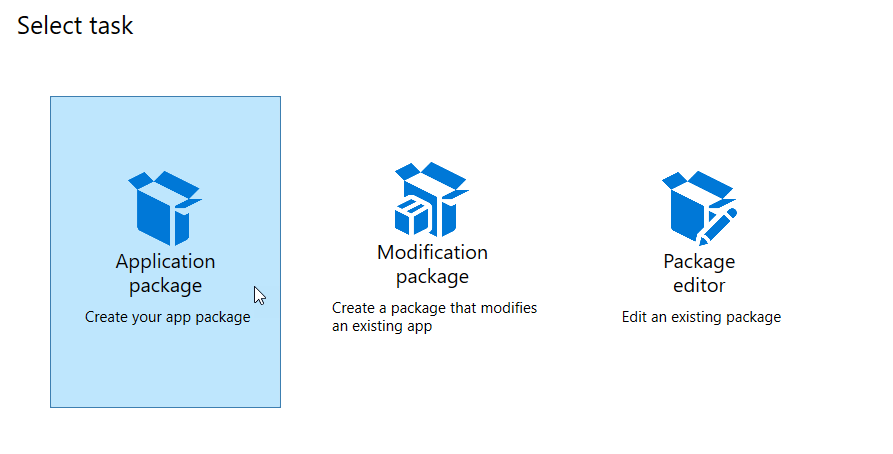
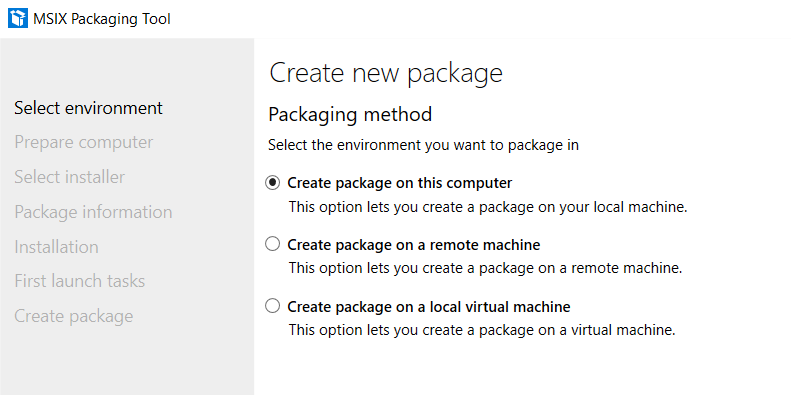
You will then choose the desired packaging method.
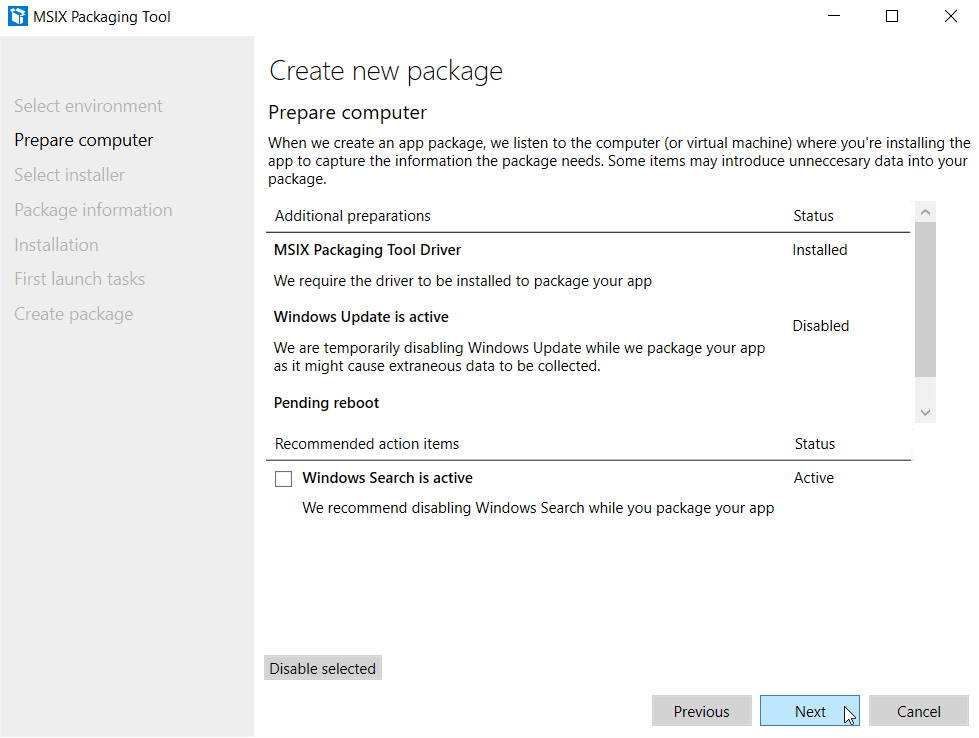
The packaging tool will perform an assessment of the machine that will handle the conversion process.
You will then set out to create the package. You need to select the installer you want to package. Then you must select a signing preference. Your choices are as follows:
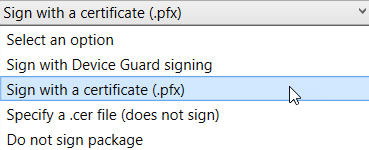
In the example below, we have selected an MSI installer with no arguments. We are signing using a certificate from a certificate authority with the assigned password.
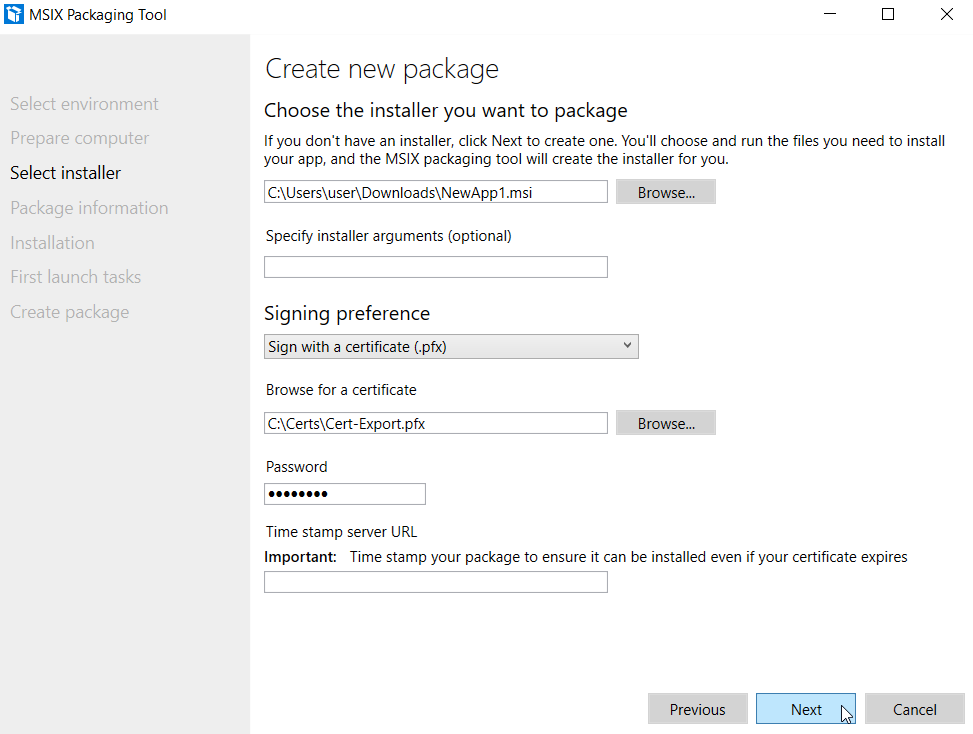
Next, fill out required packaging information.
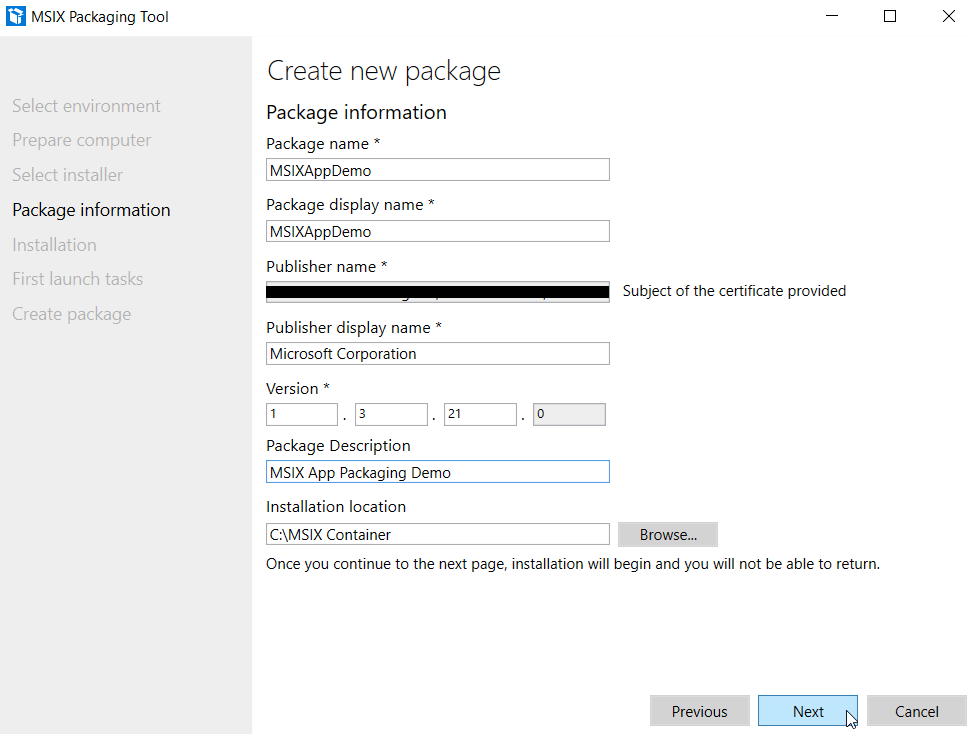
Click “Next” and the installation process will begin. During this process, the packager will capture the registry or any files needed to install or configure the app.
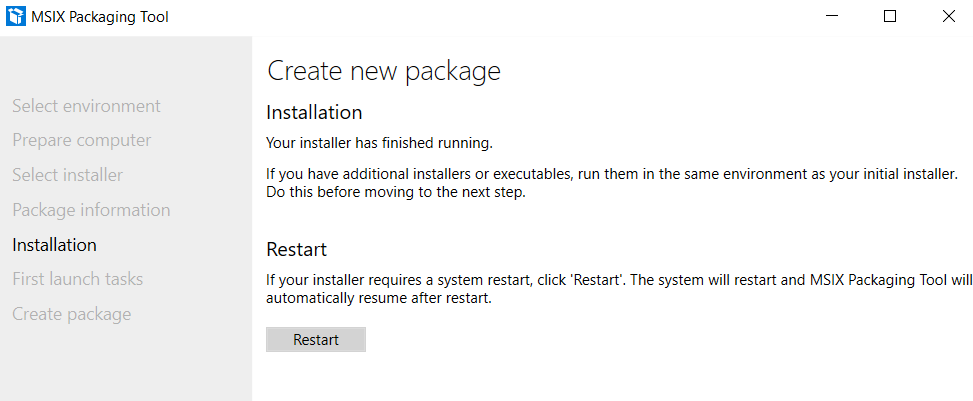
At this point, the conversion process will listen for any executables that are triggered at the initial launch of the application. This is why it is essential use a quiet machine for the conversion process. Captured executables will be displayed on the screen. It is here that you will manage any first launch tasks. You should launch the application at least one time in order to capture any first launch tasks.
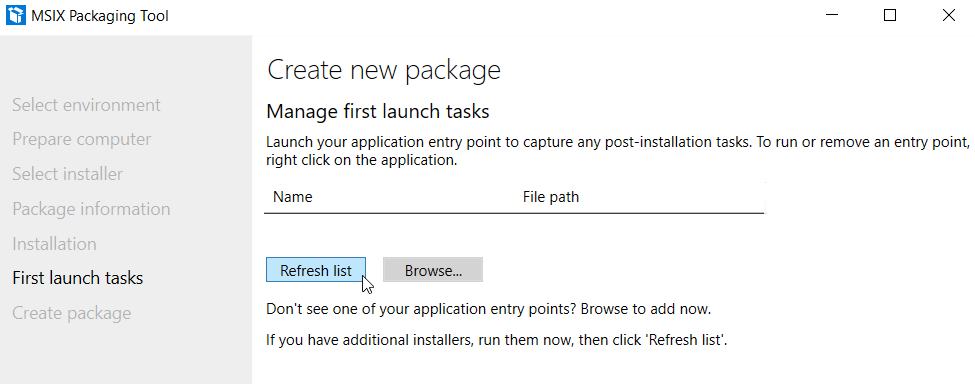
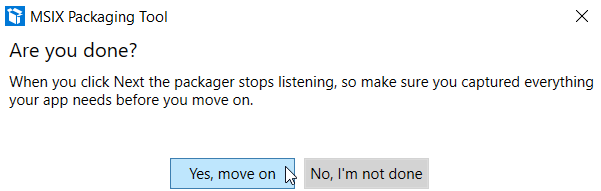
Upon clicking “Next” you will asked to confirm that you wish to culminate the listening process.
Now choose a destination folder for the final package and click Create.
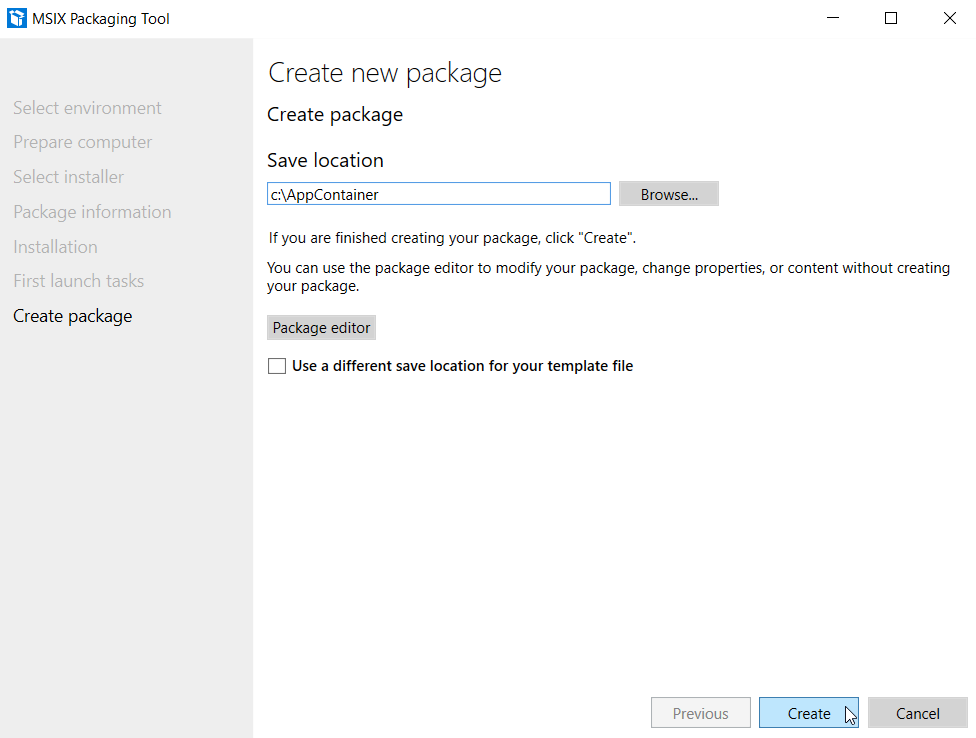
That completes the MSIX packaging process. Be prepared to see MSIX packages a lot more down the road.
Будущее программного обеспечения на Windows: Что такое MSIX-файл?
Файл с расширением .msix является программой установки приложений Windows. Недавно компания Microsoft представила MSIX в качестве альтернативы пакетам EXE, MSI и даже AppX. Соблюдайте осторожность и убедитесь, что доверяете источнику файла MSIX, прежде чем запускать его.
Слишком много различных типов инсталляторов в Windows
В настоящее время Windows имеет три распространенных формата программы установки: MSI, EXE и AppX. У каждого из них есть свои сильные и слабые стороны.

Инсталляторы MSI лучше всего подходят для простой и, возможно, неуправляемой установки. Они используют базовый графический пользовательский интерфейс установки (GUI), который устанавливает или деинсталлирует программу без дополнительных функций и опций. В основе программы установки лежит сжатый набор установочных файлов, содержащий все необходимые для работы программы данные. В процессе установки не будет обнаружено, существует ли уже программное обеспечение или отсутствуют какие-либо компоненты. Он может перезаписывать любые файлы в пути установки.
Установщики EXE более универсальны, чем инсталляторы MSI, но с дополнительными возможностями возникают сложности. Эта программа установки может включать опции для языков, дополнений, обнаружения предыдущих установок и многое другое. Установщики EXE позволяют выбирать собственные пути установки и компоненты для установки. Разработчики могут добавлять свой собственный брендинг в графический интерфейс и включать специфические для языка условия обслуживания или указывать на веб-страницу с приветственным сообщением. Но это, в свою очередь, значительно усложняет бесшумную автоматическую установку.
Программы установки AppX используются для Universal Windows Apps и имеют некоторые преимущества программы установки MSI. Это простые и удобные инсталляторы с небольшим количеством вариантов выбора для конечного пользователя. Кроме того, они упрощают процесс обновления со старых версий программного обеспечения на более новые версии, а также обеспечивают более чистую деинсталляцию. Установщики AppX также полагаются на контейнерную технологию, поэтому они изолированы от остальной части операционной системы для обеспечения безопасности. К сожалению, программу, написанную для MSI или EXE инсталлятора, пришлось бы переписать или преобразовать для пакета AppX. А также пакеты AppX можно использовать только с Windows 10.
MSIX сочетает в себе лучшие возможности MSI и AppX.
Файл MSIX имеет преимущества AppX, будучи похожим на файл MSI. Это простой инсталлятор, с помощью которого системные администраторы могут даже создавать сценарии для автоматической «неуправляемой» установки. Кроме того, он опирается на контейнерную технологию, которая позволяет легко демонтировать и модернизировать компоненты.

С точки зрения пользователя, MSIX устанавливается как MSI файл, но за кулисами, он устанавливается как AppX файл. Кроме того, возможно распространение MSIX за пределами магазина Microsoft Store. И с этим новым процессом проще внедрять старые программы и переупаковывать их для MSIX.
MSIX будет работать даже на Windows 7, Linux и других ОС
Пожалуй, самой интересной особенностью MSIX является то, что компания Microsoft выпустила SDK для повышения кросс-платформенной совместимости. Как видно на их странице GitHub, поддержка возможна для iOS, MacOS, Android, Linux и даже более старых версий Windows. Разработчики помещают в MSIX-файлы специальные инструкции, позволяющие идентифицировать ОС.
Программы будут деинсталлированы более аккуратно
Когда вы устанавливаете программу с помощью MSI и EXE, она может вносить изменения в реестр и создавать файлы и папки по всей вашей системе. Когда вы удаляете программу, эти файлы и ключи реестра часто остаются в памяти, оставляя беспорядок в вашей системе.
В MSIX программы устанавливаются в контейнеры, и все необходимые файлы либо остаются в них, либо следуют точным, предсказуемым правилам о том, где могут находиться эти файлы (например, в папке AppData). При деинсталляции все данные удаляются в комплекте. Это означает, что ваша система будет более чистой в будущем.
Это все еще инсталлятор, так что будьте осторожны!
Если вы смотрите на MSIX файл и задаетесь вопросом, безопасно ли это, то первый вопрос, который вы должны задать, где вы получили программу установки. Вирусы можно упаковать куда угодно.

Когда я смогу получить доступ к MSIX файлам?
Возможно, потребуется некоторое время, прежде чем вы увидите файл MSIX. Microsoft все еще дорабатывает некоторые из обещанных возможностей, и до недавнего времени пакет MSIX можно было создавать только с помощью Insider билдов Windows 10.
Даже после тонкой настройки разработчикам и поставщикам технологий установки, на которых они полагаются, придется принять, изучить и развернуть новый пакет.
Спасибо, что читаете! На данный момент большинство моих заметок, статей и подборок выходит в telegram канале «Левашов». Обязательно подписывайтесь, чтобы не пропустить новости мира ИТ, полезные инструкции и нужные сервисы.
Респект за пост! Спасибо за работу!
Хотите больше постов в блоге? Подборок софта и сервисов, а также обзоры на гаджеты? Сейчас, чтобы писать регулярно и радовать вас большими обзорами, мне требуется помощь. Чтобы поддерживать сайт на регулярной основе, вы можете оформить подписку на российском сервисе Boosty. Или воспользоваться ЮMoney (бывшие Яндекс Деньги) для разовой поддержки:
Заранее спасибо! Все собранные средства будут пущены на развитие сайта. Поддержка проекта является подарком владельцу сайта.
Saved searches
Use saved searches to filter your results more quickly
You signed in with another tab or window. Reload to refresh your session. You signed out in another tab or window. Reload to refresh your session. You switched accounts on another tab or window. Reload to refresh your session.
License
microsoft/msix-packaging
Name already in use
- Local
- Codespaces
Use Git or checkout with SVN using the web URL.
Work fast with our official CLI. Learn more about the CLI.
Sign In Required
Please sign in to use Codespaces.
Launching GitHub Desktop
If nothing happens, download GitHub Desktop and try again.
Launching GitHub Desktop
If nothing happens, download GitHub Desktop and try again.
Launching Xcode
If nothing happens, download Xcode and try again.
Launching Visual Studio Code
Your codespace will open once ready.
There was a problem preparing your codespace, please try again.
Latest commit
Git stats
Files
Failed to load latest commit information.
README.md
Copyright (c) 2019 Microsoft Corp. All rights reserved.
The MSIX SDK project is an effort to enable developers on a variety of platforms to pack and unpack packages for the purposes of distribution from either the Microsoft Store, or their own content distribution networks.
The MSIX Packaging APIs that a client app would use to interact with .msix/.appx packages are a subset of those documented here.
The MSIX SDK project includes cross platform API support for packing and unpacking of .msix/.appx packages
Guidance on how to package your app contents and construct your app manifest such that it can take advantage of the cross platform support of this SDK is here.
Release notes on the latest features and performance improvements made to the SDK are listed here
- Clone the repository: git clone [URL]
If you are using Visual Studio 2017 and you run into errors about not being able to find the v140 toolset:
- Install the Microsoft Build Tools (https://chocolatey.org/packages/microsoft-build-tools)
- Start -> visual studio installer -> Visual Studio Build Tools 2017 -> Modify the 2014 toolset -> individual components
- Make sure that VC++ 2015.3 v140 toolset for desktop is selected and then unselect VC++ 2017 141 toolset
- Close, then re-open the solution.
Depending on the platform for which the MSIX shared library (MSIX.DLL | libmsix.dylib | libmsix.so) is compiled, one or more of the following dependencies may be statically linked into the binary:
For convinience, Zlib, Xerces-C and OpenSSL are git-subtrees that are mapped in under the lib folder of this project. Edits on top of these subtrees for build related optimizations are tracked within this repository.
The Android NDK is only required for targeting the Android platform.
The project uses git-lfs to store some large binary test files. You can find out more and install it from here:
Make sure that you have CMAKE installed on your machine
One or more of the following prerequisites may also be required on your machine:
VS 2017 clients:
Open Visual Studio 2017 File->Open Folder->navigate to project root and select «CMakeLists.txt»
See cmake-support-vs for details regarding how to configure your environment.
open terminal, from project root: mkdir build && cd build && cmake -DMACOS=on -G»Xcode» .. open xcode File->Open->navigate to project root/build and select «Project.xcodeproj»
See cmake-Xcode-integration for additional details
On Windows using Visual Studio nmake:
This will start MSVC environment calling vcvarsall.bat , clean the output directory, call cmake and nmake. The latest Visual Studio version is obtained by calling vswhere.exe
On Mac using make:
On Linux using make:
How to compile for Android on Windows:
- Unpack the latest Android NDK to c:\android-ndk
- Unpack Ninja-build to c:\ninja
- Add c:\ninja to the path environment variable
- Create a folder under the root of the enlistment called «android», cd into that folder, then run the following command to create ninja build files:
To compile, run the following command from the android folder:
Enable pack features
By default, pack is NOT turned on in the build scripts and is not supported for mobile devices. Use the —pack option in the build scripts or pass -DMSIX_PACK=on to the CMake command to enable it. You will have to set also -DUSE_VALIDATION_PARSE=on in the build script, otherwise the build operation will fail.
The following native platforms are in development now:
| master |
|---|
| Debug x32 |
| Debug x64 |
| Release x32 |
| Release x64 |
| Release x32 Without Bundle support |
| Release x64 Without Bundle support |
| Release x32 With Validation Parser |
| Release x64 With Validation Parser |
| Debug x32 With Pack |
| Debug x64 With Pack |
| Release x32 With Pack |
| Release x64 With Pack |
| Release x32 Xerces With Pack |
| Release x64 Xerces With Pack |
Built in the Azure Pipelines windows-latest pool. See specifications here
| master |
|---|
| Debug |
| Release |
| Release Without Bundle support |
| Debug With Pack |
| Release With Pack |
| Debug arm64 |
| Release arm64 |
| Release Without Bundle support arm64 |
| Debug With Pack arm64 |
| Release With Pack arm64 |
| Release Universal |
| Release Without Bundle support Universal |
| Release With Pack Universal |
Built in the Azure Pipelines macOS pool. See specification here
| master |
|---|
| Debug Emulator |
| Release Emulator |
| Release Emulator Without Bundle support |
| Release arm64 |
Built in the Azure Pipelines macOS pool. See specification here
| master |
|---|
| Debug Emulator |
| Release Emulator |
| Release Emulator Without Bundle support |
| Release arm |
| Release arm Without Bundle support |
Built in the Azure Pipelines macOS pool. See specification here
| master |
|---|
| Debug |
| Release |
| Release Without Bundle Support |
| Release With Validation Parser |
| Debug With Pack |
| Release With Pack |
Built in the Azure Pipelines Hosted Ubuntu 1604. See specification here
Windows 7 support
The MSIX SDK is fully supported and tested on Windows 7. However, an Application Manifest MUST be included to any executable that is expected to run on Windows 7 and uses msix.dll. Specifically, the Application Manifest MUST include the supportedOS flags for Windows 7. The manifest is not included on msix.dll because the compat manifest doesn’t matter on DLLs. See the manifest that is used for makemsix and samples of this project as example. The Windows 7 machine might also require the Microsoft Visual C++ Redistributable binaries installed to run properly. Alternatively, build msix.dll with makewin.cmd <x86|x64> -mt [options] to use static version of the runtime library and don’t require the redistributables.
The MSIX SDK minimum supported for Android is API Level 19.
We also produce msix-jni.jar which acts as a helper to get the languages from the Android device. Because of it, we expect either a -DANDROID_SDK and -DANDROID_SDK_VERSION on the cmake command and, if not present, we default to $ANDROID_HOME and 24 respectively. The default level for the SDK level is 24 because we use the Configuration class and, depending on the version of the device, we either use the locale attribute (deprecated as of API level 24) or getLocales. We recommend using the makeaosp script to build for Android on non-Windows devices.
To enable building the MSIX SDK to run on Apple Silicon do the following:
- Install Xcode beta 12 (https://developer.apple.com/download/)
- Change active developer directory sudo xcode-select -switch /Applications/Xcode-beta.app/Contents/Developer
- Build using makemac.sh ./makemac.sh -arch arm64 —skip-tests
msixtest uses Catch2 as testing framework. msixtest is either an executable or a shared library, depending on the platform. It has a single entrypoint msixtest_main that takes argc and argv, as main, plus the path were the test packages are located. The shared library is used for our mobile test apps, while non-mobile just forwards the arguments to msixtest_main. It requires msix.dll to be build with «Release» or «RelWithDebInfo» CMake switch.
First build the project, then:
Testing for non-mobile devices:
Go to the build directory and run msixtes\msixtest.exe. You can run an specific test by running msixtest [test name]. By default, the test will only output the failling tests, use -s to output successfull tests.
Testing on mobile devices:
First build the project for iOS, then launch xCode and load src/test/mobile/iOSBVT.xcworkspace, compile the test app, and then launch the iPhone simulator. You can also run «testios.sh -p iOSBVT/iOSBVT.xcodeproj» from src/test/mobile.
From within bash, navigate to src/test/mobile, and run «./testaosponmac.sh».
If you are the current maintainer of this project:
- Pull latest payload to release in master
- Confirm that all platforms/architectures/flavors build and all BVTs pass
- From a windows cmd prompt: release_master.cmd
- Confirm that new branch called «release_v1.xxx» where «xxx» is the next incremental version is created
This project welcomes contributions and suggestions. Most contributions require you to agree to a Contributor License Agreement (CLA) declaring that you have the right to, and actually do, grant us the rights to use your contribution. For details, visit https://cla.microsoft.com.
When you submit a pull request, a CLA-bot will automatically determine whether you need to provide a CLA and decorate the PR appropriately (e.g., label, comment). Simply follow the instructions provided by the bot. You will only need to do this once across all repositories using our CLA.
If you have any questions or comments, you can send them our team directly!
This project has adopted the Microsoft Open Source Code of Conduct. For more information see the Code of Conduct FAQ or contact opencode@microsoft.com with any additional questions or comments.
Report a Computer Security Vulnerability
If you are a security researcher and believe you have found a security vulnerability that meets the definition of a security vulnerability that is not resolved by the 10 Immutable Laws of Security, please send e-mail to us at secure@microsoft.com. To help us to better understand the nature and scope of the possible issue, please include as much of the below information as possible.
- Type of issue (buffer overflow, SQL injection, cross-site scripting, etc.)
- Product and version that contains the bug, or URL if for an online service
- Service packs, security updates, or other updates for the product you have installed
- Any special configuration required to reproduce the issue
- Step-by-step instructions to reproduce the issue on a fresh install
- Proof-of-concept or exploit code
- Impact of the issue, including how an attacker could exploit the issue
Microsoft follows Coordinated Vulnerability Disclosure (CVD) and, to protect the ecosystem, we request that those reporting to us do the same. To encrypt your message to our PGP key, please download it from the Microsoft Security Response Center PGP Key. You should receive a response within 24 hours. If for some reason you do not, please follow up with us to ensure we received your original message. For further information, please visit the Microsoft Security Response Policy and Practices page and read the Acknowledgment Policy for Microsoft Security Bulletins.
For additional details, see Report a Computer Security Vulnerability on Technet