Как выводить только часы с помощью DateTime?
 Input type="datetime" — как выводить календарь при клике на любой участок поля "datetime"
В данный момент календарь раскрывается только при клике на стрелку вниз. Надо выводить его при.
Как вытащить часы из поля DateTime
Собственно как вытащить SQL-запросом час из поля DateTime? Т.е. нужны данные по часам за день.
Как в PS1 выводить часы, минуты и секунды?
Изменить файлы командного интерпретатора чтобы формировалась динамически изменяются и наследуемая в.
Как в PS1 выводить часы, минуты и секунды?
нужна помощь код сам есть, но не могу проверить работу способность, умер комп где был линукс, а на.
Сообщение было отмечено Nikita110001 как решение
Решение
Выбирай
| Format | E.g. Result |
| DateTime.Now.ToString("MM/dd/yyyy") | 05/29/2015 |
| DateTime.Now.ToString("dddd, dd MMMM yyyy") | Friday, 29 May 2015 |
| DateTime.Now.ToString("dddd, dd MMMM yyyy") | Friday, 29 May 2015 05:50 |
| DateTime.Now.ToString("dddd, dd MMMM yyyy") | Friday, 29 May 2015 05:50 AM |
| DateTime.Now.ToString("dddd, dd MMMM yyyy") | Friday, 29 May 2015 5:50 |
| DateTime.Now.ToString("dddd, dd MMMM yyyy") | Friday, 29 May 2015 5:50 AM |
| DateTime.Now.ToString("dddd, dd MMMM yyyy HH:mm:ss") | Friday, 29 May 2015 05:50:06 |
| DateTime.Now.ToString("MM/dd/yyyy HH:mm") | 05/29/2015 05:50 |
| DateTime.Now.ToString("MM/dd/yyyy hh:mm tt") | 05/29/2015 05:50 AM |
| DateTime.Now.ToString("MM/dd/yyyy H:mm") | 05/29/2015 5:50 |
| DateTime.Now.ToString("MM/dd/yyyy h:mm tt") | 05/29/2015 5:50 AM |
| DateTime.Now.ToString("MM/dd/yyyy HH:mm:ss") | 05/29/2015 05:50:06 |
| DateTime.Now.ToString("MMMM dd") | May 29 |
| DateTime.Now.ToString("yyyy’-‘MM’-‘dd’T’HH’:’mm’:’ss.fffffffK") | 2015-05-16T05:50:06.7199222-04:00 |
| DateTime.Now.ToString("ddd, dd MMM yyy HH’:’mm’:’ss ‘GMT’") | Fri, 16 May 2015 05:50:06 GMT |
| DateTime.Now.ToString("yyyy’-‘MM’-‘dd’T’HH’:’mm’:’ss") | 2015-05-16T05:50:06 |
| DateTime.Now.ToString("HH:mm") | 05:50 |
| DateTime.Now.ToString("hh:mm tt") | 05:50 AM |
| DateTime.Now.ToString("H:mm") | 5:50 |
| DateTime.Now.ToString("h:mm tt") | 5:50 AM |
| DateTime.Now.ToString("HH:mm:ss") | 05:50:06 |
| DateTime.Now.ToString("yyyy MMMM") | 2015 May |
Минуты, часы из datetime в (int)е
собственно хочу сделать стрелочные часы.Нужно извлечь секунды, мин., часы в целых . Пришло в голову.
Как с помощью DateTime вывести название дня недели с большой буквы?
как с помощью DateTime вывести название дня недели с большой буквы? я нашел что можно написать.
Как от DateTime.Now оставить только секунды?
Как от DateTime.Now оставить только секунды?
Как в типе Datetime изменить только минуты
Как в новом инициализированном типе Datetime изменить только (например)минуты,т.е назначить.
Функция должна выводить несколько значений, но выводить только одно. Почему?
Здравствуйте! Мне нужно создать рекурсивную функцию, которая выводит на экран все простые.
Сложение System.DateTime (Сложить часы, минуты и секунды)
Как сложить часы, минуты и секунды? На такой код ругается mShutdownTime = DateTime.Now.AddHours(h).
TablePlus
MS SQL Server — How to get Date only from the datetime value?
September 1, 2018
To get the current date and time:
And we have a datetime value: 2018-09-01 11:50:05.627
From the datetime value above, you want to extract the date value only and hide the time value. There are several ways to do that:
1. Use CONVERT to VARCHAR:
In this case, date only, you we are gonna run this query:
It returns 2018/09/01 for my test.
The style we used just now is 111, which is yyyy/mm/dd. There are many other style you can choose from. Here are some common types:
| Style | How it’s displayed |
|---|---|
| 101 | mm/dd/yyyy |
| 102 | yyyy.mm.dd |
| 103 | dd/mm/yyyy |
| 104 | dd.mm.yyyy |
| 105 | dd-mm-yyyy |
| 110 | mm-dd-yyyy |
| 111 | yyyy/mm/dd |
| 106 | dd mon yyyy |
| 107 | Mon dd, yyyy |
Because each type generates a different length, so you should define the right varchar length then.
2. You can also convert to date:
It will return the current date value along with starting value for time. For example, the result for my case is:
For older version than SQL Server 2008, you should use this instead:
And it returns the same result.
3. Use CAST
For the example above, you can use:
Or you can cast it to varchar:
Need a good GUI Tool for MS SQL Server? Try TablePlus, a modern, native tool for multiple databases including SQL Server, MySQL, PostgreSQL, SQLite, etc. And it’s free to use for as long as you need it to.
How to get Time, Hour, Minute, Second and Millisecond Part from DateTime in Sql Server
Many a times we may need to get the Time, Hour, Minute, Second and Millisecond Part from DateTime in Sql Server. In this article we will see how we can get these parts of the DateTime in Sql Server.
You may like to read the other popular articles on Date and Time:
1. TIME part of DateTime in Sql Server
Following demos shows how to get some of the commonly required Time Part format from a DateTime.
Demo 1: Time in the 24-hour format hh:mi:ss
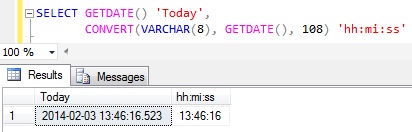
RESULT:
Demo 2: Time in the 24-hour format hh:mi:ss:mmm
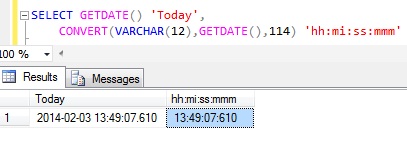
RESULT:
Demo 3: Time in the 12-hour format hh:mi:ss:mmmAM (or PM)
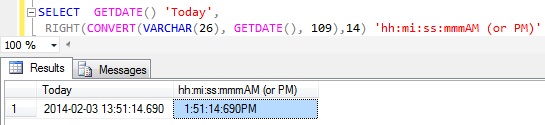
RESULT:
Demo 4: Time in the 12-hour format hh:miAM (or PM)
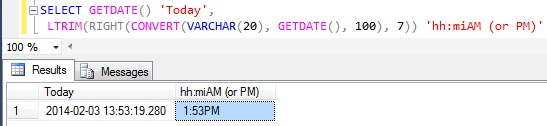
RESULT:
Demo 5: Time in the 24-hour format hh:miAM (or PM)
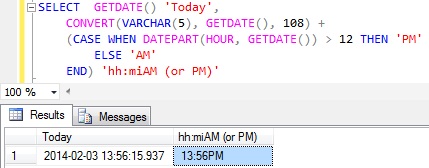
RESULT:
Demo 6: Time in the 24-hour format hh:mm:ss.nnnnnnn
Note this script will work in sql Server 2008 and above as here I am using TIME datatype and SYSDATETIME() functions which were introduced in Sql Server 2008.
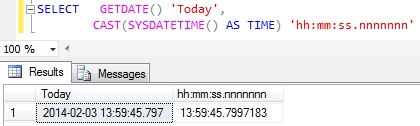
RESULT:
2. HOUR part of the DateTime in Sql Server
We can use DATEPART() function to get the HOUR part of the DateTime in Sql Server, here we need to specify datepart parameter of the DATEPART function as hour or hh.
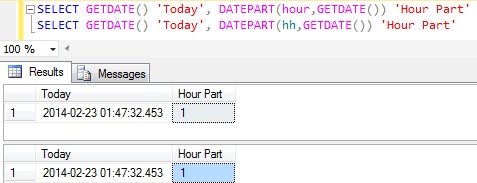
RESULT:
3. MINUTE part of the DateTime in Sql Server
We can use DATEPART() function to get the MINUTE part of the DateTime in Sql Server, here we need to specify datepart parameter of the DATEPART function as minute or mi or n.
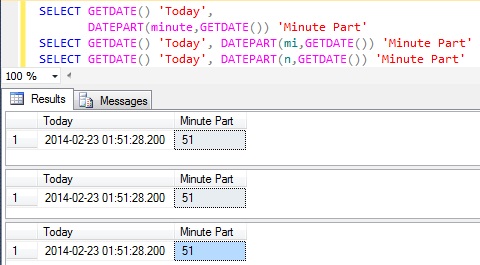
RESULT:
4. SECOND part of the DateTime in Sql Server
We can use DATEPART() function to get the SECOND part of the DateTime in Sql Server, here we need to specify datepart parameter of the DATEPART function as second or ss or s.
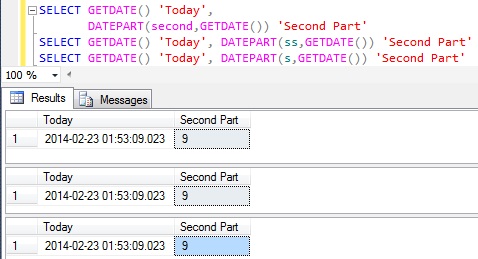
RESULT:
5. MILLISECOND part of the DateTime in Sql Server
We can use DATEPART() function to get the MILLISECOND part of the DateTime in Sql Server, here we need to specify datepart parameter of the DATEPART function as millisecond or mi .
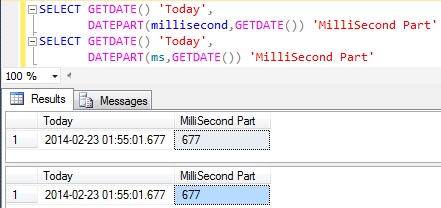
RESULT:
How to get only time from date-time C# [closed]
Want to improve this question? Update the question so it focuses on one problem only by editing this post.
Closed 3 years ago .
Suppose I have the value 6/22/2009 10:00:00 AM. How do I get only 10:00 Am from this date time.

14 Answers 14
You have many options for this:
From a DateTime , you can use .TimeOfDay — but that gives you a TimeSpan representing the time into the day (10 hours).

There is only DateTime type in C# and it consist of both the date and time portion. If you don’t care about the Date portion of DateTime, set it to default value like this:
This way you can be consistent across all versions of .NET, even if Microsoft decides to change the base date to something else than 1/1/0001.
You might want to look into the DateTime.ToShortTimeString() method.
Also, there many other methods and properties on the DateTime object that can help you in formating the date or time in any way you like. Just take a look at the documentation.