Не можете импортировать MKV в Adobe Premiere Pro? Решено!
Если вы часто используете Adobe Premiere и обычно импортируете в программу для редактирования файлы MKV, вам понадобится эффективный конвертер, который сделает эти файлы совместимыми с Premiere Pro. Это связано с тем, что по умолчанию Adobe Premiere Pro не поддерживает формат MKV. Фактически, некоторые из расширений, которые можно импортировать в Adobe Premiere, это AVI, MOV, WMV, MXF, XAVC S, VOB, MP4 и т. д. Среди всех них MP4 широко используется большинством плееров и приложения для пост-обработки способны его распознать.
Приведённый ниже текст расскажет как импортировать MKV в Adobe Premiere Pro:
Часть 1. Как конвертировать MKV для Adobe Premiere без проблем
Как упоминалось ранее, вам нужен эффективный конвертер, чтобы конвертировать файл MKV в формат, совместимый с Adobe Premiere Pro. Определение «эффективный» в контексте конвертера состоит в том, что он должен поддерживать несколько форматов для импорта и конвертирования исходных файлов, иметь простой пользовательский интерфейс, а весь процесс должен оставаться плавным и быстрым. Одна из таких программ, которая имеет все вышеупомянутые преимущества, а также имеет множество других функций, таких как встроенный видеоредактор, видеокомпрессор, конвертер VR, средство записи экрана и т. д., — это UniConverter от Wondershare..
Помимо того, что на момент написания статьи конвертер может работать с более чем 1000 форматов файлов, Wondershare UniConverter (изначально Wondershare Video Converter Ultimate) чрезвычайно легок и может обрабатывать файлы в 30 раз быстрее, чем другие инструменты пост-обработки. Благодаря способности применять эффекты, добавлять водяные знаки и создавать субтитры к видео, UniConverter можно рассматривать как универсальное средство для решения всех ваших задач, связанных с мультимедиа, для получения результатов, соответствующих отраслевым стандартам.
Wondershare UniConverter — Лучший конвертер MKV ляWindows/Mac

- Конвертируйте MKV в более 1000 форматов, например WAV, AVI, MOV, MP4, и т.д.
- Конвертируйте MKV с помощью преднастроек для телевизора, игр, Windows Movie Maker, а так же для редактирования
- В 30 раз более быстрая конвертация по сравнению с другими конвертерами
- Редактируйте, улучшайте & персонализируйте ваши видео.
- Записывайте MKV на DVD с помощью симпатичных бесплатных шаблонов.
- Скачивайте и записывайте видео с сайтов.
- Универсальный набор инструментов включает в себя исправление метаданных видео, создание GIF, трансляцию видео на телевизор, конвертер VR и средство записи экрана.
- Поддерживаемые ОС: Windows 10/8/7/XP/Vista, Mac OS 10.15 (Catalina), 10.14, 10.13, 10.12, 10.11, 10.10, 10.9, 10.8, 10.7, 10.6
Безопасность проверена. Уже скачали 5,481,347 человек.
Научиться использовать Wondershare UniConverter для конвертирования MKV в формат, поддерживаемый Adobe Premiere Pro, чрезвычайно просто, и следующий метод объясняет, как это сделать:
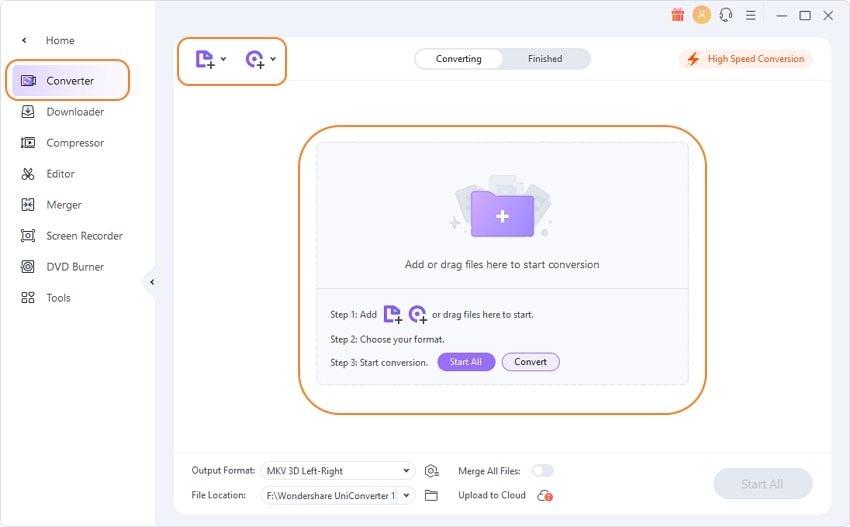
Шаг 1 Импортируйте MKV в UniConverter.
Скачайте и установите Wondershare UniConverter на вашем Windows или Mac, запустите программу и убедитесь, что вы находитесь на вкладке Конвертер , кликните Добавить файл или перетащите его в окно программы, найдите и импортируйте файл MKV который вы хотите открыть через Adobe Premiere Pro.
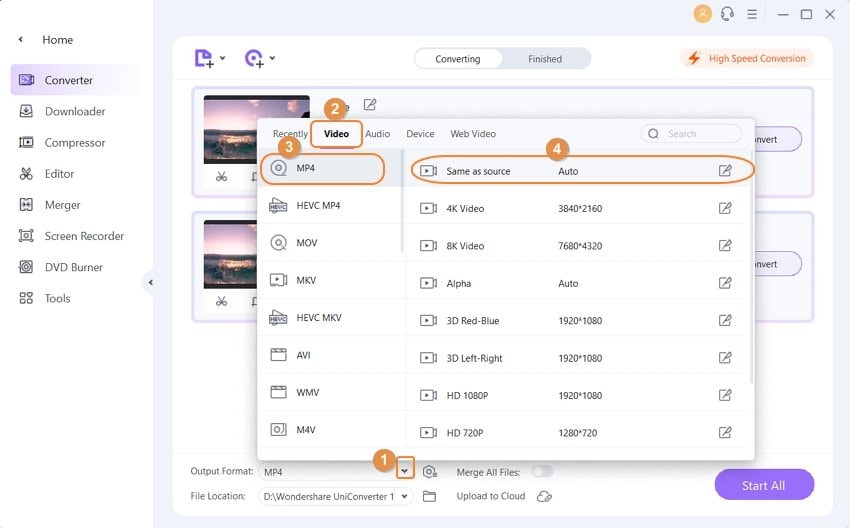
Шаг 2 Выберите поддерживаемый формат.
Справа сверху выберите Формат на выходе: , затем перейдите во вкладку Видео , а слева выберите формат поддерживаемый Adobe Premiere Pro( MP4 выбран здесь), а затем выберите разрешение видео ( Оригинальное , чтобы не потерять качество после конвертирвоания).
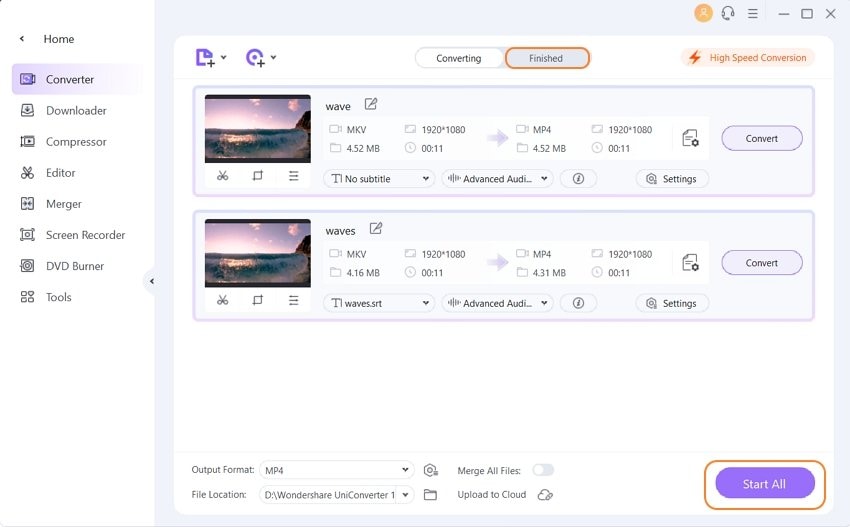
Шаг 3 Конвертируйте файл MKV в формат подедрживаемый Adobe Premiere Pro.
В поле Расположение файла выберите папку в которую сохраните файл, включите Конвертация на высокой скорости , чтобы быстро конвертировать видео в высоком качестве и кликните на кнопку Запустить все , чтобы конвертировать MKV для Adobe Premiere Pro используя Wondershare UniConverter. Конвертированные видео будут во вкладке Готовое .
Часть 2. Как конвертирвоать MKV для Adobe Premiere онлайн
Если вы не любите перегружать свой компьютер несколькими приложениями, определенно стоит попробовать надежный онлайн-конвертер. Хотя вы можете выбрать любой веб-инструмент конвертирования, Wondershare Online UniConverter делает процесс чрезвычайно простым. Wondershare Online UniConverter — это веб-версия UniConverter, не требующая установки на ваш компьютер. Кроме того, Online UniConverter так же эффективен, как и его устанавливаемая версия, он имеет почти все те же функции.
Данная пошаговая инструкция оъясняет как конвертировать MKV для Adobe Premiere Pro используя Wondershare Online UniConverter:
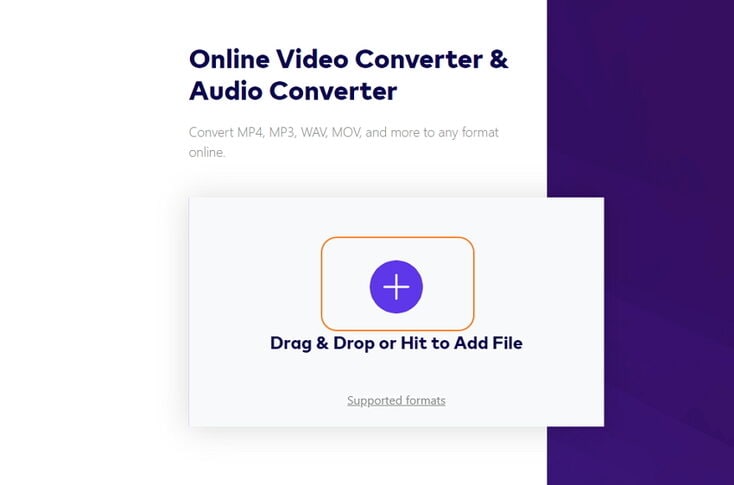
Шаг 1: Откройте страницу конвертера
Откройте браузер и перейдите на https://www.media.io/ ,кликните на иконку + на странице Online Video Converter , следуйте инструкции, чтобы конвертировать файл MKV для Adobe Premiere Pro.
Шаг 2: Конвертируйте файл.
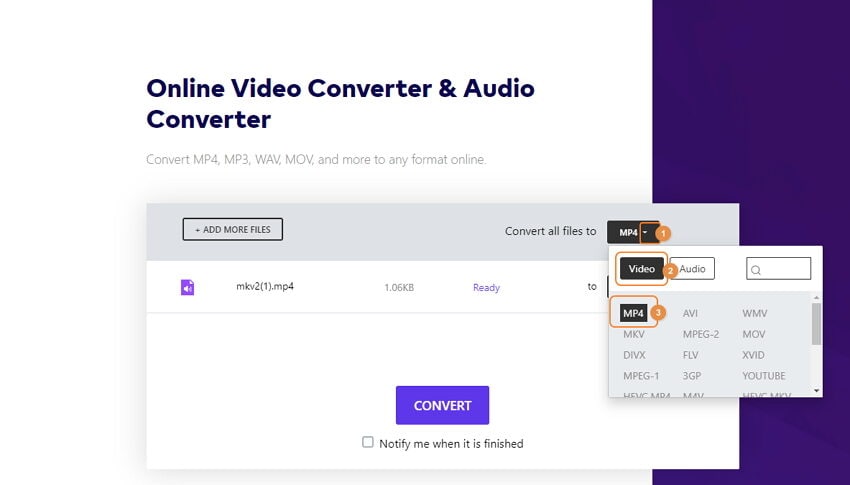
Убедитесь, что в раскрывающемся списке выбран формат совместимый с Adobe Premiere Pro ( MP4 здесь). Если не выбран, просто кликните на формат и раскроется список. Далее, нажмите КОНВЕРТИРОВАТЬ , чтобы начать процесс конвертации. После. скачайте файл.
Часть 3. Три других конвертера для конвертации MKV для Adobe Premiere
Помимо устанавливаемого и онлайн варианта UniConverter, о которых говорилось выше, вы также можете попробовать несколько альтернатив. Хотя они могут быть не такими многофункциональными, как продукты Wondershare, они все же могут хорошо выполнить поставленную задачу.
Одни из рекомендуемых альтернатив Wondershare UniConverter и Wondershare Online UniConverter это:
-
Zamzar (https://www.zamzar.com/)
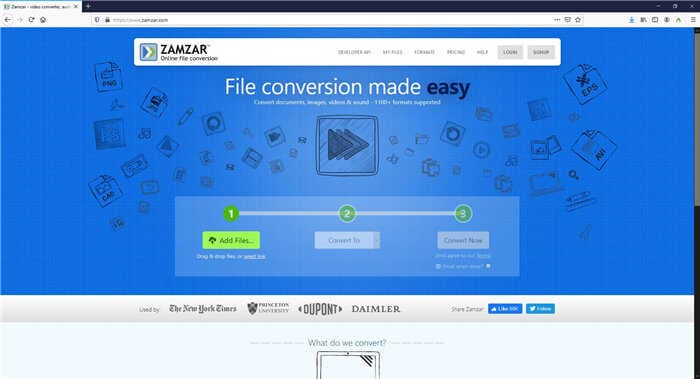
Zamzar, один из самых известных онлайн-конвертеров, используется некоторыми известными организациями, такими как The New York Times, Princeton University, DUPONT и т. д. Веб-инструмент поддерживает более 1200 форматов, поэтому конвертирование MKV в любой файл, совместимый с Premiere Pro, абсолютно не будет сложной задачей.
- Поддержка всех основных форматов
- Требуется платная подписка для загрузки больших файлов
-
Convertio (https://convertio.co/)
Обладая способностью распознавать более 300 форматов на момент написания этой статьи, в качестве незарегистрированного пользователя Convertio позволяет загружать видеофайлы размером до 100 МБ. Приложение может принимать исходные видео с вашего локального компьютера, Dropbox, Google Диска или с URL-адреса, если клип был опубликован в Интернете.
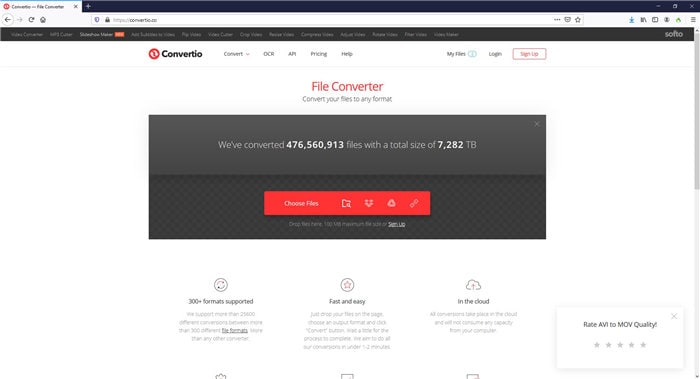
- Окно настроек позволяет отредактировать видео перед конвертированием, повернуть и т.д.
- Требуется подписка для конвертации видео размером более 100МБ
-
ONLINE-CONVERT (https://video.online-convert.com/)
Помимо видео, ONLINE-CONVERT может конвертировать почти все основные типы файлов, такие как изображения, электронные книги, документы, аудио и т. д., в соответствующие форматы. Веб-инструмент абсолютно бесплатный, и, говоря о видео, он может легко превратить ваши исходные файлы MKV в нужное вам расширение, поддерживает расширения под Adobe Premiere, включая MOV, MP4, WMV и т. д.
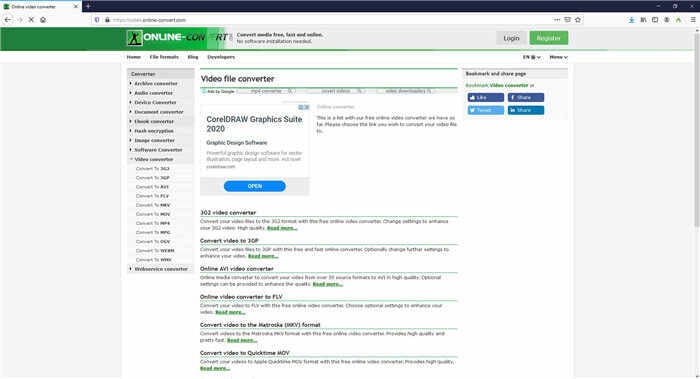
- Онлайн конвертер всё-в-одном
- Абсолютно бесплатный и не требующий подписки
- Страница забита рекламными обьявлениями
Если у вас есть файлы MKV, которые вы хотите отредактировать в Adobe Premiere Pro, вам необходим хороший конвертер MKV. Поскольку Wondershare UniConverter поддерживает более 1000 различных форматов файлов для конвертирования, вы можете положиться на приложение, когда дело доходит до конвертирования файлов MKV для Premiere Pro. Кроме того, поскольку UniConverter имеет собственный видеоредактор, вы даже можете не использовать ресурсоемкий Adobe Premiere и переключиться на Wondershare UniConverter для выполнения всех ваших задач постпроизводства.
Adobe Premiere Pro File Format Not Supported Mkv
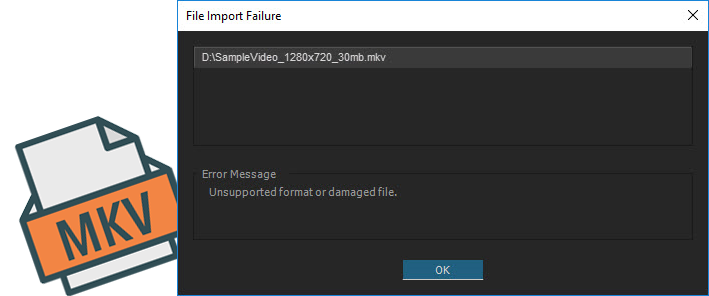
Adobe Premiere Pro File Format Not Supported Mkv. Mkv import failure in adobe premiere pro is mainly due to incompatible file format or codec missing, you can try to rename the mkv as an mkv file. Choose premiere pro supported formats. The trick for how to import mkv files into adobe premiere pro, is to convert the mkv file to an. To edit mkv files in premiere pro (no matter pp cs4, pp cs5, pp cs6, or the latest version premiere pro cc), you have to convert mkv to adobe premiere pro friendly format before importing and editing.

How to fix Adobe Premiere Pro import failure Problem From youtube.com
Other popular output formats included mp4, wmv, avi, mpg and many more. Flash is not supported by ios devices. Your safest bet is to rewrap into mp4 or transcode (using an ffmpeg tool) to dnx and then edit. Frequently asked questions in microsoft help. Select “converter” icon to enter the converter module. Hello friends, in this video, i am explaining how to fix file format not supported in adobe premiere pro whether it can be.mkv/.avi media files etc.,join am.
We have never offered support for encoding mkv, and overall usage of this format has been very low.
I will give you 2 solutions how you can fix this problem. Start mkv to premiere pro video conversion. Mkv is not compatible with adobe premiere pro. Choose premiere pro supported formats. If you have the problem that adobe premiere pro is not supporting mkv files and you get the error message: Select preset setting (for example:

Source: helpx.adobe.com
To open the destination folder containing the new created files, click the open folder button next to output folder field. To use mkv in premiere, install and launch wonderfox hd video converter factory pro. Our test shows that some mkv videos can be loaded, while some others cannot. Therefore, you have to find a way to work around this problem. Mkv import failure in adobe premiere pro is mainly due to incompatible file format or codec missing, you can try to rename the mkv as an mkv file.

Source: berkasbelajar.github.io
Adobe removed the matroska (mkv) container support from premiere in the latest version 15, 14, 13 after they silently added support for it in earlier version 12. You should know that codec format decides whether you can load a video or audio file successfully or not, while mkv is just a container format. Load unsupported mkv(s) into the adobe premiere converter. Select “converter” icon to enter the converter module. Both methods are introduced in the following part.
 Source: adobe-video.uservoice.com
For a list of frequently asked questions (faqs) on codecs, and how they determine playback of files, see codecs: Flash is not supported by ios devices. And they have never offered support for encoding mkv, and overall usage of this format has been very low. I got some files from a cutsomer which i want to edit slightly in adobe premiere pro (cc 2018). If you�re interested in how to edit with an mkv file, there�s a simple answer.

Source: animation-quality.blogspot.com
Select “converter” icon to enter the converter module. Mkv has not been added to the official supported format list. Mkv import failure in adobe premiere pro is mainly due to incompatible file format or codec missing, which can be easily solved by transcoding mkv to other premiere freindly formats. Therefore, you have to find a way to work around this problem. Flash is not supported by ios devices.

Source: videoproc.com
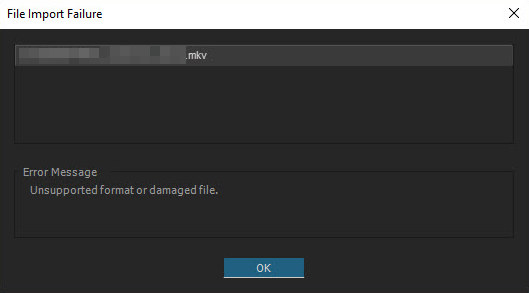
If you�re interested in how to edit with an mkv file, there�s a simple answer. This means that you can�t open an mkv file in the application. So even though you are importing an.mkv video, the encoded file wrapped in the mkv box might not be supported, which leads to file import failure. Now, all you need to do is launch adobe premiere pro and click the file option to import your files. But my problem is that the files i got are on an.mkv container and adobe premiere does not support mkv.
“ file format not supported ”. Mkv import failure in adobe premiere elements is mainly due to incompatible file format or codec missing, which can be easily solved by transcoding with a video converter software like easefab video converter. To import mkv files to adobe premiere pro, you have to find a way to convert them into a codec that it can edit. We have never offered support for encoding mkv, and overall usage of this format has been very low. To use mkv in premiere, install and launch wonderfox hd video converter factory pro.

Source: pinterest.com
This format offers a richer media experience than any other current format. Users who need access to mkv files can. They wasted a lot of precious time but still can not sort this out. The customer has only these files so. To convert mkv to an editable format for premiere, you can use google to find a converter.
Mkv file import failure in premiere pro. I got some files from a cutsomer which i want to edit slightly in adobe premiere pro (cc 2018). To edit mkv files in premiere pro (no matter pp cs4, pp cs5, pp cs6, or the latest version premiere pro cc), you have to convert mkv to adobe premiere pro friendly format before importing and editing. Start mkv to premiere pro video conversion. “ file format not supported ”.

Source: youtube.com
If you�re interested in how to edit with an mkv file, there�s a simple answer. This means that you can�t open an mkv file in the application. To use mkv in premiere, install and launch wonderfox hd video converter factory pro. While /u/vincibleandy said otherwise, i wanted to test it myself; If you�re interested in how to edit with an mkv file, there�s a simple answer.
Source: berkasbelajar.github.io
Therefore, you have to find a way to work around this problem. But my problem is that the files i got are on an.mkv container and adobe premiere does not support mkv. While /u/vincibleandy said otherwise, i wanted to test it myself; Therefore, you have to find a way to work around this problem. I got some files from a cutsomer which i want to edit slightly in adobe premiere pro (cc 2018).
![[Solved] How to Import an MKV file into Adobe Premiere Pro](https://dumbofab.com/images/adobe/mkv-failure-in-premiere.jpg)
Source: dumbofab.com
Mkv is an open standard free container format, a file format that can hold an unlimited number of audio, video, subtitle tracks or picture in one file. Mkv import failure in adobe premiere elements is mainly due to incompatible file format or codec missing, which can be easily solved by transcoding with a video converter software like easefab video converter. And till now, mkv has not been added to the official supported format list of adobe. I will give you 2 solutions how you can fix this problem. In this video i will show how to import mkv files in adobe premiere pro in 1 min and how to fix file format is not supported file import failure in adobe p.

Source: berkasbelajar.github.io
Mkv is an open standard free container format, a file format that can hold an unlimited number of audio, video, subtitle tracks or picture in one file. Adobe premiere elements supports codecs that the operating system (windows, mac os) running on your computer supports. Our previous mkv file format was limited to decoding for playback. Now, all you need to do is launch adobe premiere pro and click the file option to import your files. We wanted to let you know that we will be removing support for the mkv file format in the next updates of adobe premiere pro and adobe media encoder.
Source: youtube.com
And till now, mkv has not been added to the official supported format list of adobe. Or transcode mkv to other premiere freindly formats with a software tool. Cara mengatasi file format not supported di adobe premiere pro cc karena import file video bertipe.mkv. The trick for how to import mkv files into adobe premiere pro, is to convert the mkv file to an. To edit mkv files in premiere pro (no matter pp cs4, pp cs5, pp cs6, or the latest version premiere pro cc), you have to convert mkv to adobe premiere pro friendly format before importing and editing.
Source: videoconverter.wondershare.com
In this video i will show how to import mkv files in adobe premiere pro in 1 min and how to fix file format is not supported file import failure in adobe p. Our test shows that some mkv videos can be loaded, while some others cannot. Both methods are introduced in the following part. And they have never offered support for encoding mkv, and overall usage of this format has been very low. Mkv import failure in adobe premiere pro is mainly due to incompatible file format or codec missing, you can try to rename the mkv as an mkv file.

Source: youtube.com
Our previous mkv file format was limited to decoding for playback. To use mkv in premiere, install and launch wonderfox hd video converter factory pro. This means that you can�t open an mkv file in the application. Mkv file import failure in premiere pro. “ file format not supported ”.
Source: camtopics.blogspot.com
Now, all you need to do is launch adobe premiere pro and click the file option to import your files. If it does not work for some unknow reaons, you can use other editing software. Mkv file import failure in premiere pro. Few professional editing tools handle mkv since zero cameras shoot with it. Load unsupported mkv(s) into the adobe premiere converter.
Source: acrok.com
This is also a premiere pro file format not supported fix video. Mkv file import failure in premiere pro. You should know that codec format decides whether you can load a video or audio file successfully or not, while mkv is just a container format. If you have the problem that adobe premiere pro is not supporting mkv files and you get the error message: Load unsupported mkv(s) into the adobe premiere converter.
Source: easefab.com
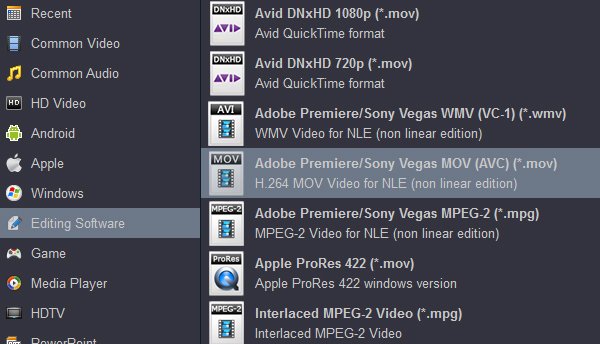
Afterwards, navigate the formats at the bottom and click editing software to select adobe premiere/sony vegas mov (avc) (*.mov) as the output file format. To open the destination folder containing the new created files, click the open folder button next to output folder field. Frequently asked questions in microsoft help. Cara mengatasi file format not supported di adobe premiere pro cc karena import file video bertipe.mkv. Our test shows that some mkv videos can be loaded, while some others cannot.
This site is an open community for users to share their favorite wallpapers on the internet, all images or pictures in this website are for personal wallpaper use only, it is stricly prohibited to use this wallpaper for commercial purposes, if you are the author and find this image is shared without your permission, please kindly raise a DMCA report to Us.
If you find this site value, please support us by sharing this posts to your own social media accounts like Facebook, Instagram and so on or you can also bookmark this blog page with the title adobe premiere pro file format not supported mkv by using Ctrl + D for devices a laptop with a Windows operating system or Command + D for laptops with an Apple operating system. If you use a smartphone, you can also use the drawer menu of the browser you are using. Whether it’s a Windows, Mac, iOS or Android operating system, you will still be able to bookmark this website.
Как формат mkv перекинуть в Adobe Premier?
Пытался их конвертировать в mp4 через OBS, но ничего не выходит и просто вытаскивает пустой файл. Через VLC тоже не выходит, но размер файла такой же, но не воспроизводится.
ffmpeg скачай. Если просто плменять контейгер с mkv на mp4, то как-то так, вроде:
ffmpeg -i LostInTranslation.mkv -codec copy LostInTranslation.mp4
А если хочешь видеоряд извлечь и работать в своей версии Premier, юзай MKVToolNix
Спасибо! Люблю, обожаю! Сейчас качается.
Не выйдет, да и грузит будет долго с моим то интернетом
Попробуй конвертировать в movavi. Я через него mkv конвертирую в mp4.
Сам по себе мовави кривой, но для конвертации сгодится
Можно в самом Premier работать. Только нужна старая версия.
Штатную возможность импорта MKV видео убрали в обновлении: Adobe Premiere Pro CC 2019 (13.1.3.44). Найди на трекерах версию старее этой, и будет тебе счастье!
Скачай Shutter Encoder и сделай в нем Rewrap в другой контейнер без перекодирования. Ну или можешь через консоль этот пердолинг сделать с ffmpeg (но лучше в шаттере, там удобно)
В самом obs есть ремуксер ( смена контейнера без перекодирования ) из mkv в mp4. В меню файл.
Так же галочка в настройках на автоматический ремукс после остановки записи.
Или записывать сразу в мп4. Но не рекомендуется, обс предупредит об этом.
How to convert MKV for use in Premiere Pro CC/CS6
Have problems with importing MKV files to Premiere Pro CC/CS6? This article is about how to convert MKV to Premiere compatible format to avoid rendering.
While looking to edit some MKV movies (ripped with MakeMKV , download from online or from other source), the only problem is that NLE like Adobe Premiere Pro won’t import MKV files directly, and you may come across lots of problems, such as nothing shows up on the screen, or there is only image or you only get sound in Premiere Pro. If you’re having trouble editing MKV files in Premiere Pro CC (2017), CS6, CS5, etc., just read on for details.
Actually, Adobe Premiere Pro supported video formats do not include MKV format. So what’s the best way to resolve the MKV and PPro incompatibility issue? Well, as we’ve found out yet, the easy workaround is to transcode MKV to a more editing-friendly format, such a Premiere Pro’s MOV or MPEG-2 codec. with Dimo Video Converter Ultimate for Mac .
It’s an optimal MKV converter that helps you decode MKV files when converting into a different, and ideally more edit friendly format for Premiere Pro. So you can edit MKV footage with Premiere Pro CC/CS6/CS5 without any issue. Beside, this video convert program can also help to convert MKV to Avid Media Composer, Final Cut Pro , iMovie, FCE, etc. Plus, with the built-in video editing feature of the program, you can trim, crop, add watermark, set effect and more to your video files so as to bring you a wonderful home movie as you want. If you want to transcode MKV to Premiere Pro on Windows, please turn to Dimo Video Converter Ultimate . Now download the software and follow the steps to re-encode .mkv to Premiere Pro for editing.
Free Download Dimo Video Converter Ultimate for Mac/Win:


Other Download:
- Cnet Download: http://download.cnet.com/Dimo-Video-Converter-Ultimate/3000-2194_4-77376153.html
- Soft32 Download: http://dimo-video-converter-ultimate-for-mac.soft32.com/
- Top4download: http://www.top4download.com/dimo-video-converter-ultimate-for-mac/digazgge.html
- handyarchive Download: http://www.handyarchive.com/Audio/Rippers-Encoders/176347-Dimo-Video-Converter-Ultimate-for-Mac.html
- filetransit Download: http://www.filetransit.com/screenshot.php?id=450316
- filedudes Download: http://www.filedudes.com/Dimo_Video_Converter_Ultimate_for_Mac-download-226665.html
- directoryofshareware Download:http://www.directoryofshareware.com/preview/dimo_video_converter_ultimate_for_mac/
- xentrik Download: http://www.xentrik.net/software/dimo_video_converter_ultimate_for_mac.html
- filebuzz Download: http://www.filebuzz.com/fileinfo/470884/Dimo_Video_Converter_Ultimate_for_Mac.html
- fileflash Download: http://146210.7.fileflash.com/download/
- yankeedownload Download: http://www.yankeedownload.com/software/dimo-video-converter-ultimate-for-mac-lnpol.html
- dodownload Download: http://www.dodownload.com/audio/grabber-converter/dimo-video-converter-ultimate-for-mac.html
- Antivire Download: http://www.antivire.com/Downloads/Audio-Multimedia/Rippers-Converters/Dimo-Video-Converter-Ultimate-for_46665.html
How to Successfully Import MKV into Premiere Pro CC/CS6/CS5
Step 1: Import MKV files
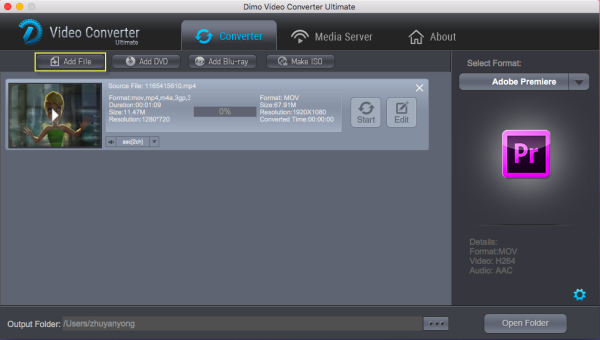
Run MKV to Premiere Converter for Mac and load source MKV clips to it. You can import MKV clips to the program through «Add File» button. You can also directly drag the video files into the program directly. Not only MKV file, but also MP4 , AVI, VOB, WMV, FLV, etc are supported. Batch conversion is supported by the latest 3.0.0 version , so you can load more than one file to save time.
Step 2: Choose Premiere Pro preferred format
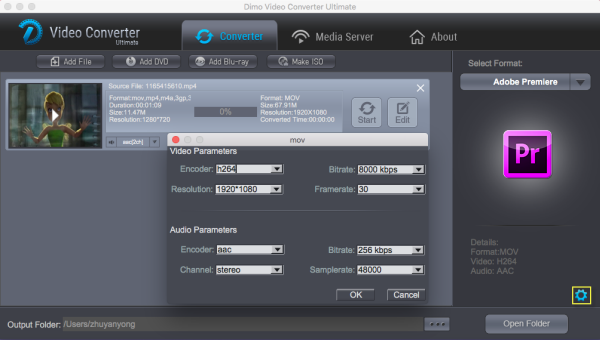
Click «Select Format» pull down list to select «Editor > Adobe Premiere» as the best video format for Premiere Pro. WMV, MPEG-2 formats from «Format > Video» are the good choice as well.
Tip -Profile Settings: In case the default settings do not fit your requirement, you can click «Settings» button and enter «Profile Settings» panel to adjust video size, bit rate, frame rate, sample rate and audio channels.
Step 3: Start conversion
Click «Start» button to start convert MKV for importing to Premiere Pro CC/CS6/CS5. When the conversion task is finished, click «Open» button to get the exported files.
Step 4: Import converted MKV files into Premiere Pro
You’re now ready to get the result files into Adobe Premiere Pro to do further editing. Launch Premiere Pro on your Mac, choose «File > Import» to import any file . If you prefer to use keyboard shortcuts, press Command+I to open the standard Import dialog.
Free Download or Purchase Dimo Video Converter Ultimate for Mac/Win:


Kindly Note:
The price of Dimo Video Converter Ultimate for Mac is divided into 1 Year Subscription, Lifetime/Family/Business License: $43.95/Year; $45.95/lifetime license; $95.95/family license(2-4 Macs); $189.95/business pack(5-8 Macs). Get your needed one at purchase page .
Related Software:
Lossless backup Blu-ray to MKV with all audio and subtitle tracks; Rip Blu-ray to multi-track MP4; Convert Blu-ray to almost all popular video/audio formats and devices; Copy Blu-ray to ISO/M2TS; Share digitized Blu-ray wirelessly.
A professional DVD ripping and editing tool with strong ability to remove DVD protection, transcode DVD to any video and audio format, and edit DVD to create personal movie.
An all-around video converter software program that enables you to convert various video and audio files to formats that are supported by most multimedia devices.
A mixture of free HD/4K video player, music player, Blu-ray/DVD player, video recorder and gif maker.